Beyond Passwords & Recovery Contacts: Google’s New Sign-in with Phone Number Explained
For years, securing your Google Account has relied on a combination of passwords, recovery emails, and increasingly, recovery contacts. Now, Google has introduced another layer: the ability to sign in directly with your phone number. But is this a true account recovery method, or something more? Let’s break down what this new feature means for your security and accessibility.
The Evolution of google Account Security
You’ve likely already used your phone number with Google, primarily for two-factor authentication (2FA) via SMS. However, this method isn’t ideal. SMS lacks end-to-end encryption, making it vulnerable. Authenticator apps offer a significantly more secure alternative.
This new sign-in method isn’t replacing 2FA; it’s offering a different access pathway.
How Does sign-In with Phone Number Work?
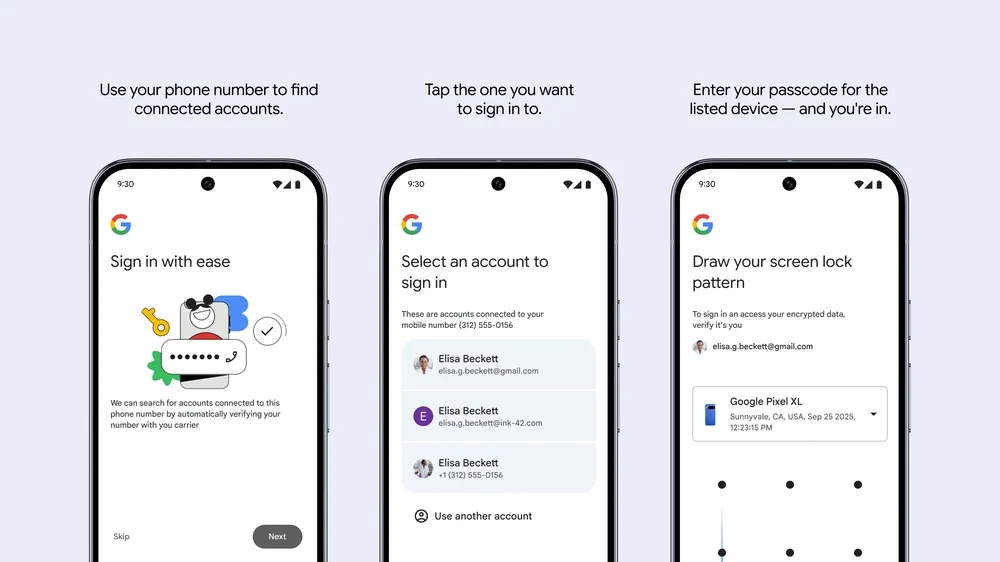
Here’s a step-by-step look at how it functions:
- Initiate Sign-In: When prompted, you enter your phone number.
- Verification: Google verifies the number is associated with an account, typically via an automated text message from your carrier.
- Account Selection: A list of Google Accounts linked to that number appears.You choose the correct one.
- Device Passcode Confirmation: Crucially, you’ll then be asked to enter the passcode (or pattern) from a previously logged-in device. This confirms your identity and unlocks access to your encrypted data.
This process bypasses the need for a password in the moment, offering a potential lifeline when you’re locked out.
Is It Secure? A Closer Look
Compared to relying solely on SMS-based 2FA, this method is a step up. It adds a layer of security by requiring verification from a device you’ve already authenticated. The inclusion of support for screen patterns is also a plus.
However,it’s not foolproof. A persistent attacker could potentially guess or brute-force a simple passcode or pattern. For maximum security, a Time-based One-Time Password (TOTP) authenticator app remains the gold standard.
beyond Recovery: A Sign-In Option for New Devices
While initially positioned as a recovery tool, Google’s new feature is more accurately described as a convenient sign-in option. It’s particularly useful when:
* You’ve lost access to your primary device.
* Your phone is lost or stolen.
* You’re setting up a new Android phone.
Google’s announcement highlights its usefulness in these scenarios. It’s designed to streamline the process of accessing your account on a new device, rather than being solely a last-resort recovery method.
Limitations to Consider
Currently, this sign-in method has limitations:
* Android Only: It’s exclusively available on Android devices. iOS, PC, Linux, and Mac users will still need to rely on customary login methods.
* Not a Replacement for 2FA: It doesn’t negate the importance of setting up and using a strong 2FA method like an authenticator app.
* Passcode Dependency: The requirement of a previous device’s passcode means you need to remember it.
What About Google Messages Security?
In related news, Google Messages is bolstering its security features. Recent updates include:
* Spam Link protection: blocking malicious links within messages.
* Contact Identity Verification: Helping you confirm the authenticity of your contacts.
These enhancements demonstrate Google’s ongoing commitment to user safety across its platforms.
Google is rolling out this sign-in option gradually to users worldwide. While it’s a welcome addition to the security toolkit, remember to prioritize strong passwords, authenticator apps, and recovery contacts for thorough account protection.
Further Reading:
* Google’s Security Announcement
*[GhacksReportonGoogle[GhacksReportonGoogle[GhacksReportonGoogle[GhacksReportonGoogle