Bertel King
2026-01-22 15:30:00
It initially pained me to write this article. As I jokingly told my colleagues, I felt shame, and I felt I should feel shame. But it’s time I acknowledge the truth—I watch more YouTube Shorts on my TV than on my phone, and I know I’m not alone.
I don’t feel shame anymore, either. After spending more time comparing the YouTube Shorts experience on my TV with that of my phone, I’ll come right out and say it: I think TV offers a superior experience.
I’ve never been a fan of vertical video
Vertical video has been described as the dominant media format of our times. We increasingly see politicians rise and fall based on how well they (or the people who support them) can pull off vertical video, which then impacts how parts of the world are run. The extent to which this is true is a trend I have little first-hand experience of, because I don’t watch vertical videos on my phone. I don’t like vertical videos in general, and I have yet to see one that I didn’t think would be improved by rotating the phone to give me a wider view.
This is why I can’t criticize YouTube Shorts compared to TikTok or Instagram. If YouTube Shorts are the inferior product, I wouldn’t know, because none of them speak to me. If you like vertical video, you do you. My wife certainly does. I’m not trying to change your mind. It was time to stop complaining about vertical video almost a decade ago.
I write these words only to tell you where I’m coming from, which plays a big part in why I’m willing to watch these videos I don’t like on a large screen that they aren’t intended for. So with that said, here’s another thing to know about me—when I open the YouTube app, I don’t see recommendations. I have those entirely turned off. If I’m not searching for a specific video or performing a search, then I immediately tap on the Subscriptions tab to see what’s new from the people I actually care to follow. I treat YouTube as a curated feed, which is exactly the opposite of the algorithm-only experience short-form vertical video is designed for.
Clutter? No, thank you
Vertical videos were made for phones, but the end experience still feels like I’m viewing media that’s too big for the screen it’s on. That’s because, unlike with other types of media, the controls and on-screen elements sit directly on top of the footage I’m trying to watch.
The name of the creator and the title appear at the bottom of the video, directly on top of whatever’s going on. Then there are like, dislike, comment, and share buttons extending up the right-hand side, though the exact placement can vary depending on the device. On my Samsung Galaxy Z Fold 6, the title actually appears underneath the video, since my phone’s cover screen aspect ratio is so tall, but the other elements still climb up the side. Fewer on-screen elements obscure the video if I watch on my inner display, so that’s an improvement, but not by much.
Either way, most shorts tend to have brightly colored and animated subtitles along the bottom, adding to the clutter. There’s just too much going on between me and the video I’m trying to watch. Fortunately, there’s a solution.
YouTube’s TV app places more focus on the video
Being able to access YouTube on a TV is nothing new, as we’ve been able to do this from streaming boxes for well over a decade. The problem is that searching on a TV sucks, especially if you aren’t using voice controls. Browsing subscriptions is a way to work around this limitation. Opening the YouTube app and clicking the Subscriptions tab is just as easy on my TV as it is on my phone.
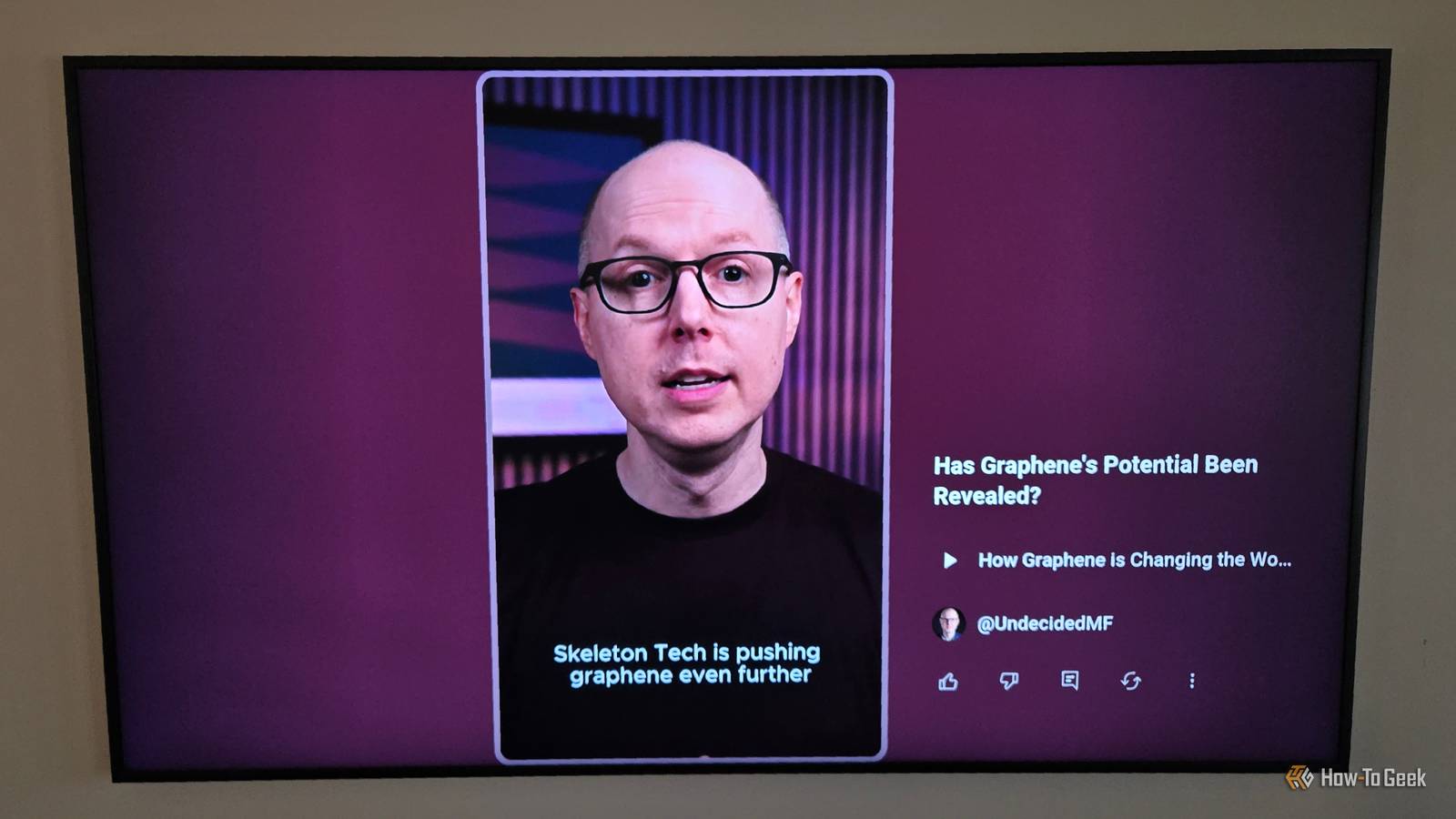
Once you start watching a video, it’s immediately clear that you’re watching something that was not made with your TV in mind. The vertical video occupies the middle of the screen, while most of the sides are dedicated to a subtle gradient.
Quite importantly, most of the controls sit off to the side of the video. If I want to see the creator, the title, or interact with the video in some way, I navigate my cursor to the right. Otherwise, I keep my eyes focused on the uninterrupted video in the middle.
Something about watching shorts on TV feels, dare I say, more intentional. Sure, the shorts still auto-loop, but there’s ever so slightly more friction between me and the next video.
On the TV, I press the down arrow on the remote, which isn’t all that different from the mindless swipe the phone app requires. Yet mindlessly scrolling is a well-exercised muscle in a way that continuously tapping a button on my remote isn’t.

I don’t want to hold my remote non-stop, waiting to tap the button every 30 seconds. On TV, I’m only going to watch the few shorts I care to watch.
The TV app gives Shorts a better home
Right now, the TV provides me with a better YouTube interface. The app on my Samsung Frame TV segregates YouTube Shorts into a horizontal row across the top, and regular videos appear in a grid underneath. YouTube Shorts get the top spot where it’s easy to find them, but it only takes a single tap on the remote to scroll through an uninterrupted feed of widescreen media instead.

On my phone, YouTube Shorts are inserted somewhere in the feed itself. The intention isn’t for me to have a dedicated place to find them (aside from the Shorts tab that is present on both phones and TVs) but for me to be reminded of the existence of shorts while I’m scrolling through other videos. That’s a design choice that, more often than not, simply leaves me feeling annoyed and more likely to want to disable YouTube Shorts as much as I can.
Whether or not I’m unique in my preference for YouTube Shorts on a TV versus a phone, I’m not alone in viewing them that way. In a YouTube blog post, CEO Neal Mohan highlighted how TV is now the primary way people watch YouTube in the US—and some of us are seeking out shorts when we do.
Worth a look