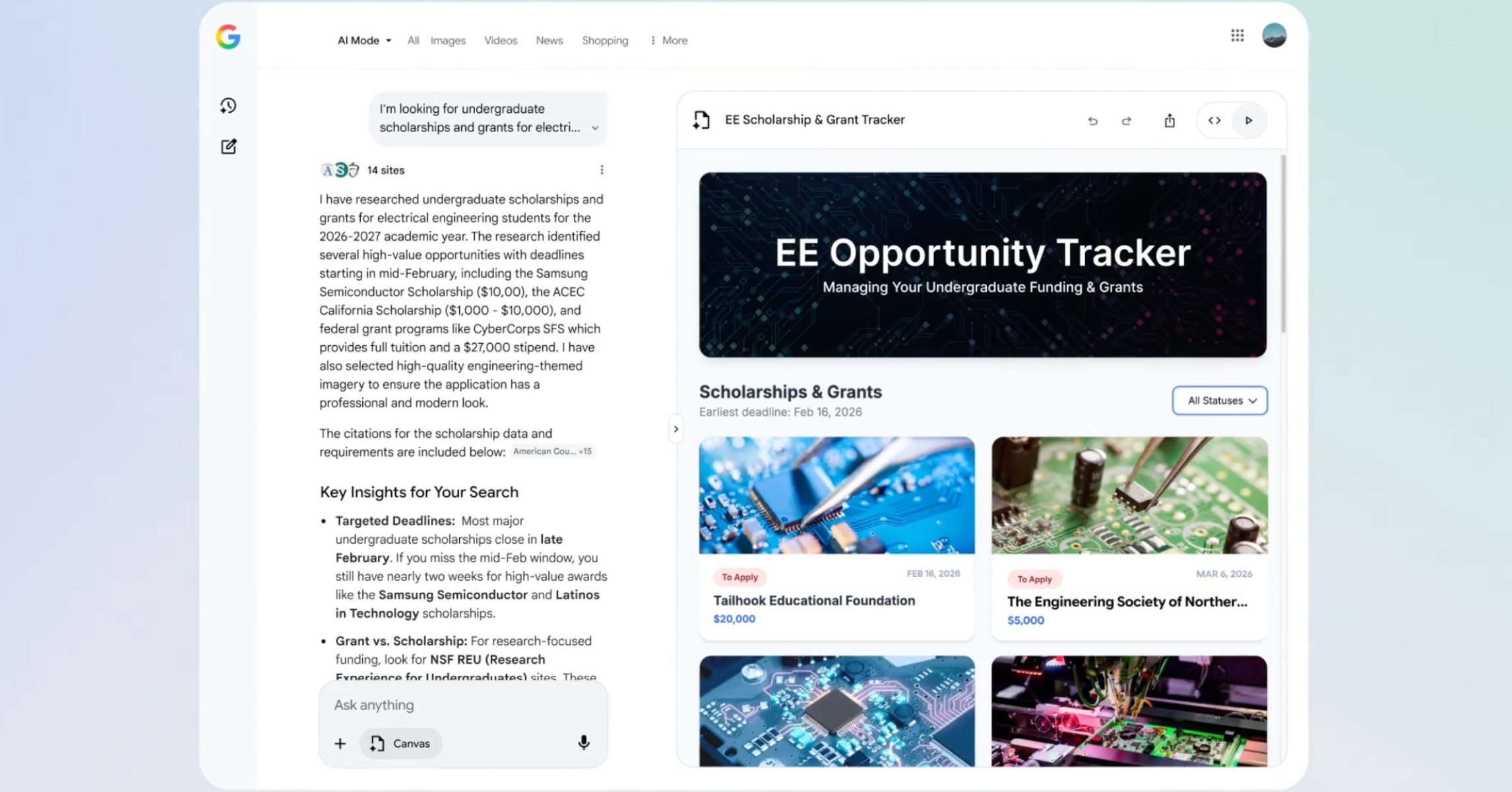
Google has expanded access to its experimental AI-powered tool, Canvas in AI Mode, making it available to all users in the United States without requiring enrollment in the previous Labs program. This new feature, integrated directly into Google Search, provides a dedicated workspace for organizing plans and projects, ranging from complex research endeavors to simpler tasks like trip planning.
The rollout of Canvas coincides with the introduction of enhanced capabilities, including support for creative writing and coding tasks. Google highlighted an example of Canvas’s potential, suggesting it could be used to create “a dashboard to visualize and track information on academic scholarships, including all the different requirements, deadlines and dollar amounts.” This illustrates the tool’s ability to synthesize information and present it in a user-friendly format. The expansion of Canvas reflects Google’s ongoing efforts to integrate artificial intelligence more deeply into its core products, aiming to provide users with more powerful and versatile tools for information management and creation.
Canvas in AI Mode isn’t simply a note-taking app; it’s designed to be a dynamic environment where users can actively build and refine their ideas. Users initiate a Canvas project by selecting the option from the tool menu within AI Mode and then describing the desired outcome. The system then generates a preliminary draft within a side panel, which can be iteratively improved through conversational prompts. This iterative process allows users to tailor the Canvas to their specific needs, creating a truly personalized workspace.
What is Canvas in AI Mode?
Canvas, as Google describes it, is an AI-powered collaboration tool designed to help users navigate plans, projects, and tasks. It’s intended to be a co-creation space, suitable for a wide range of activities, including planning vacations, organizing events, developing fitness schedules, and even drafting professional documents like cover letters. Beyond these practical applications, Canvas can likewise be leveraged for educational purposes, such as generating study guides or interactive quizzes. Google’s support documentation details the feature’s capabilities, emphasizing its ability to save, edit, and share projects over time.
The core functionality of Canvas revolves around its ability to gather and organize information. It can pull data from the web and Google’s Knowledge Graph, presenting it in a structured and accessible manner. Users can customize the output, add specific details, and compare different options to make informed decisions. Canvas allows users to ask questions about the content within both the AI Mode response and the Canvas itself, fostering a more interactive and engaging experience.
New Features and Capabilities
Beyond its core organizational features, Canvas has been enhanced with new functionalities focused on creative and technical tasks. The addition of support for creative writing allows users to draft documents, brainstorm ideas, and refine their prose with the assistance of AI. Similarly, the integration of coding capabilities enables users to build custom tools and interactive applications directly within Search. This opens up possibilities for users with varying levels of technical expertise to create personalized solutions for their specific needs.
The example provided by Google – the scholarship dashboard – highlights the potential of Canvas to tackle complex information management challenges. Such a dashboard could automatically track application deadlines, required documents, and scholarship amounts, streamlining the often-arduous process of applying for financial aid. This demonstrates Canvas’s ability to not only organize information but also to proactively assist users in achieving their goals.
Another notable feature is the ability to undo and redo changes, providing users with greater control over their Canvas projects. The auto-saving functionality ensures that progress is preserved, and users can easily resume their work from where they left off. These features contribute to a seamless and intuitive user experience, making Canvas a valuable tool for both individual and collaborative projects.
How to Acquire Started with Canvas in AI Mode
Accessing Canvas in AI Mode is straightforward for users in the United States. Users simply need to navigate to google.com and click on the “AI Mode” option in the Search bar. Alternatively, they can access it through the menu within the “Ask anything” bar at the bottom of the screen. Once AI Mode is activated, users can select the “Canvas” option and enter a prompt describing the project they wish to create.
For example, a user planning a summer vacation to Florida with two children could enter the prompt: “Plan me a summer vacation to Florida with two kids.” Similarly, someone undertaking a bathroom remodel could prompt: “Create a bathroom remodel plan on a budget.” For coding projects, a user could request: “Build me a simple website for my cupcake business in Chicago.” The system will then generate a preliminary draft on the Canvas side panel, which can be refined through subsequent prompts.
Google emphasizes that AI responses may contain errors and encourages users to be aware of the limitations of generative AI. More information about generative AI and its capabilities can be found at google.com/ai. For optimal performance, Google recommends enabling Search history by turning on Web & App Activity.
Canvas and the Broader AI Landscape
The launch of Canvas in AI Mode is part of a broader trend of integrating AI into search and productivity tools. Google’s AI Mode, which provides the foundation for Canvas, has been steadily evolving, with features like Search Live – which leverages Project Astra capabilities – allowing users to receive real-time assistance with visual search. TechCrunch reported in July 2025 that Search Live integrates with Google Lens, enabling users to ask questions about objects they see through their camera.
This integration of visual and textual AI represents a significant step towards more intuitive and versatile search experiences. Users can now leverage the power of AI to understand and interact with the world around them in new ways. The addition of Canvas further enhances this capability, providing a dedicated space for users to organize their thoughts, plan projects, and bring their ideas to life.
The development of Canvas also reflects the growing demand for tools that can help users manage the increasing complexity of information in the digital age. By providing a centralized and AI-powered workspace, Canvas aims to empower users to navigate this complexity and achieve their goals more efficiently.
Key Takeaways
- Expanded Access: Canvas in AI Mode is now available to all users in the U.S. Without requiring a Labs opt-in.
- Enhanced Capabilities: New features include support for creative writing and coding tasks, expanding the tool’s versatility.
- Iterative Design: Canvas allows users to refine projects through conversational prompts, creating a personalized workspace.
- Integration with Search: Canvas is seamlessly integrated into Google Search, providing a convenient and accessible AI-powered tool.
Google is continuing to refine AI Mode and Canvas, with ongoing development focused on improving the accuracy and reliability of AI responses. The company plans to further integrate Canvas with other Google services, creating a more cohesive and powerful ecosystem for users. The next major update is expected to include the ability to upload files, such as class notes or syllabi, to further customize study guides and learning materials. Users can expect continued improvements and new features as Google continues to invest in the development of AI-powered tools.
The evolution of Canvas in AI Mode represents a significant step forward in the integration of artificial intelligence into everyday workflows. As the tool continues to develop, it has the potential to grow an indispensable resource for students, professionals, and anyone seeking to organize their thoughts, plan projects, and unlock their creative potential. We encourage readers to explore Canvas and share their experiences in the comments below.
Keep reading