
In the digital age, the lines between personal privacy and platform data collection often become blurred. A recurring concern for many users of Meta’s platforms—specifically Facebook and Instagram—is the extent to which these applications access photos stored on a user’s device. While viral social media trends often frame this as a hidden “secret” or a looming threat, the reality is rooted in the standard functionality of mobile operating systems and the permissions users grant when installing or using these apps.
As a technology editor, I often hear from readers concerned about how their personal media data is handled. It is important to distinguish between “access” necessitated by features—such as uploading a photo to a post—and unauthorized data collection. Understanding how your smartphone manages these permissions is the first step toward regaining control over your digital footprint.
Understanding App Permissions and Media Access
When you download an application like Facebook or Instagram, the software requires specific permissions to function as intended. For example, if you want to post a photo from your camera roll, the app must have permission to access your device’s storage. On both iOS and Android, these permissions are not granted implicitly; they are subject to user approval at the time of installation or upon the first attempt to use a feature that requires access.

The confusion often stems from the granularity of these settings. Modern mobile operating systems now offer options such as “Allow access to all photos,” “Select photos,” or “None.” If a user selects “Allow access to all photos,” the application can indeed “see” your media library. This is designed for convenience, allowing you to quickly browse and select images to upload. However, it also means the app has the technical capability to scan that library, provided it stays within the boundaries set by the platform’s Terms of Service and privacy policies.
How Meta Processes Your Visual Data
Meta has long maintained that it uses data—including photos and videos—to provide its services, which include personalized content and advertising. According to their Data Policy, the company processes information about the content you provide, which includes metadata associated with photos, such as the date a file was created or the type of camera used. This is standard industry practice for social media giants, but it often surprises users who assume their local device storage is entirely siloed from the cloud-based social network.
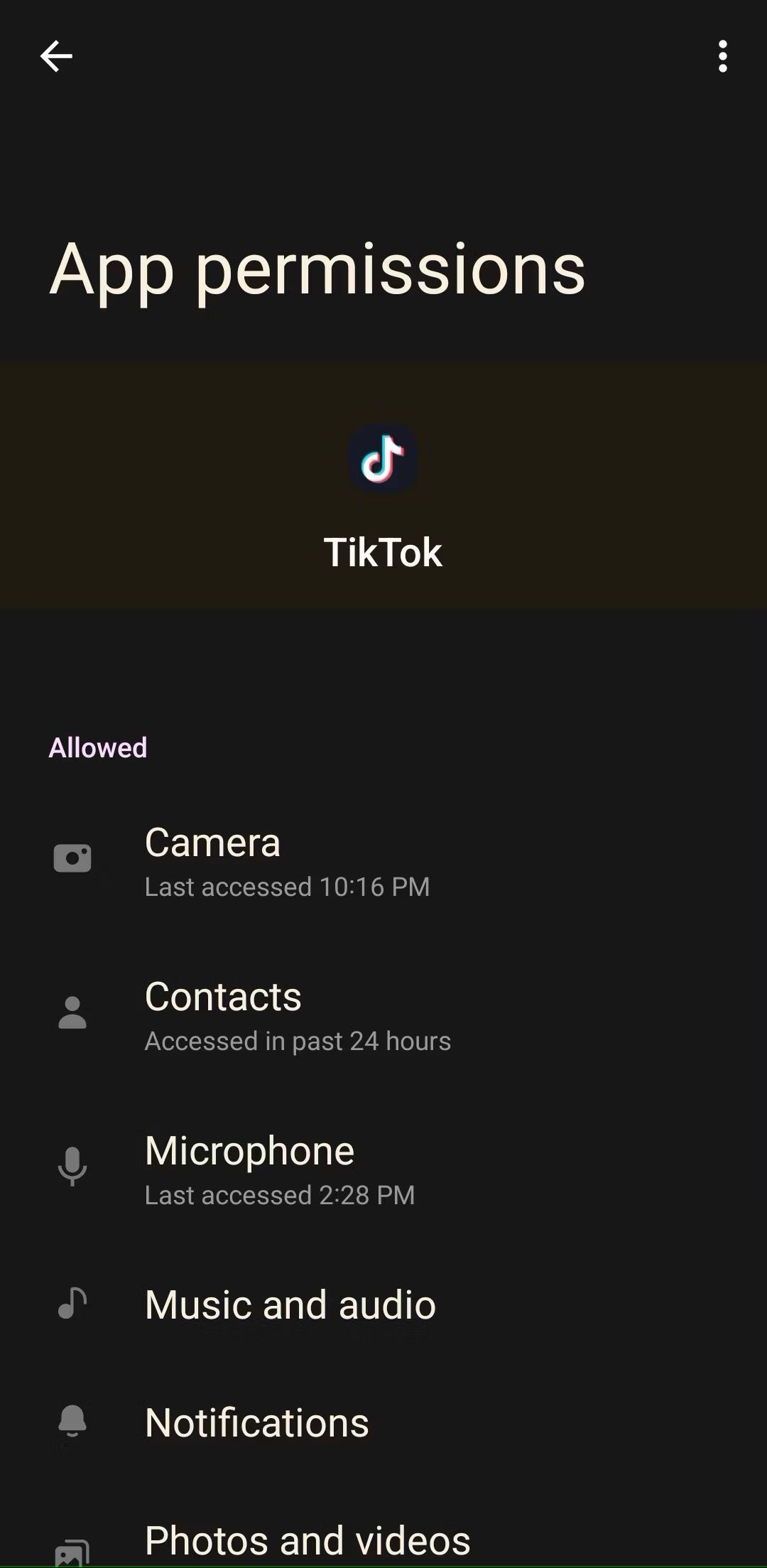
It is a common misconception that these platforms are “spying” on your private files in the background. In reality, the primary mechanism for data ingestion is user-initiated. When you interact with the app, you are essentially providing the platform with a window into your media. The “astuce” or “trick” often shared on social media regarding privacy is usually just a reminder to navigate to your phone’s settings and restrict app permissions.
Steps to Protect Your Privacy
If you are uncomfortable with the level of access you have previously granted, you can revoke or modify these permissions at any time. This does not delete your account or prevent you from using the app; it simply changes the interface through which you upload content.
- For iOS Users: Navigate to Settings > Privacy & Security > Photos. Locate Facebook or Instagram and select “None” or “Select Photos” to limit what the app can access.
- For Android Users: Go to Settings > Apps > [App Name] > Permissions > Photos and Videos. From here, you can choose “Don’t allow” or “Ask every time.”
The Broader Context: Why Privacy Matters
The conversation around photo access is part of a larger, necessary dialogue regarding data sovereignty. As regulatory bodies like the European Union continue to enforce the General Data Protection Regulation (GDPR), tech companies are increasingly required to be transparent about how they collect and utilize user data. In the United States, discussions at the federal level regarding comprehensive privacy legislation remain ongoing, though no single overarching law currently governs all aspects of data collection across all states.
For the average user, the takeaway is clear: convenience and privacy are often in tension. By granting an app full access to your media, you are prioritizing the ease of sharing over the restriction of data flow. Being intentional about these settings is not just a “trick”—it is a fundamental aspect of digital literacy in the 21st century.
Key Takeaways for Digital Safety
- Review Regularly: Check your app permissions every few months to ensure they align with your current comfort level.
- Understand Metadata: Be aware that photos often contain location data and timestamps; stripping this information before uploading is a viable privacy measure.
- Read the Policies: While dense, the privacy policies of major platforms are the legal documents that dictate how your data is handled.
As we move into the next quarter, regulators are expected to discuss new requirements for data minimization, which could further restrict how apps categorize and store user-provided media. We will continue to monitor updates from the Federal Trade Commission and international data protection authorities. If you have questions about your specific privacy settings or have experienced issues with account access, please feel free to share your thoughts in the comments section below.
Keep reading