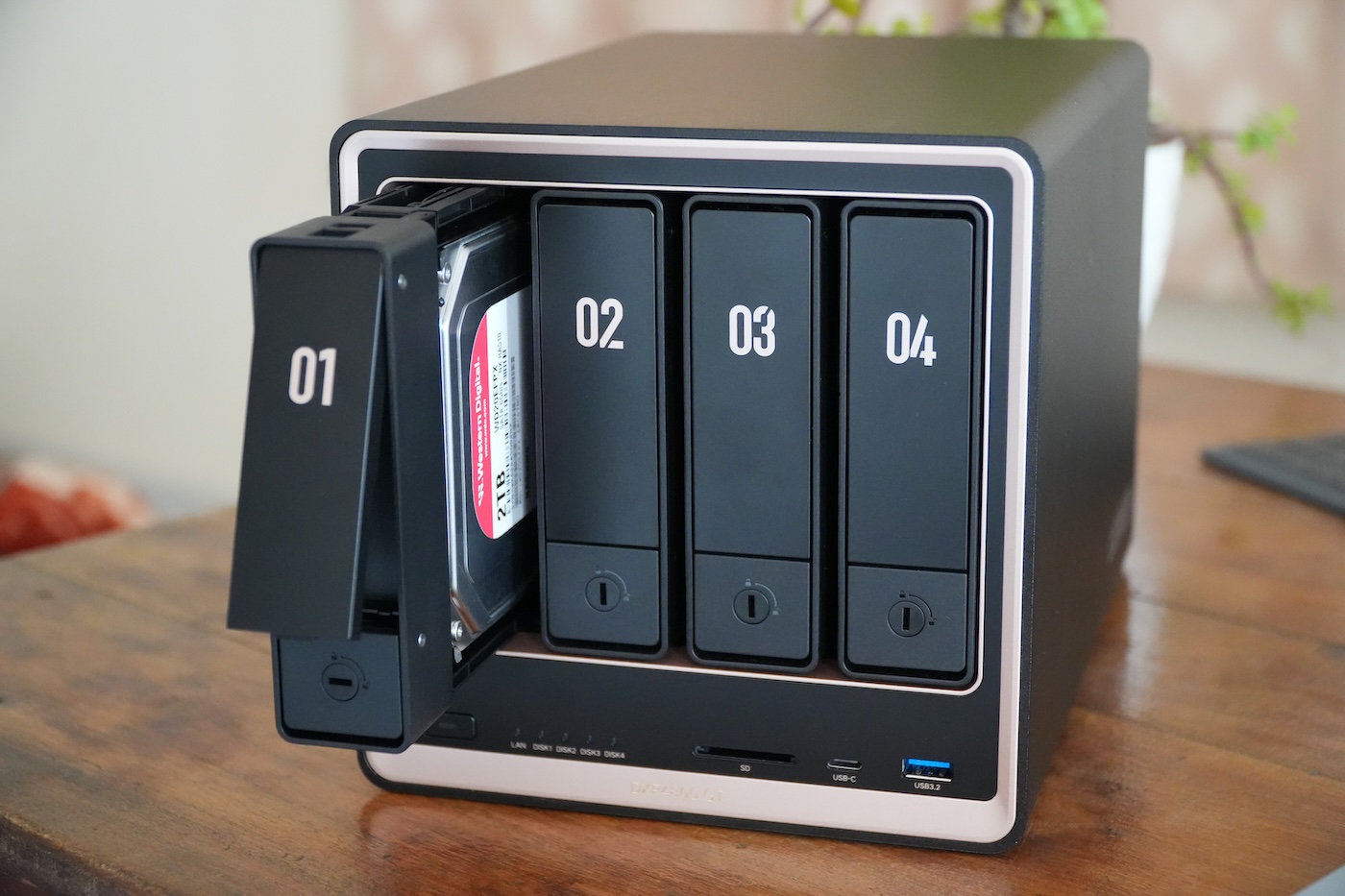
The Ugreen NASync DXP4800 GT is a 4-bay Network Attached Storage (NAS) device powered by an AMD Ryzen processor, designed to support high-bandwidth workflows for content creators. It features dual 10 GbE ports, dual M.2 NVMe slots for caching, and a built-in SD card slot to facilitate rapid data transfers for photographers and videographers.
Ugreen has entered the competitive Network Attached Storage market with the NASync series, positioning the DXP4800 GT as a high-performance hardware option for users requiring significant throughput. While established players like Synology and QNAP have long dominated the sector, Ugreen’s strategy focuses on providing advanced hardware specifications—specifically regarding networking and processing power—at a competitive price point.
The device is built around an AMD Ryzen CPU, which provides the computational overhead necessary for managing complex file systems, running containerized applications, and handling high-speed data transfers. This hardware configuration aims to address the growing demand from video editors and digital artists who require centralized, high-speed access to massive media libraries.
What hardware specifications define the Ugreen DXP4800 GT?
The core of the DXP4800 GT is its AMD Ryzen processor, a component that distinguishes it from many entry-level NAS units that often rely on lower-power ARM-based chips. According to Ugreen’s technical specifications, this processor enables the unit to handle intensive multitasking and serves as a foundation for running various software services and media transcoding tasks.
Networking is a primary focus for this model. The DXP4800 GT includes two 10 GbE (10 Gigabit Ethernet) ports. This dual-port configuration allows users to implement link aggregation to increase total bandwidth or to provide redundancy in professional environments. For users working with 4K or 8K video files, the jump from standard 1 GbE or even 2.5 GbE to 10 GbE is critical for minimizing latency during direct editing from the NAS.

For storage expansion and speed, the unit includes two M.2 NVMe slots. These slots are intended for use as high-speed cache or as dedicated storage volumes. By utilizing NVMe SSDs for caching, the system can accelerate frequently accessed data, reducing the time it takes to retrieve files stored on the slower, high-capacity mechanical hard drives located in the main bays.
The physical architecture consists of four main drive bays that support 3.5-inch or 2.5-inch SATA hard drives or SSDs. Ugreen states that the system can support a total storage capacity of up to 144 TB, depending on the individual capacity of the drives installed. This makes the device a viable central repository for large-scale digital asset management.
How does the SD card slot benefit content creators?
A notable hardware feature of the DXP4800 GT is the integration of a built-in SD card slot. While many NAS devices require users to connect external card readers to a computer or a USB port on the NAS, the integrated slot allows for more direct interaction with media.

For photographers and videographers, this feature simplifies the ingest process. Users can transfer files directly from a camera’s SD card into the NAS file system, potentially streamlining the workflow from capture to archival. This integration positions the DXP4800 GT as more than just a storage server, but as a dedicated workstation component for media professionals.
What is the role of UGOS Pro in the user experience?
Ugreen operates the NASync series using its proprietary operating system, UGOS Pro. Because Ugreen is a relatively new entrant to the NAS software space, the maturity of the operating system is a key area of observation for potential buyers. UGOS Pro is designed to manage the hardware, provide a user interface for file management, and host various applications.
The software environment includes tools for:
- File Management: Organizing and accessing data via web browsers or dedicated desktop clients.
- User Permissions: Controlling which users or groups can access specific folders or datasets.
- Application Support: Running third-party applications or containerized services to extend the NAS functionality.
- Data Protection: Managing RAID configurations to ensure data redundancy in the event of a drive failure.
While the hardware is robust, the utility of the DXP4800 GT depends heavily on the continued development of the UGOS Pro ecosystem. Users looking for highly specialized, mature software suites—such as those found in Synology’s DiskStation Manager (DSM)—may find the Ugreen interface to be in an earlier stage of development.
How does the DXP4800 GT compare to industry standards?
When evaluating the DXP4800 GT, a comparison between hardware value and software maturity is necessary. The following table outlines how the DXP4800 GT positions itself against the general market trends seen in the 4-bay NAS segment.
| Feature | Ugreen DXP4800 GT | Typical Industry Standard (Mid-Range) |
|---|---|---|
| Processor Type | AMD Ryzen (High Performance) | ARM or Intel Celeron (Efficiency Focused) |
| Standard Networking | Dual 10 GbE | Single 1 GbE or 2.5 GbE |
| Integrated Media Input | Built-in SD Card Slot | None (Requires external reader) |
| Software Ecosystem | UGOS Pro (Emerging) | Proprietary OS (Mature/Established) |
The data suggests that Ugreen is prioritizing raw throughput and hardware capabilities. For users who prioritize high-speed data movement and have the technical proficiency to work with a newer operating system, the DXP4800 GT offers a compelling hardware-to-price ratio. Conversely, users who require a “set it and forget it” experience with deeply integrated third-party software may still lean toward established manufacturers.
What are the technical considerations for RAID and storage?
To maximize the 144 TB potential and protect data, users must configure RAID (Redundant Array of Independent Disks) levels. The DXP4800 GT supports several standard configurations that allow users to balance capacity, performance, and data safety.
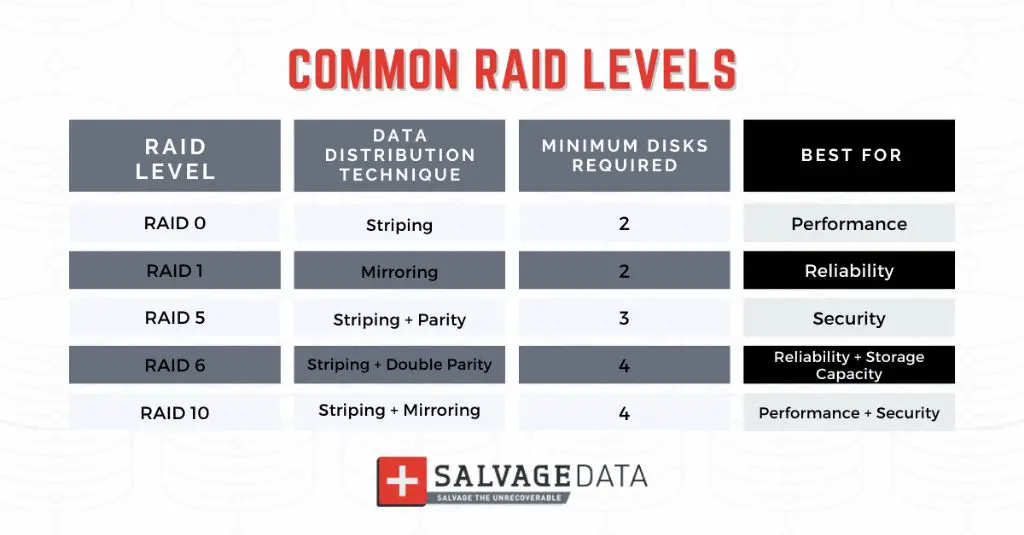
RAID 0: This configuration stripes data across all drives to maximize speed and capacity. However, it offers no redundancy; if one drive fails, all data in the array is lost. This is generally not recommended for primary storage.
RAID 1: This provides mirroring, where data is duplicated across two drives. It offers high redundancy but only half of the total drive capacity is usable for storage.
RAID 5: A common choice for 4-bay NAS units, RAID 5 uses parity data distributed across all drives. This allows for the loss of one drive without losing data, while providing significantly more usable space than RAID 1. It offers a balance of performance, capacity, and protection.
RAID 6: This level uses double parity, allowing for the simultaneous failure of two drives without data loss. While it provides higher security than RAID 5, it incurs a higher capacity penalty and slightly lower write speeds.
RAID 10: This combines mirroring and striping. It provides excellent performance and high redundancy but requires at least four drives and consumes 50% of the total capacity for redundancy.
Key Technical Specifications Summary
- Processor: AMD Ryzen-based architecture.
- Network Connectivity: 2 x 10 GbE ports.
- Expansion Slots: 2 x M.2 NVMe slots.
- Drive Bays: 4 x 3.5″/2.5″ SATA bays.
- Maximum Capacity: Up to 144 TB.
- Special Features: Integrated SD card slot.
- Operating System: UGOS Pro.
The next major update regarding the Ugreen NASync series is expected to involve further software refinements to the UGOS Pro platform and potential expansions of the application library. Users should monitor official Ugreen technical bulletins for firmware updates and security patches.
What are your thoughts on Ugreen’s entry into the NAS market? Can hardware specs alone compete with mature software ecosystems? Share your comments and views below.