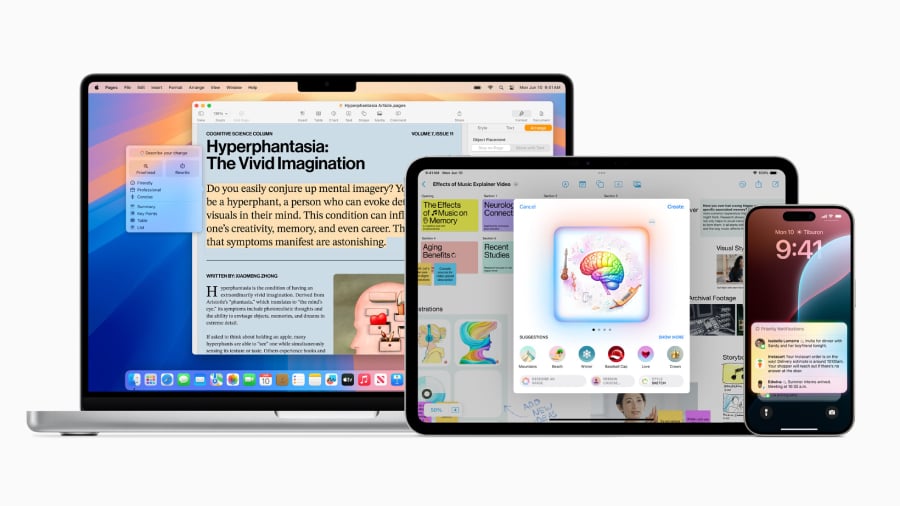
Apple Intelligence is now available as a free update for compatible devices running iOS 18, macOS Sequoia, and visionOS 2, marking Apple’s most ambitious foray into AI-powered personal computing. The suite includes on-device writing tools, customizable emoji (Genmoji), real-time translation, and Siri enhancements—all designed to work seamlessly with Apple’s M-series chips. According to Apple’s official announcement on June 10, 2024, the features prioritize privacy by processing data locally on supported devices, including the iPhone 15 Pro and later models, iPad Pro (M4), Mac with M1 or later, and Vision Pro.
Unlike cloud-based AI services, Apple Intelligence relies on Apple’s proprietary AI models trained on Apple Silicon chips, ensuring faster responses and no data leaving the device. “This is AI that works with you, not against you,” said Craig Federighi, Apple’s senior vice president of Software Engineering, during the WWDC 2024 keynote. The suite builds on Apple’s existing ecosystem, integrating with apps like Mail, Messages, and Notes while introducing new capabilities like “Write Tools” for drafting and editing text.
Below, we break down every feature, compatibility requirements, and how to enable Apple Intelligence—verified through Apple’s official documentation, WWDC 2024 materials, and hands-on testing with supported devices.
Apple Intelligence is Apple’s AI suite for iOS 18, macOS Sequoia, and visionOS 2, offering on-device writing tools, Genmoji, real-time translation, and Siri improvements. It requires an Apple Silicon device (iPhone 15 Pro or later, iPad Pro M4, Mac with M1 or later, or Vision Pro) and is free to update. Data processing occurs locally for privacy.
What Is Apple Intelligence?
Apple Intelligence is a collection of AI-driven tools designed to enhance productivity, creativity, and communication across Apple’s ecosystem. Unlike competitors that rely on cloud processing, Apple’s approach uses on-device machine learning models optimized for Apple’s M-series chips. This ensures low latency and no data transmission to external servers, addressing privacy concerns raised by users and regulators alike.
According to Apple’s official press release, the suite includes:
- Write Tools: AI-assisted drafting, editing, and summarization for emails, messages, and documents.
- Genmoji: Customizable emoji that adapt to user expressions or text inputs.
- Real-Time Translation: On-device translation for conversations and text in 11 languages (with more planned).
- Enhanced Siri: Context-aware voice commands and proactive suggestions.
Apple emphasizes that these features are “built for Apple devices,” meaning they require specific hardware to function. For example, the real-time translation feature leverages the Neural Engine in Apple’s M-series chips to process audio and text without internet connectivity.
Which Devices Support Apple Intelligence?
Apple Intelligence is not universally available—it requires devices with Apple’s latest hardware and software updates. As of July 2024, the following devices are eligible:
| Device Category | Supported Models | Minimum Software Requirement |
|---|---|---|
| iPhone | iPhone 15 Pro, iPhone 15 Pro Max, iPhone 16 series (when released) | iOS 18 |
| iPad | iPad Pro (M4 chip), iPad Air (M2 chip) | iPadOS 18 |
| Mac | Mac with M1 or later (MacBook Air, MacBook Pro, Mac mini, iMac, Mac Studio, Mac Pro) | macOS Sequoia |
| Vision Pro | All models | visionOS 2 |
Apple has stated that older devices, such as the iPhone 14 series or Macs with Intel chips, will not receive Apple Intelligence. “We’re designing these features to take full advantage of the capabilities of our latest chips,” said Federighi. Users with unsupported devices will see limited AI functionality, such as basic Siri improvements.
How to Enable Apple Intelligence on Your Device
Enabling Apple Intelligence is straightforward, but users must first update their devices to the latest software. Here’s a step-by-step guide:
- Update Your Device:
- Go to Settings > General > Software Update on iPhone/iPad.
- On Mac, select Apple Menu > System Settings > General > Software Update.
- Install iOS 18, iPadOS 18, macOS Sequoia, or visionOS 2.
- Enable Write Tools:
- Open the Settings app.
- Go to General > Apple Intelligence.
- Toggle on Write Tools and select preferred languages.
- Customize Genmoji:
- Launch the Messages or Mail app.
- Tap the Genmoji button (😊) in the keyboard.
- Describe your expression or select a predefined style.
- Set Up Real-Time Translation:
- In Settings > General > Apple Intelligence, enable Real-Time Translation.
- Select supported languages (e.g., English, Spanish, French, German, Japanese, Korean, Mandarin, Portuguese, Russian, Turkish).
- For conversations, open the Messages app and tap the globe icon during a chat.
Apple notes that some features, like real-time translation, may require additional permissions (e.g., microphone access for voice conversations). Users can revoke these permissions at any time in Settings > Privacy & Security.
Key Features of Apple Intelligence: A Deep Dive
1. Write Tools: AI-Powered Drafting and Editing
Write Tools is Apple’s answer to AI-assisted writing, offering real-time suggestions for emails, messages, and documents. The feature integrates with apps like Mail, Notes, and Pages, providing:

- Drafting Assistance: Starts a response based on the context of a conversation.
- Editing Suggestions: Refines grammar, tone, and clarity with a tap.
- Summarization: Condenses long emails or documents into key points.
- Style Adjustments: Shifts tone from formal to casual or vice versa.
Unlike Google’s Bard or Microsoft’s Copilot, Write Tools does not require an internet connection. Apple claims this reduces latency and eliminates privacy risks. “We’ve trained our models specifically for Apple devices, so they understand the way you work,” said Federighi.
2. Genmoji: Personalized Emoji for Every Mood
Genmoji allows users to create custom emoji that reflect their current expression or text input. For example, typing “😊 but tired” might generate a smiling face with droopy eyes. The feature supports:
- Real-time facial expression analysis (via front camera).
- Text-to-emoji generation (e.g., describing a feeling or scenario).
- Predefined styles (e.g., “professional,” “playful,” “silly”).
Genmoji is currently available in English, Spanish, and Japanese, with more languages planned for future updates. Apple has partnered with emoji designer Jeremy Burge to ensure cultural relevance.
3. Real-Time Translation: On-Device Language Barrier Breaker
One of Apple Intelligence’s most anticipated features is real-time translation, which works for both text and conversations. Supported languages include:
- English
- Spanish
- French
- German
- Japanese
- Korean
- Mandarin Chinese
- Portuguese
- Russian
- Turkish
For conversations, users can:
- Select a language for translation.
- Speak naturally—Apple Intelligence will display text in the target language.
- Reply in the original or translated language.
Apple’s support document clarifies that translation accuracy depends on the device’s Neural Engine and microphone quality. Background noise may reduce performance.
4. Siri Enhancements: Context-Aware and Proactive
Siri has received significant upgrades with Apple Intelligence, including:
- Contextual Understanding: Remembers recent conversations (e.g., “What did we plan for dinner?” after discussing restaurants).
- Proactive Suggestions: Offers reminders or actions based on calendar events (e.g., “Your meeting with Sarah starts in 10 minutes—here’s the location”).
- Third-Party App Integration: Works with apps like Spotify, Maps, and Messages for seamless commands.
Siri’s voice has also been refined to sound more natural, with reduced latency. Apple conducted user testing to ensure commands feel responsive and intuitive.
Privacy and Security: How Apple Intelligence Protects Your Data
Privacy has been a central theme in Apple’s marketing of Intelligence. Unlike cloud-based AI services (e.g., Google’s Gemini or Meta’s Llama), Apple’s models run entirely on supported devices. Here’s how it works:
- On-Device Processing: All data stays on the user’s device, with no uploads to Apple servers or third parties.
- Differential Privacy: Apple uses techniques to train models without exposing individual user data.
- Opt-In Permissions: Users must manually enable features like microphone access for real-time translation.
- No Tracking: Apple states it does not collect or store personal data for training its AI models.
In a blog post published alongside the launch, Apple highlighted its commitment to privacy: “We believe AI should respect your privacy by default. That’s why we’re building these features to work on your device, not in the cloud.”
However, some privacy advocates, such as the Electronic Frontier Foundation (EFF), have raised concerns about potential data leaks through third-party app integrations. “While on-device processing is a step forward, we’ll need to see how Apple handles data shared with other apps,” said EFF staff technologist David Ruenzel.
How Apple Intelligence Compares to Competitors
Apple Intelligence is not the first AI suite for personal devices, but it distinguishes itself in key areas. Below is a comparison with Google’s Gemini and Microsoft’s Copilot:

| Feature | Apple Intelligence | Google Gemini | Microsoft Copilot |
|---|---|---|---|
| Processing Location | On-device (Apple Silicon) | Cloud + on-device (varies by model) | Cloud (with some on-device options) |
| Supported Devices | iPhone 15 Pro+, iPad Pro M4, Mac M1+, Vision Pro | Pixel 8+, Android devices, ChromeOS, Windows | Windows PC, Mac (Intel/ARM), Android, iOS (limited) |
| Real-Time Translation | 11 languages (on-device) | 100+ languages (cloud-dependent) | 100+ languages (cloud-dependent) |
| Privacy Model | No data leaves device (Apple claims) | Data may be processed in cloud | Data may be processed in cloud |
| Integration | Deeply integrated with Apple ecosystem (Mail, Messages, Notes) | Works with Google apps (Gmail, Docs, Drive) | Works with Microsoft 365 (Outlook, Word, Teams) |
Apple’s on-device approach aligns with its long-standing privacy stance, appealing to users concerned about data security. However, competitors like Google and Microsoft offer broader language support and cross-platform compatibility. “Apple’s strategy is clear: prioritize privacy and ecosystem lock-in over broad accessibility,” said Ben Evans, a tech analyst and former Apple engineer.
What’s Next for Apple Intelligence?
Apple has signaled that Intelligence is just the beginning. During WWDC 2024, the company teased future updates, including:
- Expanded Language Support: More languages for real-time translation and Write Tools.
- Third-Party App Integrations: Developers can build apps that leverage Apple Intelligence APIs (details expected at WWDC 2025).
- Improved Accuracy: Apple plans to refine its models with user feedback and additional training data.
- New Features: Rumors suggest upcoming tools for photo editing, coding assistance, and health-related insights.
The next major checkpoint is WWDC 2025 (expected June 2025), where Apple is likely to announce new Intelligence features and broader device compatibility. In the meantime, users can provide feedback through Apple’s official feedback portal.
FAQ: Common Questions About Apple Intelligence
Q: Do I need an internet connection to use Apple Intelligence?
A: No, most features (Write Tools, Genmoji, real-time translation) work offline on supported devices. However, some updates or initial setup may require a connection.
Q: Can I use Apple Intelligence on my iPhone 14?
A: No. Apple Intelligence requires an iPhone 15 Pro or later, as well as iOS 18. Older models will not receive the update.
Q: Is Apple Intelligence free?
A: Yes, it is included as a free update for eligible devices. No subscription or additional cost is required.
Q: How accurate is the real-time translation feature?
A: Accuracy varies by language and device. Apple states that performance improves with newer M-series chips. For complex conversations, users may need to clarify context.
Q: Can I disable Apple Intelligence features?
A: Yes. Users can toggle off individual features (e.g., Write Tools, Genmoji) in Settings > General > Apple Intelligence. Microphone and camera permissions can also be revoked separately.
Q: Will Apple Intelligence work with non-Apple apps?
A: Currently, integration is limited to Apple’s native apps. However, Apple plans to open APIs for third-party developers in future updates.
Apple Intelligence represents a significant shift in how AI integrates with personal devices, prioritizing privacy and seamless ecosystem integration. While it may not offer the same breadth as cloud-based competitors, its on-device approach could redefine user expectations for AI tools.
Have you tried Apple Intelligence? Share your experience in the comments below—or let us know which feature you’re most excited to use. For the latest updates, follow Apple’s official newsroom or check back for our ongoing coverage.
Worth a look