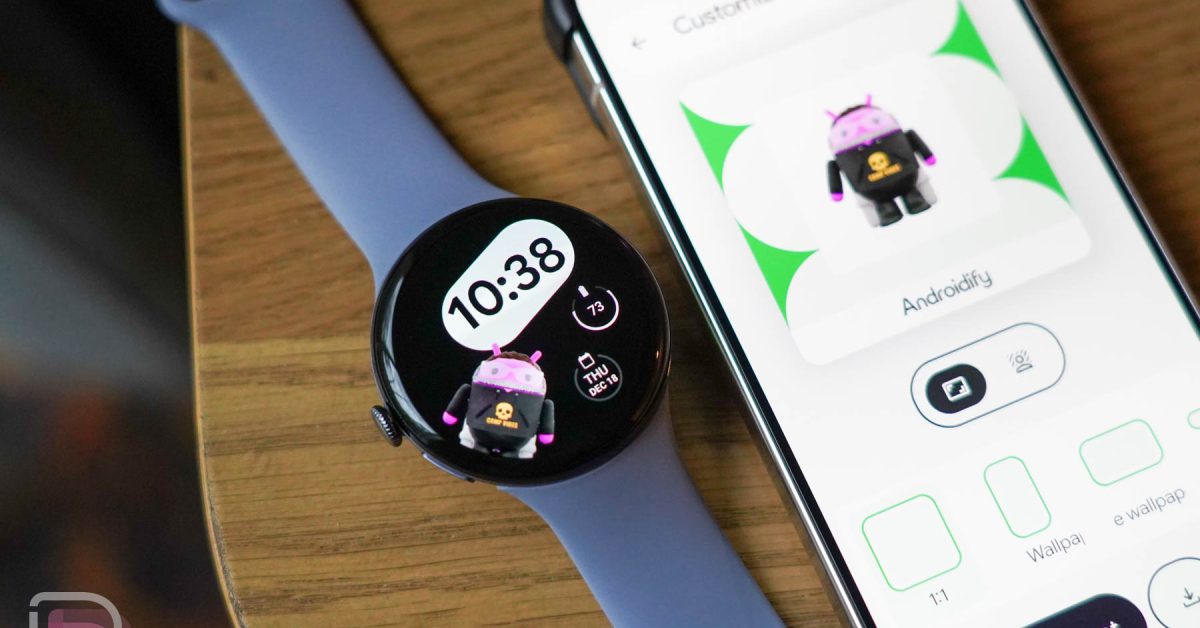
Personalize Your Wrist: Create Custom Watch Faces with Androidify
Google has expanded the playful Androidify experience, now letting you transform your own digital likeness into a unique watch face for your Wear OS smartwatch. This exciting feature arrives via a refreshed Androidify app, bringing a new level of personalization to your wearable tech.
Designing Your Bot
Creating your custom watch face is a straightforward process. First, install the Androidify app on both your phone and your connected Wear OS watch. Then,open the app on your phone and begin designing your very own bugdroid bot.
Once you’re happy with your creation, simply choose the “share” or “export” option. Select the dedicated watch icon to initiate the transfer to your smartwatch. You’ll then be presented with a selection of different watch face styles to complement your bot. click “Send to watch” and prepare to personalize your wrist.
Applying Your New Watch Face
After sending your design, you might need to manually set the watch face on your device. Don’t worry, it’s a simple process.Long-press on your current watch face and select the option to add a new one. Alternatively, you can manage watch faces through your Wear OS companion app – for Pixel Watch owners, this is done within the pixel Watch app.
here’s a quick recap:
* Download: Install Androidify on your phone and Wear OS watch.
* Design: Create your unique bugdroid bot within the app.
* Export: Select the watch icon and choose your preferred watch face style.
* Apply: Manually set the new watch face on your smartwatch if needed.
This update offers a fun and engaging way to express your individuality on your Wear OS device. It’s a small detail that can make a big difference in your daily experience, turning your smartwatch into a truly personal accessory.