
Microsoft’s Gaming Copilot: Is Your Gameplay Being Watched & Used for AI Training?
A concerning discovery by a vigilant user monitoring network traffic reveals that Microsoft’s new Gaming copilot AI is actively being trained – potentially by observing your gameplay. This raises significant privacy questions,echoing the backlash faced by Microsoft’s Recall feature earlier this year. Let’s break down what’s happening, how to check if you’re affected, and how to disable this data collection.
What’s Going On?
According to initial findings, Gaming Copilot utilizes Optical Character Recognition (OCR) technology to analyze text within your game screenshots. This data is then used to train the AI, improving its understanding of gaming contexts. It’s a practise reminiscent of the issues surrounding Microsoft Recall, which prompted a redesign due to privacy concerns.
Currently, it’s unclear whether this recording is happening globally or in specific regions. While some Windows 11 (version 24H2) users haven’t found the relevant privacy settings, reports from WCCFTech confirm the feature is enabled by default on some systems.
Why This Matters to You
This isn’t just about data collection; it’s about transparency and control. You deserve to know when your activity is being monitored and have the ability to opt-out. The lack of upfront disclosure or consent prompts from Microsoft is particularly troubling.
How to Disable Gaming Copilot‘s Training Feature
Fortunately, you can take steps to protect your privacy. Here’s a step-by-step guide to disable the data collection:
- Open the Start menu.
- Type “Game Bar” and press Enter (or use the Windows-G shortcut).
- Select the Settings gear icon.
- Navigate to the Privacy settings.
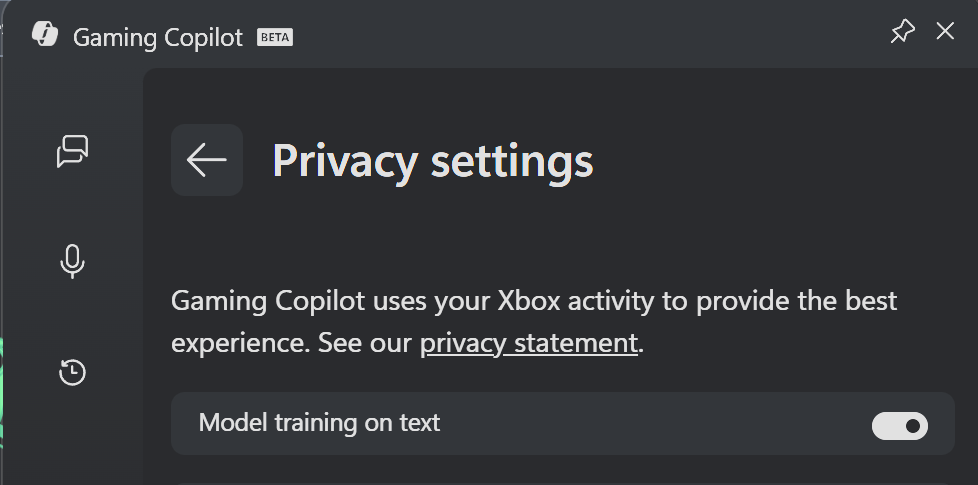
- Toggle “Model training on text“ to the off position.
- Return to the main Settings menu.
- Open Capture settings.
- Toggle “Enable screenshots (experimental)” to the off position.
Even if you don’t actively play games, it’s wise to check for these settings. Unless you’re eager to contribute to Microsoft’s AI training, disabling these features is a proactive step toward safeguarding your privacy.
Understanding the Settings
[Image of Gaming Copilot Privacy Settings – sourced from RedbullCola / Resetera]
The “Model training on text” setting directly controls whether your in-game text is used for AI learning. Disabling this prevents Copilot from analyzing the content of your screenshots.
[Image of Gaming Copilot Capture Settings – sourced from RedbullCola / Resetera]
The “Enable screenshots (experimental)” setting, when enabled, allows Copilot to capture screenshots, which are then likely used in conjunction with the OCR process.Turning this off further limits data collection.
Microsoft’s Response (or Lack Thereof)
We’ve reached out to Microsoft for comment regarding these findings. As of this publication, we have not received a response. We will update this article instantly if and when we receive feedback from the company.
A Pattern of Concern?
This situation highlights a growing trend: AI features being rolled out with potentially intrusive data collection practices enabled by default.It underscores the importance of actively reviewing your privacy settings and staying informed about how your data is being used.
Don’t assume your privacy is protected; take control and make informed decisions about the data you share.
Original Article Source: https://www.ghacks.net/2025/10/24/report-gaming-copilot-ai-is-being-trained-by-watching-you-play-games-and-it-is-on-by-default/





