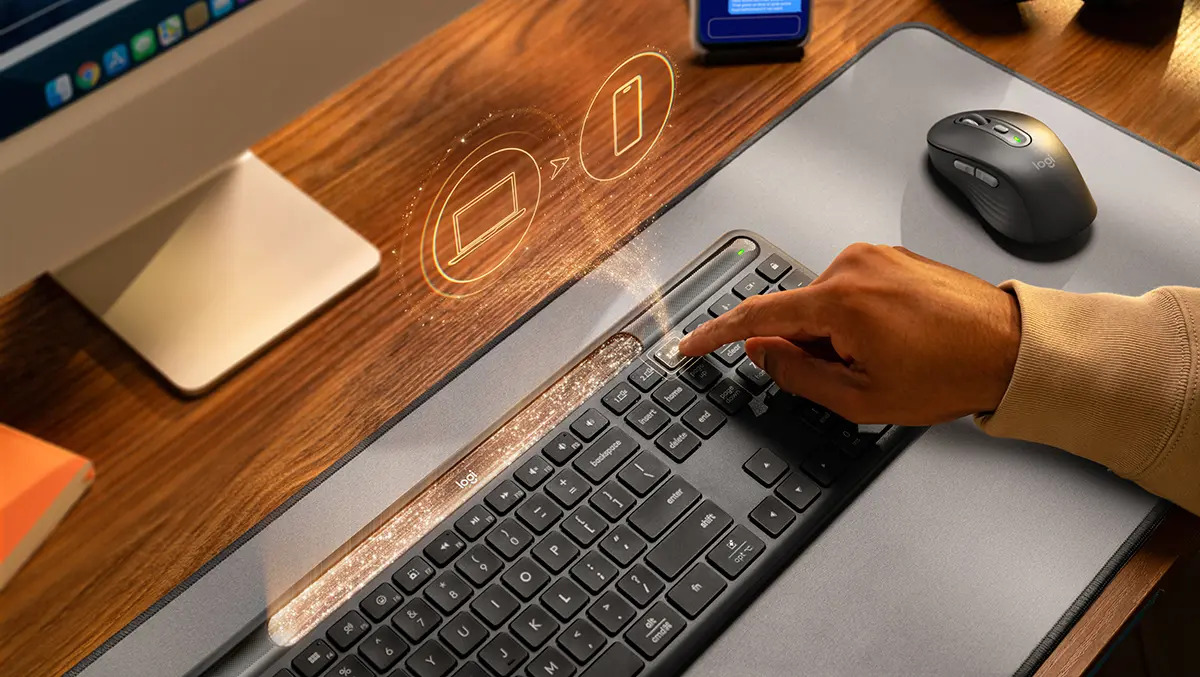
Logitech Signature Slim Solar+ K980 Review: The Keyboard That Liberates You From Charging
(Last Updated: November 8, 2023)
For years, the humble keyboard has remained largely unchanged. A necessary peripheral, often overlooked, and perpetually tethered to a cable or reliant on disposable batteries.Logitech aims to disrupt that status quo with the Signature Slim Solar+ K980, a keyboard that promises a truly wireless experiance – powered by light. As a long-time tech reviewer and productivity specialist, I’ve tested countless keyboards, and the K980’s core proposition is genuinely intriguing. This in-depth review will dissect its performance, features, and whether it truly delivers on its promise of a perpetually powered, multi-device workflow.
Why This Review Matters: Addressing the Modern Workspace Pain Points
The modern professional juggles devices. Laptop, tablet, smartphone – the lines between work and personal life are blurred, and our tools need to adapt. Furthermore, the desire for a clean, minimalist workspace is growing. Cables are clutter, battery replacements are inconvenient, and constant charging is a drain on time and mental energy. The K980 directly addresses these pain points, and this review will provide a comprehensive assessment of its success.
Key Features & Specifications at a Glance
* Power Source: Solar & Internal Rechargeable Battery (no USB charging or replaceable batteries)
* Connectivity: Bluetooth (up to 3 devices) & Optional Logitech Bolt USB Receiver
* Layout: Full-size with Numpad & Inverted-T Arrow Keys
* Key Switches: Low-Profile Scissor-Switch
* Weight: 700g (approximately 1.54 lbs)
* Dimensions: Slim profile designed for portability and desk space optimization.
* materials: Durable Plastic Construction
* Colors: Graphite & Pale Cream
* Customization: Logitech Options+ Software for Function Key Programming
* Compatibility: Windows, macOS, ChromeOS, iOS, Android
Design & Build Quality: Sleek Minimalism with Practicality
The K980 instantly impresses with its understated elegance. Available in a elegant graphite or a calming pale cream, it blends seamlessly into any workspace. Logitech has opted for a plastic construction to keep the weight down (a commendable 700g) and the price competitive. While some might prefer a metal chassis, the plastic feels surprisingly robust and capable of withstanding daily use.
The slim profile is a key design element, contributing to a clean aesthetic and making it easy to slip into a bag for mobile work. The top housing cleverly conceals the solar-charging strip, maintaining a streamlined look. It’s a thoughtful design that prioritizes both form and function.
The Solar Power Revolution: Does it Actually Work?
This is the defining feature, and I’m pleased to report it works exceptionally well. I subjected the K980 to a typical office surroundings with moderate indoor lighting (around 500 lux). Throughout a full week of consistent use, the battery level remained consistently full. Logitech claims up to four months of battery life on a full charge in complete darkness, a claim I haven’t been able to fully verify, but the performance under normal conditions is genuinely remarkable.
The freedom from charging cables and battery replacements is liberating.It’s a small change, but one that significantly reduces mental overhead and contributes to a more streamlined workflow. Though, it’s crucial to understand the limitations: the keyboard needs light. Stashing it in a dark drawer will, eventually, deplete the battery. But for typical desk setups, this isn’t an issue.
Multi-Device Mastery: Seamless Switching & Connectivity
The K980 excels at multi-device support. Pairing with up to three devices via Bluetooth is a breeze, and the dedicated “Easy-Switch” buttons make toggling between them instantaneous. I seamlessly transitioned between a Windows laptop, an iPad Pro, and a Samsung Galaxy smartphone without a single hiccup.
Connectivity was rock solid throughout my testing. No lag, no dropped connections, and no compatibility issues. This is a critical feature for anyone who frequently switches between devices, and the K980 delivers a truly seamless experience. The inclusion of Windows and Mac key legends further enhances usability across platforms. For enterprise users, the optional Logitech Bolt USB receiver provides a more secure and reliable connection.
Typing Experience: Comfort & Productivity
The low-profile scissor-switch keys offer a comfortable and responsive typing experience.While those accustomed to the tactile feedback of mechanical keyboards might