
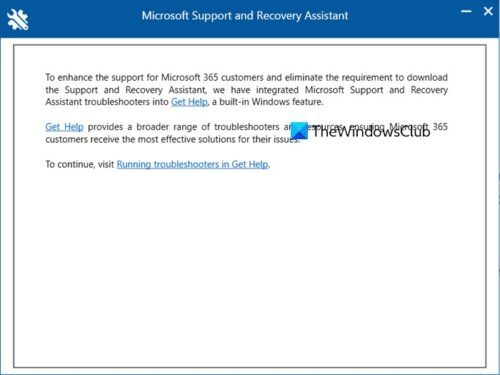
Microsoft has officially retired a long-standing pillar of its troubleshooting toolkit, deprecating the Microsoft Support and Recovery Assistant (SaRA) command-line utility across its current operating system lineup. As of updates released on or after March 10, 2026, the SaRA command-line tool has been entirely removed from Windows, marking a significant shift in how both casual users and enterprise IT administrators diagnose and repair system issues via Windows Report.
The move is part of a broader strategic effort by Microsoft to modernize the Windows ecosystem and “harden” the operating system against potential security vulnerabilities. For years, SaRA served as a scriptable, automated diagnostic tool designed to identify and resolve common failures within Microsoft 365, Office, Outlook, and various Windows-related services. However, the company has now directed all users and administrators to migrate to a modern environment: the Get Help command-line tool.
For the global community of IT professionals who relied on SaRA for remote endpoint management and automated scripting, this change is not merely a rebranding but a technical migration. The transition replaces the older SaRACmdLine interface with a new environment known as GetHelpCmdLine, utilizing the GetHelpCmd.exe executable to perform similar diagnostic scenarios via BleepingComputer.
The Scope of the Removal: Which Systems Are Affected?
The deprecation of the Support and Recovery Assistant is comprehensive, affecting nearly every in-support version of the Windows operating system. According to official updates, the removal is active for Windows 11 versions 23H2, 24H2, and 25H2, as well as Windows 10 version 22H2 via Windows Report. Supported Windows Server releases are also impacted by this change.
SaRA was originally designed as a versatile tool that could operate across a wide range of legacy and modern systems, including Windows 7 and Windows 8, to resolve installation failures, activation errors, and connectivity issues. By removing the command-line utility from the most recent updates, Microsoft is effectively closing the door on the legacy scripting environments that powered the tool.
Security and Stability: Why SaRA Was Killed Off
The decision to deprecate SaRA was driven by two primary factors: security vulnerabilities and diminishing reliability. Microsoft has stated that the removal is a necessary step to improve the overall security posture of the OS. Legacy tools like SaRA often rely on older scripting environments or require elevated permissions to function, which can introduce potential vulnerabilities that malicious actors could exploit to gain unauthorized access or escalate privileges within a system via Windows Report.
Beyond security, the tool had begun to show signs of instability before its official removal. Reports from users indicated that SaRA had frequently failed to launch in certain environments, suggesting that Microsoft had already begun phasing out the backend infrastructure prior to the March 10 deadline. By consolidating troubleshooting into the Get Help platform, Microsoft aims to provide a more stable and secure infrastructure for diagnostics.
A Guide for IT Administrators: Migrating to Get Help
For IT administrators, the removal of the SaRACmdLine utility requires an immediate update to their maintenance scripts and deployment workflows. Microsoft has explicitly advised admins to migrate away from the SaRA utility to “help secure and harden your environment” via BleepingComputer.
The replacement, the Get Help command-line tool, is described as a self-contained, enterprise-ready diagnostic utility. It maintains the core functionality that made SaRA valuable, allowing administrators to run automated diagnostic tests on endpoints remotely using scripts or PowerShell. The primary technical difference lies in the underlying infrastructure; the Get Help environment is built on a more modern framework that provides enhanced security compared to the legacy SaRA architecture.
To implement the new tool, administrators will demand to download the latest version and utilize GetHelpCmd.exe to execute their specific troubleshooting scenarios. This tool continues to support critical Microsoft 365 applications, including Microsoft Outlook and Microsoft Teams, ensuring that the ability to resolve activation and connectivity issues remains intact.
Key Comparison: SaRA vs. Get Help Command-Line
| Feature | Support and Recovery Assistant (SaRA) | Get Help (GetHelpCmdLine) |
|---|---|---|
| Status | Deprecated/Removed (March 10, 2026) | Current Replacement |
| Primary Executable | SaRACmdLine | GetHelpCmd.exe |
| Security Level | Legacy (Potential Vulnerabilities) | Enhanced/Hardened Infrastructure |
| Deployment | Scriptable/Remote | Scriptable/Remote (PowerShell supported) |
| Target Apps | Office, Outlook, M365, Windows | M365 apps, Outlook, Teams, Windows |
What So for the Average User
Although the removal of the command-line utility primarily impacts power users and IT professionals, the general user experience is being shifted toward the Get Help app. The Get Help app now serves as the centralized hub for troubleshooting, incorporating expanded capabilities that were previously reserved for the standalone assistant. This app is designed to run a series of tests to identify the root cause of a problem and then either automatically fix the issue, provide step-by-step manual instructions, or facilitate direct contact with Microsoft support via Microsoft.
By moving these capabilities into a unified app, Microsoft is reducing the number of fragmented tools installed on the system, which simplifies the user interface and reduces the attack surface for security threats.
The transition highlights a broader trend in software development where “scriptable” legacy tools are being replaced by API-driven or app-based frameworks. While this can be frustrating for those who have spent years perfecting their custom PowerShell scripts for SaRA, the trade-off is a more secure and reliable operating system for the global user base.
With the removal process already underway for all in-support versions of Windows, the next confirmed action for users and organizations is the full migration to the GetHelpCmd.exe utility to ensure uninterrupted diagnostic capabilities across their fleet of devices.
Do you rely on automated scripts for your Windows environment? Let us know in the comments how this migration affects your workflow or share this article with your IT team to ensure they’ve updated their tools.