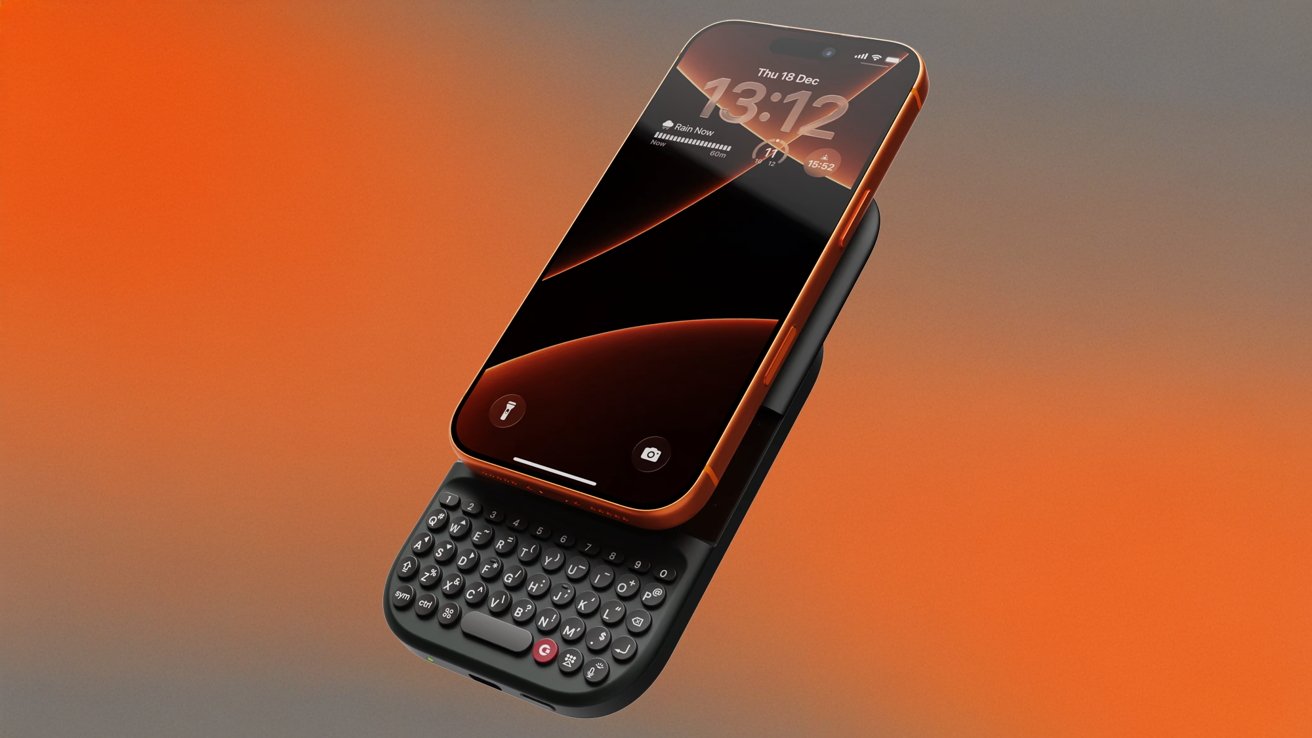
The Resurgence of Tactile Typing: Clicks’ MagSafe Keyboard Battery and the Future of Mobile Input
The digital world, increasingly dominated by sleek glass surfaces, is experiencing a engaging counter-current: a yearning for the satisfying, tactile feedback of physical keys. This trend isn’t just about nostalgia; it’s about enhancing the mobile typing experiance, and Clicks is at the forefront of this movement. The company, initially known for its MagSafe keyboard iPhone cases, has pivoted, unveiling a new device – a MagSafe-compatible keyboard with a built-in battery. This isn’t simply an accessory; it’s a statement about how we interact with our smartphones and a potential glimpse into the future of mobile input methods. But is this a genuine innovation, or a solution in search of a problem? Let’s delve into the details, exploring the evolution of mobile keyboards, the technology behind Clicks’ approach, and the broader implications for smartphone users.
The evolution of Mobile Keyboards: From Physical to Virtual and Back Again
For years, the trajectory of mobile keyboards seemed firmly set: towards the virtual.The introduction of the iPhone in 2007 revolutionized smartphone interaction,and with it,the on-screen keyboard became ubiquitous. While virtual keyboards have become incredibly sophisticated – boasting predictive text, autocorrect, and gesture typing - they lack the definitive feel of physical keys. This absence of tactile feedback can lead to slower typing speeds and increased error rates for many users.
Did You Know? Studies have shown that typing speed and accuracy are often higher on physical keyboards, even smaller ones, due to the muscle memory developed through tactile feedback.
Recent years have seen a resurgence of interest in physical mobile keyboards. Companies like Clicks recognized this demand, initially offering keyboard cases for iPhones. However, the case format presented limitations – adding bulk and potentially compromising the sleek aesthetic of the device. The new Clicks device addresses this by decoupling the keyboard from the case, offering a more versatile and streamlined solution.
Clicks’ MagSafe Keyboard Battery: A Deep dive into Functionality and Design
The core innovation of Clicks’ latest offering lies in its dual functionality.It’s not just a keyboard; it’s a MagSafe battery pack with an integrated keyboard. This design choice is notable. MagSafe, Apple’s magnetic attachment system, allows for a secure and convenient connection to compatible iPhones. The integrated battery addresses a common pain point for smartphone users – battery life – while together providing a tactile typing experience.
Here’s a breakdown of the key features and technical considerations:
* MagSafe Compatibility: Ensures a secure and reliable connection to iPhones 12 and later. The magnetic alignment simplifies attachment and detachment.
* Tactile Key Switches: Clicks is known for its high-quality tactile key switches, offering a satisfying “bump” with each keystroke. The specific switch type (likely a mechanical switch variant) considerably impacts the typing experience.
* Battery Capacity: The battery capacity is a crucial factor. While specific details haven’t been widely publicized, the battery needs to provide a ample boost to iPhone battery life to justify its existence. Expect a capacity in the range of 3000-5000 mAh.
* bluetooth Connectivity: While MagSafe provides the physical connection, Bluetooth is highly likely used for data transmission between the keyboard and the iPhone. Bluetooth 5.0 or later is essential for a stable and low-latency connection.
* portability & Weight: Balancing functionality with portability is key. The device needs to be compact and lightweight enough to be easily carried in a pocket or bag.
Pro Tip: When evaluating a mobile keyboard, consider the key travel (the distance the key moves when pressed) and actuation force (the amount of force required to register a keystroke). These factors significantly impact typing comfort and speed.
Real-World Applications and Use Cases
The Clicks MagSafe Keyboard Battery isn’t designed for everyone. However, several key use cases highlight its potential value:
* Prolonged Typing Sessions: For users who frequently compose long emails, write documents, or engage in extensive messaging, a physical keyboard can significantly improve efficiency and comfort.
* Content Creators: Bloggers,
Keep reading
- Hyperice Collaboration: Vibration & Heat Revolutionize Your Recovery
- First AI-Driven Cyberattack Triggers Response from 30 US Tech Companies
- Toronto Fire Chief Warns of E-Bike Dangers After Scarborough Battery Blast (archyworldys.com)
- EGO 56V 5.0Ah Battery – Lightning Sale for $108.80 Shipped (world-today-news.com)