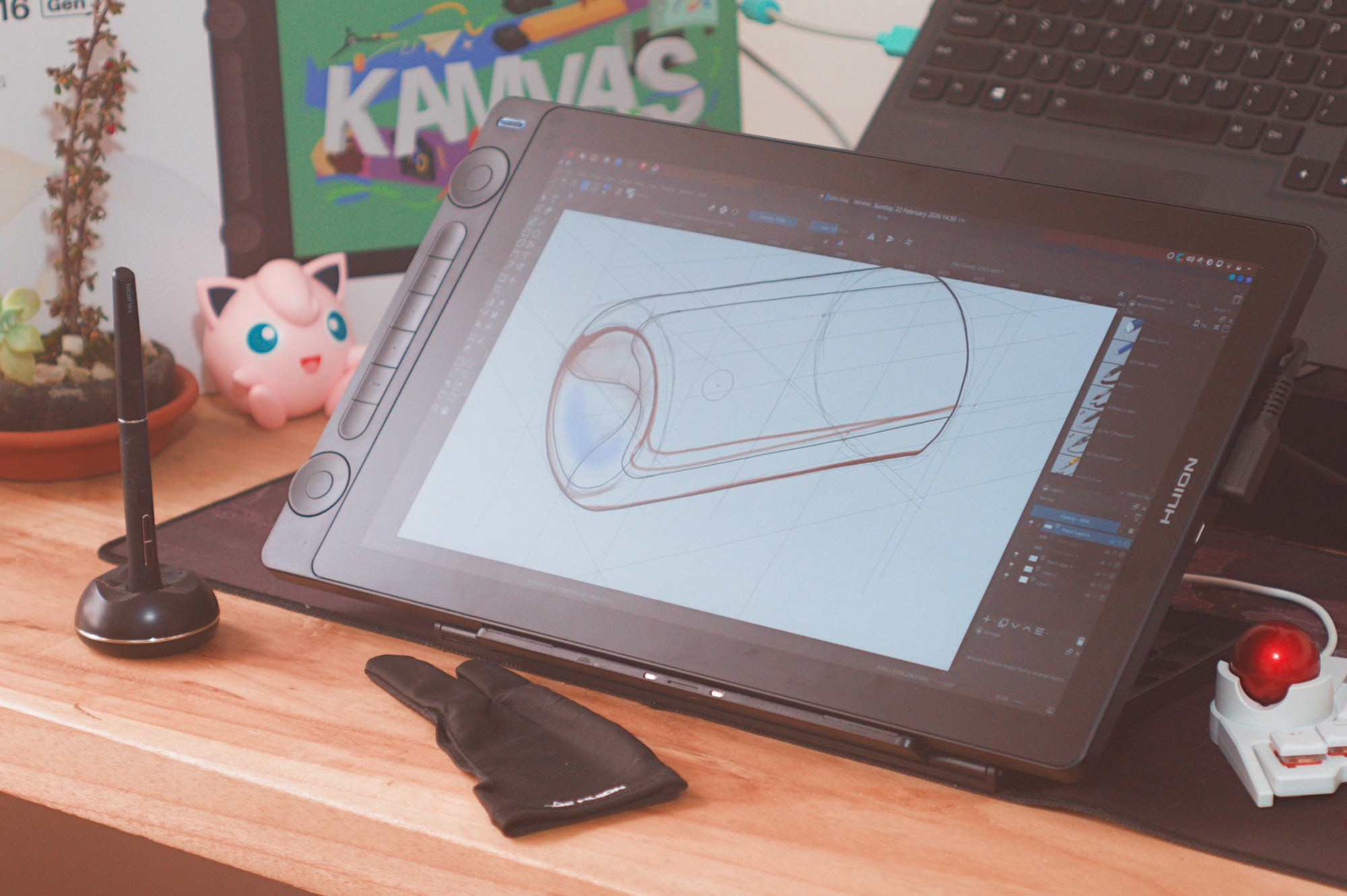
San Francisco, CA – For digital artists seeking a balance between portability and performance, Huion’s Kamvas 16 (Gen 3) pen display emerges as a compelling option. Offering a 2.5K QHD resolution and a host of features aimed at both beginners and seasoned professionals, the Kamvas 16 Gen 3 aims to deliver a premium drawing experience without the premium price tag traditionally associated with competitors like Wacom. Priced at $499, and often available for $459, the tablet positions itself as a strong contender in the increasingly crowded pen display market. But does it live up to the hype? This review delves into the specifics, examining its strengths, weaknesses, and overall suitability for a range of artistic workflows.
The appeal of a pen display like the Kamvas 16 Gen 3 lies in its ability to bridge the gap between traditional drawing and digital art. Unlike a graphics tablet that requires looking at a separate monitor, a pen display allows artists to draw directly onto the screen, providing a more intuitive and natural experience. The Gen 3 iteration builds upon previous models with improvements to pen technology, color accuracy, and connectivity, aiming to provide a seamless creative process. The device’s 15.8-inch screen size strikes a balance between providing ample workspace and maintaining portability, making it suitable for both studio and on-the-go use. This latest version, a flagship product in Huion’s Kamvas Gen 3 line, focuses on delivering a professional-grade experience at a more accessible price point.
A Closer Look at the Kamvas 16 Gen 3’s Features
At the heart of the Kamvas 16 Gen 3 is its 2.5K QHD (2560 x 1440) display, offering a pixel density that makes images appear crisp and detailed. This is particularly important for pen displays, where artists are closely examining their work. The display boasts 99% sRGB color coverage, ensuring accurate color reproduction, a crucial factor for professional artists and designers. Huion’s PenTech 4.0 technology promises improved pressure sensitivity and tilt recognition, allowing for nuanced and expressive strokes. The pen itself is comfortable to hold and comes with a variety of nibs to suit different drawing styles. Connectivity is streamlined with a single USB-C cable handling both video and data transmission, simplifying setup and reducing cable clutter. The inclusion of dual dials provides convenient access to frequently used functions, such as brush size and zoom.
One of the standout features of the Kamvas 16 Gen 3 is its compatibility with various operating systems, including Windows, macOS, and, increasingly, Linux. Testing with a Lenovo Legion 5 laptop running CachyOS and KDE Plasma revealed surprisingly seamless functionality out of the box using a USB-C connection with DisplayPort 1.2. Huion has even developed a Linux app to customize the display’s side buttons and pen shortcut buttons, whereas early versions of the app have experienced some bugs, particularly when running under the older X11 windowing system. Huion has acknowledged these issues and is reportedly working on a version optimized for the more modern Wayland display server, though a specific release date remains uncertain. For users who prefer more extensive customization options, the OpenTabletDriver offers a robust alternative for Linux, macOS, and Windows.
Performance and User Experience
In practical use, the Kamvas 16 Gen 3 delivers a largely positive experience. The pen is predictably responsive, with virtually no wobble, and the granular pressure sensitivity allows for a wide range of expressive control. The matte coating on the display effectively minimizes glare, making it suitable for use in various lighting conditions, although brightness can be a limitation in incredibly bright environments. The 1440p resolution contributes to a sharp and detailed image, enhancing the overall drawing experience. The ability to select color profiles directly from the on-screen display (OSD) using the pen itself is a thoughtful touch, particularly for artists who also engage in light photo or video editing.
However, the Kamvas 16 Gen 3 isn’t without its drawbacks. The 60Hz refresh rate and somewhat slow response times can be noticeable during fast movements, potentially impacting the experience for artists working with dynamic compositions or those accustomed to higher refresh rates. A minor degree of pen drift towards the edges of the display has been observed, although this is generally predictable and can be mitigated by utilizing brush outlines in drawing applications. The lack of a VESA mount limits its versatility for desktop setups, and the absence of a built-in stand requires users to purchase one separately. The peak brightness, even as adequate for most situations, could be higher for optimal visibility in brightly lit spaces.
Who is the Huion Kamvas 16 Gen 3 For?
The Huion Kamvas 16 Gen 3 is ideally suited for beginner to intermediate digital artists seeking an affordable and feature-rich pen display. Its combination of a high-resolution screen, accurate color reproduction, and responsive pen technology makes it a capable tool for a wide range of artistic styles. The portability of the device also makes it a good choice for artists who frequently work on the go or need a secondary display for their laptop setup. The Linux support, while still evolving, is a significant advantage for artists who prefer open-source operating systems.
While professional artists may uncover the 60Hz refresh rate and limited brightness to be drawbacks, the Kamvas 16 Gen 3 can still serve as a valuable secondary display for tasks such as sketching and concept development. The price point makes it an attractive alternative to more expensive Wacom models, offering a comparable feature set at a significantly lower cost. The device’s versatility extends beyond art, making it suitable for light photo and video editing, as well as general productivity tasks.
Potential Improvements and Future Considerations
Looking ahead, several areas could be improved in future iterations of the Kamvas 16 Gen 3. Increasing the peak brightness would enhance visibility in bright environments. Implementing a higher refresh rate would improve the responsiveness of the display, particularly for fast-paced artwork. Adding a VESA mount would increase its versatility for desktop setups. Continued development and refinement of the Linux app, with a focus on Wayland compatibility, would further enhance its appeal to open-source users. Addressing the minor pen drift issue would provide a more polished and accurate drawing experience.
Huion’s commitment to providing affordable and feature-rich pen displays is evident in the Kamvas 16 Gen 3. While it may not be perfect, it offers a compelling combination of performance, portability, and value. The ongoing software updates and improvements demonstrate Huion’s dedication to supporting its users and refining its products. As the digital art landscape continues to evolve, Huion is poised to remain a significant player, offering accessible tools for artists of all levels.
Key Takeaways:
- The Huion Kamvas 16 Gen 3 offers a 2.5K QHD display with accurate color reproduction at a competitive price of $499.
- PenTech 4.0 technology delivers responsive and precise drawing experience, though minor drift can occur at screen edges.
- Linux support is a significant advantage, with a dedicated app (though currently with some bugs) and compatibility with OpenTabletDriver.
- Limitations include a 60Hz refresh rate, moderate peak brightness, and lack of a built-in stand or VESA mount.
The Huion Kamvas 16 Gen 3 represents a solid choice for artists seeking an affordable and versatile pen display. As Huion continues to refine its software and address minor hardware limitations, the Kamvas line is likely to become even more competitive in the years to approach. The company has not yet announced a timeline for the Wayland driver update, but continues to support the X11 version.
What are your thoughts on the Huion Kamvas 16 Gen 3? Share your experiences and opinions in the comments below. And don’t forget to share this article with your fellow artists and tech enthusiasts!
Related reading