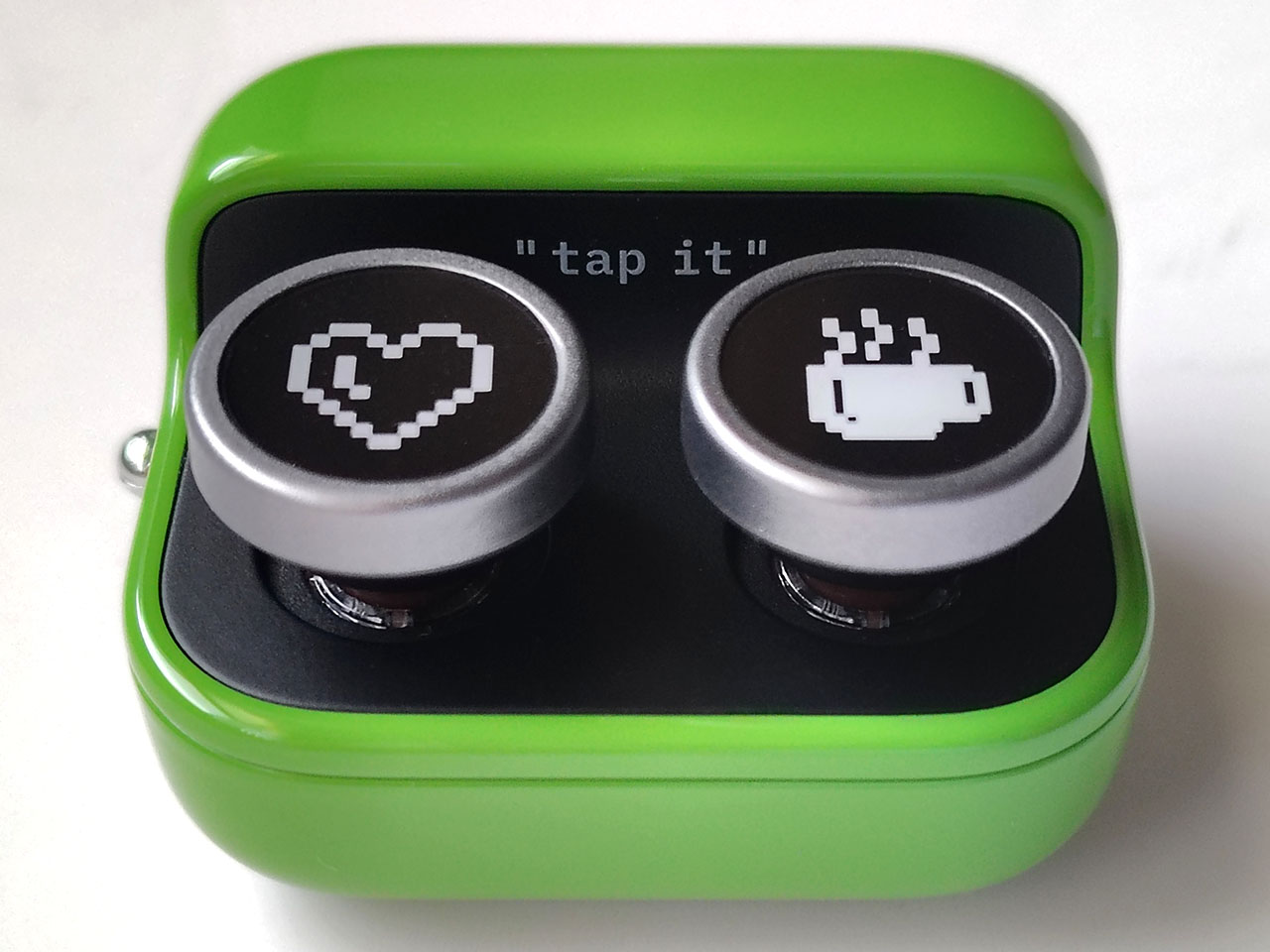
The Boox Tappy is a wireless Bluetooth page turner designed to interface with Onyx Boox e-ink tablets, allowing users to navigate digital documents, web browsers, and reading applications without direct screen contact. Marketed by Onyx International, the device functions as a remote control for E Ink displays, utilizing a physical button mechanism to signal page turns, volume adjustments, or scroll commands across supported software interfaces.
For users who rely on e-readers for long-form content or accessibility purposes, the hardware offers a way to maintain reading momentum without requiring a hand to touch the tablet. According to the official Onyx Boox product documentation, the Tappy connects via Bluetooth 5.0, a standard protocol that ensures low-latency communication between the peripheral and the host tablet. The device is powered by a rechargeable battery, though specific battery life metrics vary based on individual usage patterns and connection stability.
Design and Functional Integration
The Boox Tappy features a minimalist aesthetic, often available in distinct colorways to distinguish it from standard black or gray e-reader accessories. Its primary function is to emulate the action of a finger swipe or a screen tap, which triggers the page-turning mechanism within the Boox NeoReader app and third-party reading applications like Kindle or Libby. By offloading the physical interaction to a handheld remote, the device aims to reduce screen smudges and provide a more ergonomic setup for users mounting their tablets on stands or using them in bed.

From a technical standpoint, the device relies on the tablet’s ability to map Bluetooth input events to software actions. Onyx International has optimized its proprietary firmware to recognize these signals automatically, though users may need to verify that their specific model of Boox tablet supports the latest firmware updates to ensure full compatibility. As noted in company support resources, maintaining current software versions is essential for hardware synchronization, particularly regarding the mapping of volume keys to page-turn actions in non-native applications.
Hardware Specifications and Connectivity
The Tappy operates on a 2.4GHz Bluetooth band, providing a consistent range for typical reading distances. Unlike touch-sensitive accessories, the Tappy uses mechanical switches, which provide tactile feedback—a feature often preferred by users who want to confirm a command was registered without looking at the screen. The device is designed for portability, weighing significantly less than a standard smartphone, which allows it to be held comfortably for extended periods.
When comparing the Tappy to other universal Bluetooth remotes, the primary advantage lies in its integration with the Boox ecosystem. Many universal remotes struggle with the specific refresh logic of E Ink displays, often causing ghosting or slow response times. The Tappy’s firmware is calibrated to work in tandem with the Boox display controller, which helps mitigate these common issues. Users should ensure their device is kept within the effective range of the tablet, as Bluetooth signal strength can be obstructed by dense materials or physical barriers between the remote and the tablet antenna.
Practical Considerations for Daily Use
For those interested in incorporating the Tappy into their workflow, it is important to understand the limitations of the hardware. The device is not a standalone e-reader and requires an active connection to a compatible host tablet to function. Furthermore, while the device supports volume adjustment, this feature is dependent on the specific app’s ability to interpret volume keys as navigation commands; for instance, some audio-heavy applications may prioritize volume control over page turning.
Installation and pairing follow standard Bluetooth procedures:
- Ensure the Tappy is charged using the provided USB-C or proprietary cable.
- Activate the Bluetooth settings on the Onyx Boox tablet.
- Put the Tappy into pairing mode, as indicated by the blinking LED light.
- Select the Tappy from the list of available devices on the tablet’s screen.
If the device fails to pair, users are advised to check for firmware updates on the Onyx Boox downloads page. These updates frequently address connectivity bugs and compatibility patches for newly released reading apps. As of the most recent firmware releases, the Tappy remains compatible with the majority of the current Boox lineup, including the Note, Tab, and Palma series.
Future Compatibility and Support
Onyx International continues to update its software ecosystem to support new hardware peripherals. The Tappy is part of a broader push by the company to expand the utility of E Ink tablets beyond simple text display, moving into productivity and accessibility-focused toolsets. For users requiring specific information on warranty coverage or troubleshooting, the company provides a centralized support portal where users can submit tickets based on their device’s serial number.
The next scheduled software update for the Boox ecosystem is expected to roll out in the coming quarter, which may include further refinements to third-party app integration for external peripherals. Readers are encouraged to monitor the official Onyx Boox social media channels and the company’s news portal for announcements regarding upcoming features. Comments and experiences regarding peripheral compatibility can be shared through the community-led forums, which often serve as a repository for user-discovered shortcuts and configuration tips.
Related reading