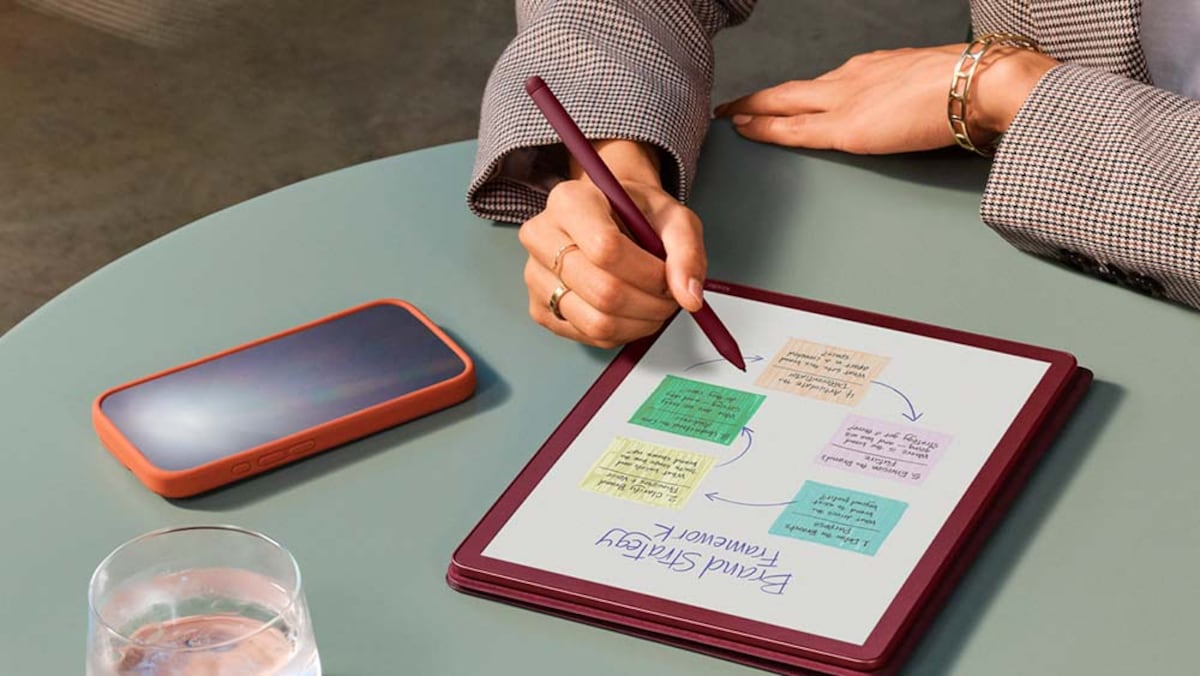
Amazon has officially expanded its premium e-reader lineup with the Kindle Scribe Colorsoft, a device that integrates a color display into the company’s largest digital writing tablet. This release marks a significant shift in Amazon’s hardware strategy, moving beyond the traditional monochrome E Ink displays that have defined the Kindle series since its inception. According to official company specifications, the device features a 7-inch Colorsoft display, designed to render color illustrations, comics, and highlighted text without sacrificing the battery longevity or glare-free readability associated with E Ink technology.
The Kindle Scribe Colorsoft represents a specialized entry in the tablet market, catering to users who require both a dedicated reading experience and the ability to annotate documents in color. By utilizing a proprietary light guide system and a custom-designed oxide backplane, Amazon aims to solve the historical challenge of color E Ink displays: the tendency for colors to appear washed out or for the screen to suffer from slow refresh rates. This development is part of a broader trend in the consumer electronics industry toward increasing the utility of e-readers as productivity tools rather than single-purpose reading devices.
Display Technology and Color Integration
The core of the Kindle Scribe Colorsoft is its Colorsoft display, which employs a multi-layered light guide to enhance color saturation and brightness. Unlike standard LCD or OLED tablets, this e-reader uses a color filter array over an E Ink panel, allowing for a more paper-like appearance while still providing the ability to view book covers, magazine spreads, and highlighted notes in color. According to Amazon’s product documentation, the display is specifically tuned to maintain a high contrast ratio even when color content is present, ensuring that black text remains sharp and legible.

For users, this means the ability to highlight text in various colors—a feature previously limited to the Kindle app on mobile devices or tablets. This functionality is particularly useful for students, researchers, and professionals who use e-readers to organize information. The color implementation is not intended to replace the vivid color reproduction of an iPad or similar tablet; instead, it is designed to provide subtle color cues that aid in navigation and comprehension during long-form reading sessions.
Writing Experience and Stylus Integration
The writing experience on the Kindle Scribe Colorsoft relies on the included Premium Pen, which features a dedicated eraser and a shortcut button. The device provides a tactile, paper-like friction that distinguishes it from the smooth-glass feel of traditional tablets. Amazon has integrated the color functionality into the note-taking software, allowing users to mark up PDFs, Kindle books, and notebooks using a palette of colors. This serves as a direct upgrade to the existing Scribe’s monochrome note-taking capabilities, which were previously limited to grayscale strokes.

The device also supports “Active Canvas,” a feature that allows users to write directly within the pages of a book. When a user creates a note, the text can be expanded into a larger window, allowing for more detailed writing without cluttering the page layout. This feature is synchronized across the user’s Amazon account, meaning that notes taken on the Scribe are accessible on mobile devices and desktops via the Kindle app. This ecosystem integration is a central component of Amazon’s strategy to keep users within its digital library environment.
Battery Life and Hardware Performance
Despite the addition of a color display, Amazon reports that the Kindle Scribe Colorsoft maintains the long-lasting battery life characteristic of its e-reader line. According to industry reporting on the launch, the device can last up to eight weeks on a single charge, depending on usage patterns such as brightness settings and wireless connectivity. This is achieved through the low-power nature of E Ink technology, which only consumes energy when the screen image is updated.
The tablet is powered by a custom-designed processor optimized for faster page turns and responsive stylus input. This hardware improvement is intended to reduce the latency often associated with E Ink displays, making the transition between pages and the act of handwriting feel more fluid. The device also includes an auto-adjusting front light, which shifts the color temperature from cool white to warm amber based on ambient lighting conditions, further reducing eye strain during evening use.
Market Positioning and Future Updates
The Kindle Scribe Colorsoft is positioned at the top of Amazon’s e-reader hierarchy, targeting power users who value the combination of a large screen and digital writing capabilities. While the market for e-readers remains niche compared to general-purpose tablets, the demand for devices that prioritize focus and reading comfort remains consistent. By introducing color, Amazon is attempting to capture a segment of the market that previously opted for tablets like the reMarkable 2 or competing color E Ink devices from manufacturers like Kobo or Onyx Boox.

Future updates to the Scribe software will likely focus on expanding the color palette and improving the organization of handwritten notes. Users can manage their device settings and receive firmware updates through the “Settings” menu on the device, which connects directly to Amazon’s servers. As the technology matures, it is expected that Amazon will continue to refine the color-rendering algorithms to improve clarity and reduce ghosting, which remains a technical hurdle for all E Ink displays.
Amazon has not yet announced a specific date for the next major software update, but users are encouraged to keep their devices connected to Wi-Fi to ensure they receive the latest features as they are released. For those interested in the device, official support pages and user manuals are available through the Amazon Help portal, which provides the most accurate and up-to-date information regarding device troubleshooting and software compatibility.
We welcome your thoughts on the evolution of e-reader technology. Are you planning to upgrade to a color display, or do you prefer the traditional monochrome experience? Share your experiences in the comments below.