Beyond the Walls: How GoogleS Pixel 10 AirDrop Integration is Changing Cross-Platform File Sharing
For years, the simple act of transferring a file between an iPhone and an Android phone felt… unnecessarily complex. We’ve relied on cloud services, email, and messaging apps as workarounds. but last week, Google dramatically shifted the landscape with a surprise feature for the Pixel 10 series: full airdrop compatibility. And after a week of intensive use, it’s clear this isn’t just a novelty – it’s a genuine productivity booster.
This article dives deep into how Google’s implementation works, its impact on daily workflows, and what it means for the future of cross-platform connectivity.
The Breakthrough: Quick Share Meets AirDrop
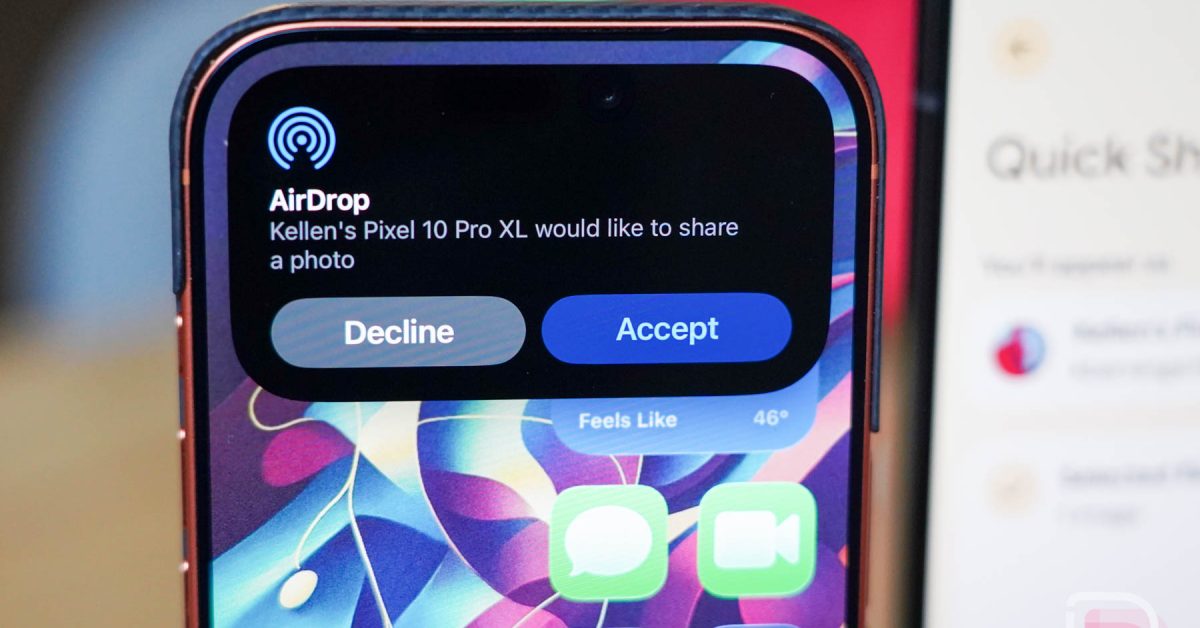
google announced that the pixel 10, Pixel 10 Pro, and Pixel 10 Pro Fold can now seamlessly connect with Apple devices using AirDrop, leveraging Android’s existing Quick Share functionality. This allows for direct file transfer – photos, videos, documents, anything – between Pixels and iPhones, iPads, and Macs.
This wasn’t achieved through Apple opening up airdrop. Instead, Google cleverly extended Quick Share with a dedicated update, essentially giving Pixel 10 devices the ability too speak AirDrop. It’s a brilliant solution to a long-standing problem.
How It Works: A Practical Guide
The setup is remarkably straightforward,though with a few key nuances:
* On your Pixel 10: Ensure Quick Share is enabled in your settings. The update automatically adds the AirDrop functionality.
* On your Apple Device:
* Mac: Set AirDrop visibility to “Everyone” in Finder settings. This setting remains until changed.
* iPhone/iPad: select “Everyone for 10 Minutes” within the Share Sheet. This temporary setting needs to be re-enabled for each transfer.
Once configured, sharing is as simple as selecting files and choosing the desired Apple device from the Quick Share menu. Files arrive quickly and without the compression issues often associated with other transfer methods.
Why This Matters: A real-World Impact
As someone who routinely juggles a Pixel 10 Pro XL, an iPad, and a Macbook, the impact has been significant. Here’s how it’s streamlined my workflow:
* Effortless Content Creation: I can now instantly transfer screenshots from my Pixel to my Mac for editing, eliminating the need for cloud uploads or cumbersome cables.
* simplified File Management: Moving documents and media between devices is now a matter of a few taps, rather than a multi-step process.
* Preserved Quality: Files transfer at their original resolution, avoiding the frustrating quality loss common with compressed sharing methods.
* Personal File Transfers: Sending photos and videos to family and friends with iPhones is now incredibly easy.
Previously, I relied heavily on Telegram and text messaging to send files to myself across devices. While convenient, those methods added extra steps. AirDrop integration removes that friction entirely.
Beyond Pixel: The future of Cross-Platform Sharing
Currently, airdrop support is exclusive to the Pixel 10 series. Though,the potential for wider adoption is enormous. Expanding this functionality to other Pixel phones is a logical next step.
But the real game-changer would be bringing this capability to the broader Android ecosystem. Imagine seamless file sharing between Samsung Galaxy devices and iPhones – a scenario that would benefit millions of users. Google has opened the door,and the industry should follow.
Addressing Concerns & Troubleshooting
Some users have reported occasional connectivity hiccups. Here are a few things to try:
* Ensure Bluetooth is enabled on both devices.
* Verify AirDrop/Quick Share visibility settings. (See “how It Works” section above)
* Restart both devices.
* Confirm you have the latest software updates installed.
A Bridge Across the Divide
For years, the walled-garden approach of Apple and Google has created friction for users who navigate both ecosystems. Google’s airdrop integration is a bold step towards bridging that divide. It’s a testament to the power of innovation and a clear signal that Google is prioritizing user experience over platform exclusivity.
This isn’t just a feature; it’s a basic shift in how we think about cross-platform file sharing. And it’s a welcome one.
**Have you experienced the new AirDrop support on your Pixel 10? Share
Keep reading