Google Enhances Android with New Features, Including Games for Android Auto and Improved Location Sharing
Google continues to refine the Android experience with a new feature bundle released alongside the latest Pixel Feature Drop. The updates span the Android ecosystem, bringing a range of improvements from entertainment options for younger passengers in vehicles to enhanced communication tools and a revamped app discovery experience within the Google Play Store. These incremental updates demonstrate Google’s commitment to continuous improvement outside of major Android version releases, delivering practical enhancements to users throughout the year.
Among the most notable additions is the introduction of games designed specifically for children using Android Auto. This feature aims to transform parked vehicles into temporary entertainment hubs, offering a distraction for kids during stops. Simultaneously, Google is streamlining communication with live location sharing in Google Messages and improving travel convenience with enhanced item tracker integration. The Google Play Store is too receiving a facelift with the introduction of short-form video previews, designed to help users quickly understand app functionality before downloading.
Kids Games Arrive on Android Auto: Entertainment on the Go
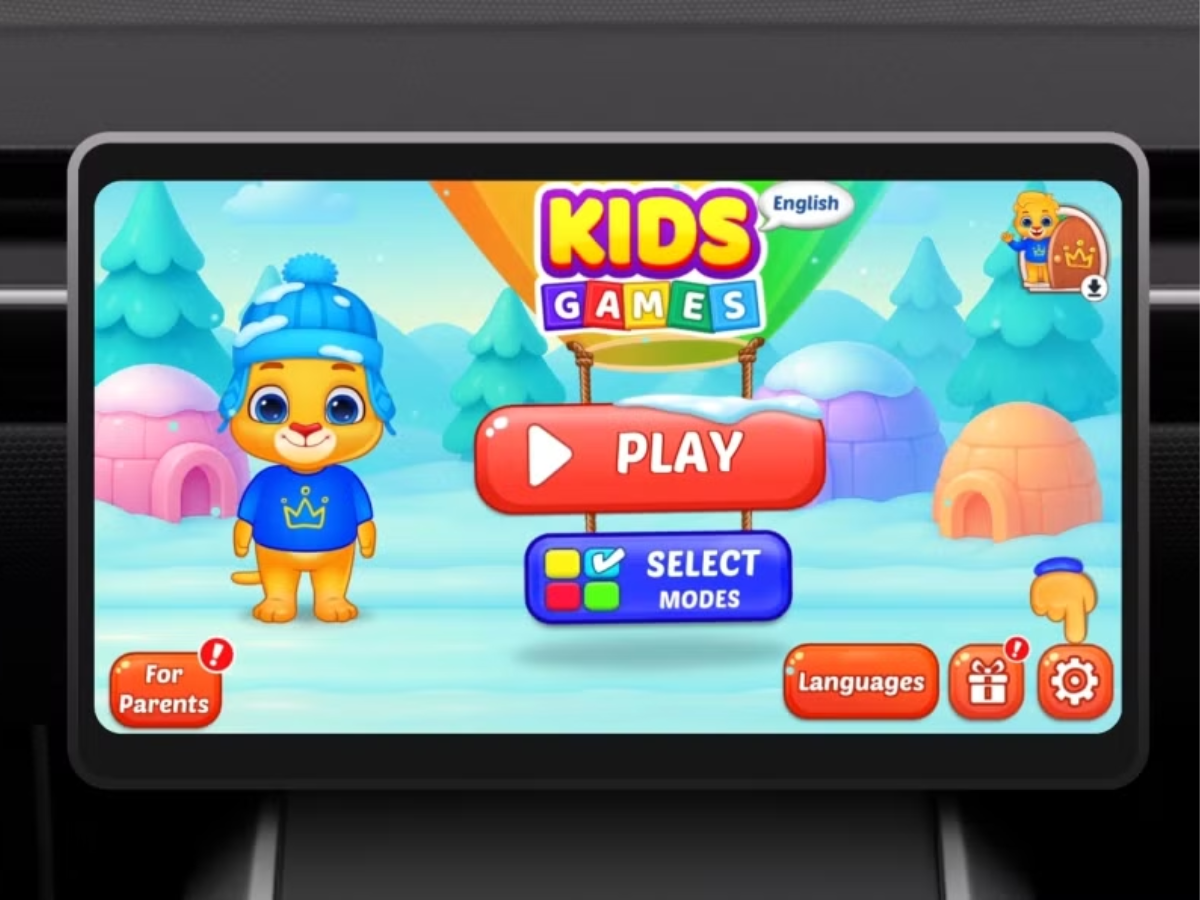
Google is addressing a common challenge for families on the road – keeping children entertained during stops – with the addition of a suite of games for Android Auto. These games are designed to be played on the car’s infotainment display while the vehicle is parked, providing a safe and engaging distraction for younger passengers. Google emphasizes that the titles are “Teacher Approved” and geared towards children between the ages of 3 and 12. Android Auto, as a whole, is designed to simplify in-car app usage with a streamlined interface and voice control.
The initial selection of games includes:
- Disney Coloring World
- LetraKid: Writing ABC for Kids
- Marvel HQ: Kids Super Hero Fun
- Draw a Stickman: EPIC 3
- Kids Games: For Toddlers 3–5
This feature effectively turns downtime in the car into an opportunity for educational and entertaining activities, potentially reducing screen time battles and making family trips more enjoyable. The availability of these games is dependent on having a compatible vehicle and an active data connection, as Android Auto requires a phone running Android 6.0 or higher.
Live Location Sharing in Google Messages: Staying Connected with Ease
Google is enhancing its messaging capabilities with the introduction of live location sharing within Google Messages. This feature allows Android users to share their real-time location directly within conversations, providing a convenient way to coordinate meetups or let loved ones know your whereabouts. The live location sharing integrates with Google’s Find Hub map interface, offering a familiar and intuitive experience. Google Pixel phones are fully compatible with this feature, as well as Android Auto.
Unlike temporary location sharing options, this feature allows users to send continuous location updates until manually stopped, offering a persistent connection for situations where ongoing tracking is desired. This could be particularly useful for coordinating travel plans, ensuring safety during commutes, or simply keeping family members informed of your progress.
Improved Item Tracker Integration: Simplifying Lost Luggage Recovery
Google is also addressing a common travel frustration – lost luggage – with improvements to its item tracker integration. If a bag equipped with a compatible tracker is lost during a flight, users can now generate a secure location-sharing link and send it directly to the airline. This eliminates the need to verbally describe the tracker’s location to airline staff, streamlining the recovery process and potentially reducing delays.
This feature leverages Google’s existing Find Hub network, which supports a variety of item trackers, to provide airlines with precise location data. The integration aims to improve the efficiency of lost luggage recovery and reduce the stress associated with travel disruptions.
Google Play Store Gets a Video Boost: Discovering Apps Made Easier
The Google Play Store is undergoing a visual refresh with the introduction of short-form video previews for apps. Users will now be able to scroll through a feed of concise videos demonstrating app functionality across various categories, including Photography, Shopping, Wellness, and Webtoons. This new feature is designed to provide a quick and engaging way to understand how an app works before committing to a download.
The short-form video format is intended to mimic the popular video-sharing platforms, making app discovery more intuitive and visually appealing. By showcasing app features in action, Google hopes to reduce download friction and encourage users to explore new applications.
Personalized Calling Cards: A New Way to Share Contact Information
Android is introducing a new feature that allows users to create their own personalized Calling Cards. Previously, contacts could design cards *for* you; now, users have control over the information displayed when they call someone. These cards automatically appear on the recipient’s device if they have the caller saved as a contact, providing a more informative and personalized calling experience.
This feature offers a modern alternative to traditional caller ID, allowing users to share relevant information such as their name, job title, or social media handles. It’s a subtle but potentially impactful change that enhances communication and simplifies networking.
The Broader Android Ecosystem: Continuous Improvement Through Feature Bundles
These new features are part of the March Android feature bundle, which accompanies the latest Pixel Feature Drop. Google is increasingly utilizing these periodic bundles to introduce ecosystem-wide improvements outside of major Android version updates. This approach allows the company to deliver smaller, more frequent enhancements to Android devices throughout the year, keeping the platform fresh and responsive to user needs.
The Pixel Feature Drop, specifically, is a monthly release of software updates for Google Pixel devices, offering exclusive features and improvements. However, many of these features are subsequently rolled out to other Android devices through the broader Android feature bundles, ensuring that a wider range of users can benefit from the latest innovations.
The ongoing development of Android Auto, as highlighted by the addition of children’s games, demonstrates Google’s commitment to adapting the platform to evolving user needs. Android Auto currently supports over 400 car models, and compatibility continues to expand.
Key Takeaways:
- Google is expanding Android Auto’s functionality with the addition of “Teacher Approved” games for children.
- Live location sharing in Google Messages provides a convenient way to stay connected with friends and family.
- Improved item tracker integration simplifies the process of recovering lost luggage.
- Short-form video previews in the Google Play Store develop app discovery more engaging.
- Personalized Calling Cards offer a modern and informative way to share contact information.
Google is expected to continue releasing feature bundles throughout 2026, bringing further enhancements to the Android ecosystem. Users can stay informed about upcoming updates by following the official Android blog and checking for updates in their device settings. The next major Android update, anticipated in late 2026, is rumored to focus on enhanced privacy features and improved cross-device integration.
What are your thoughts on these new Android features? Share your comments and experiences below!