AppleS Digital ID: A Deep dive into Secure Identification on Your iPhone
Apple has quietly launched a important advancement in digital identity with its new Digital ID feature, now rolling out in beta at over 250 U.S. airports through TSA checkpoints.This innovative system allows you to securely store a digital version of your driver’s license or passport directly on your iPhone, streamlining the identification process. However, it’s crucial to understand its capabilities and limitations.
What is Apple’s Digital ID?
Essentially, Digital ID brings a secure, privacy-focused approach to presenting identification. It’s designed to replace the need to physically carry your state-issued ID or passport in certain situations. Importantly, this Digital ID is not a replacement for your physical passport when traveling internationally or crossing borders.
How Dose it Work?
Setting up your Digital ID is a straightforward process within the apple Wallet app. Here’s a step-by-step guide:
* First, open the Wallet app on your iPhone.
* Then, tap the “+” button to add a new card.
* Next, select the type of ID you want to add.
* You’ll be prompted to scan your passport’s photo page using your iPhone’s camera.
* After that,use your phone to scan the chip on the back of your passport.
* you’ll need to take a selfie and complete a series of facial and head movements for verification.
Once completed, your Digital ID is securely stored on your iPhone, protected by the device’s existing security features.
Using Digital ID at TSA Checkpoints
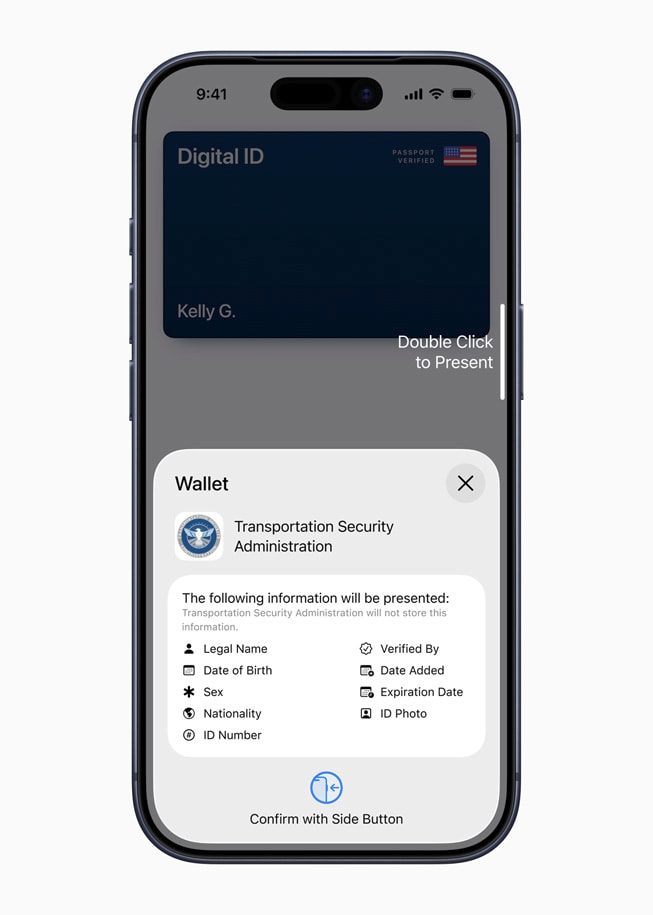
TSA is equipped with Credential Authentication Technology (CAT) units – sophisticated biometric ID systems. These units verify your identity by taking a live photo and comparing it to the information on your physical ID or Digital ID.
Here’s how to present your Digital ID at a TSA checkpoint:
* Double-press the side button on your iPhone to activate Apple Pay.
* select your Digital ID card from the displayed stack.
* Hold your iPhone near the card reader.
* You’ll then be prompted to review and authenticate the data request with another double-press of the side button.
Current State Acceptance & Limitations
Currently, you can add your driver’s license or state ID to Apple Wallet if you reside in one of the following states:
- Arizona
- California
- Colorado
- Georgia
- Hawaii
- Iowa
- Maryland
- Montana
- New Mexico
- North Dakota
- ohio
- Puerto Rico
- West Virginia
Apple anticipates expanding acceptance to additional use cases in the future.
Beyond the Airport: Potential Applications & Security Concerns
The potential applications of Digital ID extend beyond airport security. Apple envisions its use for age verification, a process increasingly common – and often problematic – online. Sadly,current age verification systems have proven vulnerable,as demonstrated by recent data breaches like the one affecting Discord.
Can Apple’s approach offer a more secure solution? The company’s focus on privacy and biometric authentication suggests a strong possibility. However, the long-term security and widespread adoption will depend on continued development and rigorous testing.
A Step Towards a Digital Future
Apple’s Digital ID represents a significant step toward a more convenient and secure digital future for identification. While still in its early stages,it offers a glimpse into how we might manage our identities in the years to come. As the technology evolves and acceptance grows, it has the potential to simplify everyday tasks while enhancing personal data protection.
Source: https://www.ghacks.net/2025/11/13/apple-launches-digital-id-in-apple-wallet/




![Best Verizon Unlimited Plans: Data, Prices & Deals [Year]](https://i0.wp.com/www.droid-life.com/wp-content/uploads/2026/01/Verizon-Unlimited-Plans-scaled-1200x628-cropped.jpg?resize=330%2C220&ssl=1 "Best Verizon Unlimited Plans: Data, Prices & Deals [Year]")