
Apple is refining its iOS design language to better balance visual depth with functional legibility, a move aimed at addressing user feedback regarding the complexities of its translucent interface elements. While the company has not officially adopted a term like “liquid glass” for its design aesthetic, recent software iterations have emphasized a more fluid, layered approach to user interface (UI) elements, utilizing advanced translucency and blur effects to create a sense of hierarchy and depth.
The shift in design follows a period of user scrutiny concerning how high-translucency layers affect readability and accessibility. As Apple continues to iterate on its mobile operating system, the focus has moved toward optimizing these “glassmorphism” effects—a design style characterized by subtle transparency and background blur—to ensure they enhance rather than distract from the user experience (UX).
The evolution of Apple’s interface reflects a broader trend in mobile computing toward more immersive, spatially aware designs. By adjusting the opacity, blur intensity, and layering of UI components, Apple aims to maintain its signature aesthetic while meeting the rigorous standards of accessibility and clarity required by a global user base.
The evolution of iOS aesthetics: From skeuomorphism to glassmorphism
To understand the current design direction, it is necessary to examine the historical shifts in Apple’s software philosophy. When the original iPhone launched, iOS utilized “skeuomorphism,” a design method that mimicked real-world textures and objects. This included leather-textured calendars and felt-lined note applications, intended to make the digital interface feel familiar to new smartphone users.
Following the introduction of iOS 7, Apple transitioned toward “flat design.” This era prioritized minimalism, removing shadows, textures, and depth in favor of bright colors and simple iconography. While this approach improved performance and visual cleanliness, some designers and users argued that it lacked a sense of physical hierarchy, making it difficult to distinguish between different layers of the interface.
The current era of iOS design represents a hybrid approach often referred to in the industry as “glassmorphism.” This style reintroduces depth and layering but does so through the use of translucency and Gaussian blur rather than heavy shadows or realistic textures. According to the Apple Human Interface Guidelines, these visual cues are intended to help users understand the relationship between different interface layers, indicating which elements are foregrounded and which are backgrounded.
This layered approach is technically demanding. The software must calculate real-time blur effects as users scroll through content, requiring significant GPU (Graphics Processing Unit) resources. As mobile hardware has become more powerful, Apple has been able to implement these “fluid” or “liquid-like” visual effects more seamlessly, creating a more dynamic and responsive feel.
Addressing the criticism of translucency and legibility
Despite the aesthetic appeal of translucent layers, the design has faced criticism from accessibility advocates and power users. The primary concern involves legibility, particularly in environments with high ambient light or for users with visual impairments. When background content bleeds through translucent UI elements, it can create “visual noise” that makes text difficult to read.
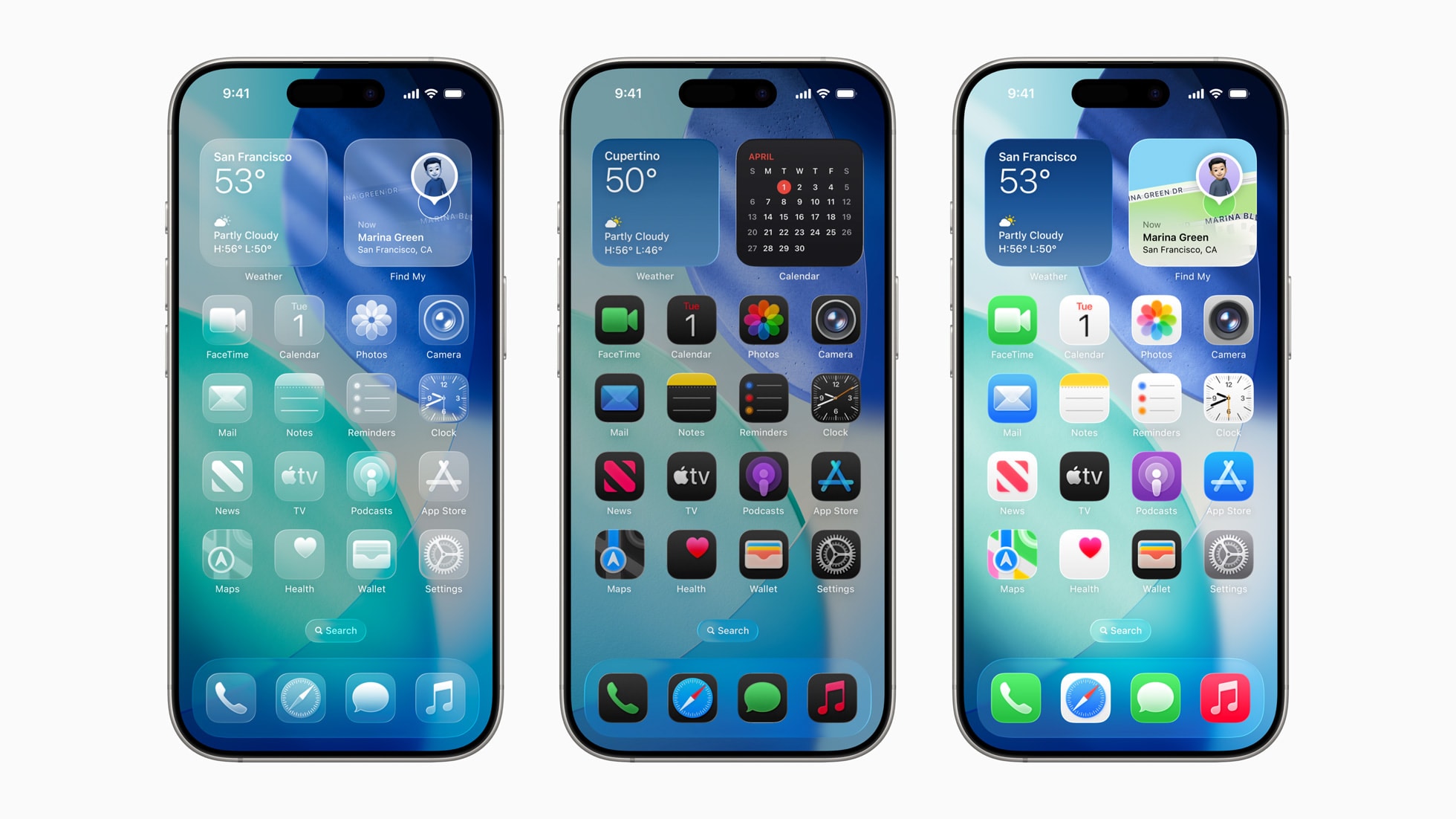
Critics have noted that the complexity of layered glass effects can occasionally lead to cognitive load, where the user must work harder to distinguish between the active interface and the content beneath it. This is particularly evident in high-density layouts, such as the Control Center or complex notification stacks, where multiple layers of transparency overlap.
In response to these concerns, Apple has implemented several software adjustments in recent updates. These include:
- Increased Contrast Ratios: Adjusting the opacity of background blurs to ensure that text remains distinct from the content behind it.
- Enhanced Dark Mode Integration: Refining how translucency behaves in dark mode to prevent “glow” effects from obscuring critical information.
- User-Controlled Accessibility Settings: Providing options such as “Reduce Transparency,” which allows users to disable these effects entirely in favor of solid, high-contrast backgrounds.
These adjustments demonstrate a move toward “functional aesthetics,” where the visual style is secondary to the utility of the interface. By allowing users to toggle these features, Apple acknowledges that a one-size-fits-all approach to design does not account for varying visual needs and environmental conditions.
Technical implementation: How iOS manages depth and blur
The “liquid” feel of modern iOS interfaces is the result of sophisticated software engineering. The system uses a technique known as real-time compositing, where the operating system treats every UI element as a separate layer. When a user interacts with a translucent element, the system must instantly sample the pixels of the layers beneath it, apply a mathematical blur algorithm, and then render the new layer on top.
This process is essential for maintaining the illusion of depth. If the blur were static, the interface would feel disconnected from the content. By making the blur dynamic, the system creates a sense of physical presence. For example, as a user scrolls a list of apps, the translucent dock or navigation bar responds to the movement of the underlying content, creating a cohesive visual flow.
However, this depth also introduces challenges for battery life and thermal management. Constant recalculation of blur effects can place a continuous load on the processor. Apple addresses this by optimizing the rendering pipeline through its custom silicon, such as the A-series chips, which are designed to handle intensive graphical tasks with high efficiency.
The role of hardware in software design
Software design at Apple does not exist in a vacuum; it is deeply integrated with the company’s hardware advancements. The transition to OLED (Organic Light Emitting Diode) displays has fundamentally changed how translucency is rendered. Unlike traditional LCD screens, OLED pixels can be turned off completely, allowing for “true blacks.” This capability enables more dramatic and effective use of shadows and transparency, as the contrast between the interface and the background is significantly higher.
Furthermore, the introduction of the “Dynamic Island” on recent iPhone models has forced a reconsideration of how UI elements interact with the physical hardware. The Dynamic Island is a software-driven interface that expands and contracts to show notifications and background activities. This feature utilizes the same principles of layering and fluid motion that define the broader iOS design language, bridging the gap between the physical camera cutout and the digital interface.
The synergy between hardware and software means that as displays become more sophisticated, the design language can become more complex. The goal is to create an interface that feels like a natural extension of the physical device, using light, shadow, and motion to guide the user’s attention.
What to expect in future iOS iterations
As Apple continues to develop its mobile operating system, the design language is expected to move even further toward spatial computing principles. This trend is driven by the integration of iOS with visionOS, the operating system powering the Apple Vision Pro. The design language used in visionOS—which relies heavily on highly realistic glass textures and spatial depth—is expected to influence future versions of iOS.
Observers expect upcoming updates to focus on “intelligence-driven design,” where the interface adapts not just to user settings, but to the context of use. This could include more subtle changes in translucency based on lighting conditions or more pronounced visual cues when the device detects a user is performing a high-focus task.
While the specific visual style may continue to evolve, the core tension between aesthetic beauty and functional accessibility will remain a central focus for Apple’s design teams. The company’s ability to balance these competing interests will likely determine the success of its next generation of software.
Key Design Trends in iOS
| Design Era | Primary Aesthetic | Core Visual Characteristics | Primary Goal |
|---|---|---|---|
| Skeuomorphism | Realism | Textures, shadows, 3D effects | Familiarity for new users |
| Flat Design | Minimalism | Solid colors, 2D icons, no depth | Clarity and efficiency |
| Glassmorphism | Translucency | Blur, layering, depth, fluid motion | Spatial awareness and hierarchy |
Apple is expected to provide further updates on its design roadmap and accessibility features during its annual Worldwide Developers Conference (WWDC). Until then, users can monitor official software release notes for incremental improvements to UI legibility and performance.
What are your thoughts on the current iOS design? Do you prefer the translucent, layered look or do you find it distracting? Let us know in the comments below and share this article with your tech community.
Worth a look
- Prime Video Casts New Kratos for God of War Series After Ryan Hurst Injury
- New In-Game and Spotify Songs: Tina Turner, Third Eye Blind & More
- Sony Pictures Updates Box Office Projections for Christopher Nolan Film (newsdirectory3.com)
- Apple AirPods with cameras could launch sooner than expected (archyde.com)