

2026-01-21 11:30:00
At a glance
Expert’s Rating
Pros
- Unique aspect ratio for extra vertical space
- Useful extra features
- Higher resolution than 4K, excellent sharpness
- Now has a 120Hz refresh rate
Cons
- HDR is supported, but not great
- MSRP is expensive for the display size
Our Verdict
The BenQ RD280UG is an outstanding coding display, with a unique 3:2 aspect ratio, an ambient light sensor that can automatically adjust display brightness, and an ultra-high resolution superior to a typical 4K monitor. All of this makes for an outstanding coding display.
Price When Reviewed
This value will show the geolocated pricing text for product undefined
Best Pricing Today
Price When Reviewed
$759.99
Best Prices Today: BenQ RD280UG

$699.99
The BenQ RD280UG is a monitor designed from scratch for coding. Of course, just about any display can be used for coding—but the BenQ RD280UG goes much further than most. It has a unique 3:2 aspect ratio, an ambient light sensor that can automatically adjust display brightness, and an ultra-high resolution superior to a typical 4K monitor. All of this makes for an outstanding coding display.
Read on to learn more, then see our roundup of the best monitors for comparison.
BenQ RD280UG specs and features
It’s hard to miss the BenQ RD280UG’s headline feature. The 28.2-inch display, which has a 3:2 aspect ratio, is instantly set apart from most monitors. It’s a sharp display, too, with a native resolution of 3840×2560. That’s a higher pixel count than a 27-inch 4K monitor, but due to the BenQ RD280UG’s larger physical display size, the pixel density is almost identical.
- Display size: 28.2-inch 3:2 aspect ratio
- Native resolution: 3840×2560
- Panel type: IPS-LCD with LED edge lit backlight
- Refresh rate: 120Hz
- Adaptive sync: VRR
- HDR: Yes, VESA DisplayHDR 400 Certified
- Ports: 1x HDMI 2.0, 1x DisplayPort 1.4, 1x USB-C with DisplayPort Alternate Mode and 90 watts USB Power Delivery, 1x USB-C downstream with DisplayPort MST and up to 15 watts of Power Delivery, 2x USB-A downstream, 1 USB-C downstream with 7.5 watts of Power Delivery, 1x USB-B upstream
- Audio: Yes, 2x 3-watt speakers
- Extra features: Moonhalo ambient light, KVM switch, ambient light sensor
- Price: $759.99 MSRP
The BenQ RD280UG makes several improvements over its predecessor, the BenQ RD280U. The refresh rate has increased from 60Hz to 120Hz and VRR is now supported, though BenQ stops short of support for any particular standard (such as AMD FreeSync or Nvidia G-Sync). The new model also lists slightly more powerful speakers, up to 3 watts from 2W before, replaces one USB-A downstream port with USB-C, and lists a better contrast ratio of 2000:1, up from 1200:1.
BenQ RD280UG design
The BenQ RD280UG’s design is dominated by its highly unusual 3:2 aspect ratio. While there are now a couple other 3:2 monitors available, it remains extremely rare. The aspect ratio results in a display that’s almost exactly as wide as a 27-inch widescreen monitor, yet nearly as tall as a 32-inch widescreen monitor.
Because of that, the RD280UG’s 3:2 aspect ratio can provide a tad more than two extra inches of vertical display space (compared to a 27-inch widescreen). This is useful not only for coding but also for writing or editing all sorts of documents. Put simply, you can see more on the display at once. The display’s size is also a great fit for viewing two vertical windows side-by-side.
Matthew Smith / Foundry
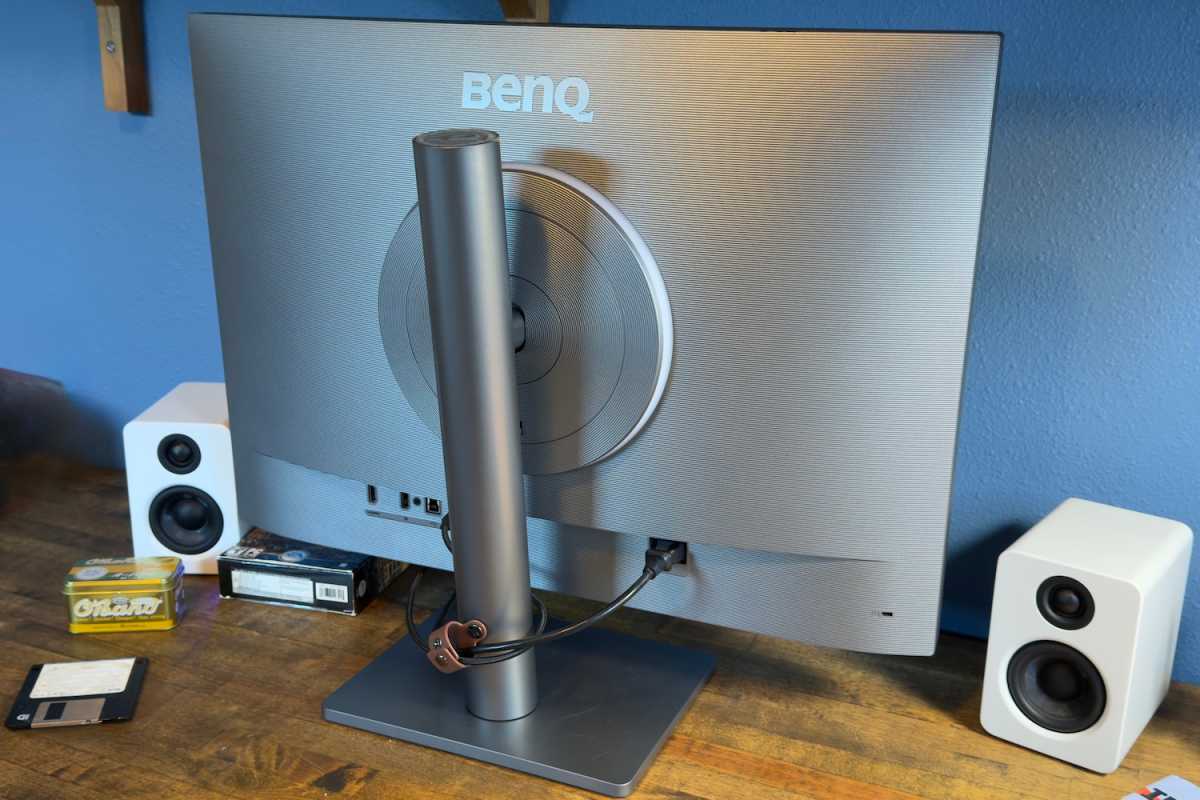
The 3:2 display is housed in a robust chassis with a distinct ridged design on the rear of the monitor. It sets the monitor apart from other brands, yet still looks professional. This is also where you’ll find the MoonHalo, an ambient light that can create a pleasant glow around the display in a bright environment. While the MoonHalo is meant to reduce eye strain, I like it for a more basic reason: It just looks nice. The ambient glow cast by the MoonHalo is pleasant and bright enough to be a genuinely useful light source in a dimly lit room.
BenQ mounts the monitor to a hefty stand with a flat base that doesn’t cause too much disruption on your desk. The stand can adjust for height, tilt, and swivel. It can also pivot, which is an upgrade from the BenQ RD280U. A 100x100mm VESA mount is used, so the monitor can be attached to third-party monitor arms and stands.
BenQ RD280UG connectivity
Around back the BenQ RD280UG provides three video inputs: one HDMI, one DisplayPort, and one USB-C with DisplayPort. The USB-C port also provides up to 90 watts of Power Delivery for powering a connected laptop or tablet.
The monitor also has a USB-C downstream port with 15 watts of Power Delivery and DisplayPort multi-stream transport. This feature lets you connect a second display to the BenQ RD280UG and “daisy-chain” the video signal to it. That’s useful if you have a laptop with just one video output, or if you want to reduce cable clutter on your desk.
The USB-C port extends USB connectivity to two USB-A ports and one USB-C port. These ports can also be driven by a USB-B upstream connection. This makes the RD280UG a fairly useful USB hub, though it lacks some more extravagant features that can be found on some competitors. The Dell U3225QE, for example, has 2.5Gbps Ethernet.
KVM switch functionality is included, too. That means you can connect multiple devices and use the monitor to switch between which has access to the monitor’s USB ports. It’s a good way to quickly swap between two connected PCs, though also included by most of the BenQ RD280UG’s competitors.
BenQ RD280UG menus and features
The BenQ RD280UG has several extra features aimed at programmers.
My favorite is the ambient light sensor. An ambient light sensor can automatically adjust the brightness of a display throughout the day to keep the brightness at a comfortable level. That’s handy, as manually adjusting brightness is annoying and easy to forget. Most monitors in the BenQ RD280UG’s price range don’t have this feature, though a few do, including some Dell Ultrasharp, Asus ProArt, and BenQ P-Series displays.
BenQ doubles down on comfort with several display modes, such as E-Paper and a Coding Dark Theme, which drastically change the image presentation. These modes are not technically “accurate” but might ease eye strain due to reduced brightness and enhanced contrast. Keep in mind, however, that the usefulness of these features can vary from person to person.
The BenQ RD280UG also has a “Function Bar” on the front of the display. This is a touch-sensitive control that can be used to quickly engage or change monitor settings. The idea is that coders may want to frequently move from a coding-specific image quality mode to another, more typical mode. I would have preferred a remote or physical button for this, but the Function Bar is better than nothing.
The monitor’s settings can otherwise be changed in one of two ways. You can use a joystick behind the lower bezel to control the on-screen menus or use BenQ’s DisplayPilot software. The DisplayPilot software supports Windows, Mac, and Linux, which is notable. Most competitors don’t support Linux.
Whichever method you choose, you’ll find a lot of options. The monitor has many color modes and gamma modes that target precise gamma values. It also has color temperature adjustment, but those adjustments do not target precise values. The monitor provides many options for controlling special features, such as the MoonHalo, ambient light sensor, and function bar. On the whole, I think the BenQ RD280UG provides a good range of features and options for the price.
My favorite feature is the automatic brightness adjustment of the ambient light sensor — manually adjusting brightness is annoying.
BenQ RD280UG audio
The BenQ RD280UG includes a pair of 3-watt speakers. According to the specification sheet, these are an upgrade over the RD280U, which used 2-watt speakers. And many similar monitors lack speakers at all. Still, the RD280UG’s audio isn’t great, lacking volume and depth. The speakers are okay for listening to a podcast but that’s about it.
BenQ RD280UG SDR image quality
I think it’s fair to say the BenQ RD280UG’s image quality is not important to the monitor’s core use case. Coding does not require a high contrast ratio or, in most cases, a wide color gamut. The BenQ RD280UG’s image quality reflects this, though it’s still decent.
Matthew Smith / Foundry
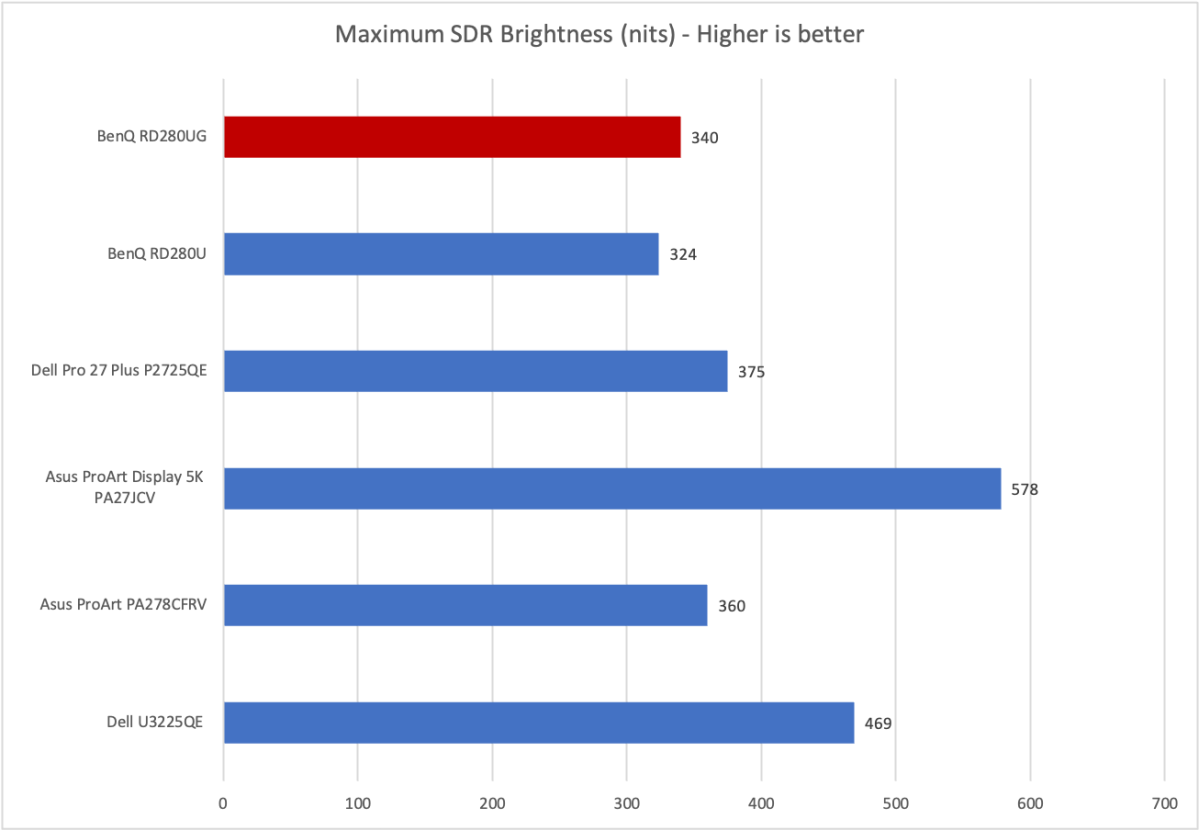
I measured a maximum sustained SDR brightness of 340 nits. That is a small upgrade from the older RD280U, which hit about 325 nits.
As the graph shows, most competing monitors can be brighter, and some are significantly brighter. However, the RD280UG is bright enough to be comfortable in most interior rooms. It’s also clearly skewed towards use in dim rooms, as many of the monitor’s features are designed to make it comfortable when viewed in such a room. So, while the RD280UG is not that bright, it’s bright enough, and I can’t say it’s a problem for how the monitor is meant to be used.
Matthew Smith / Foundry
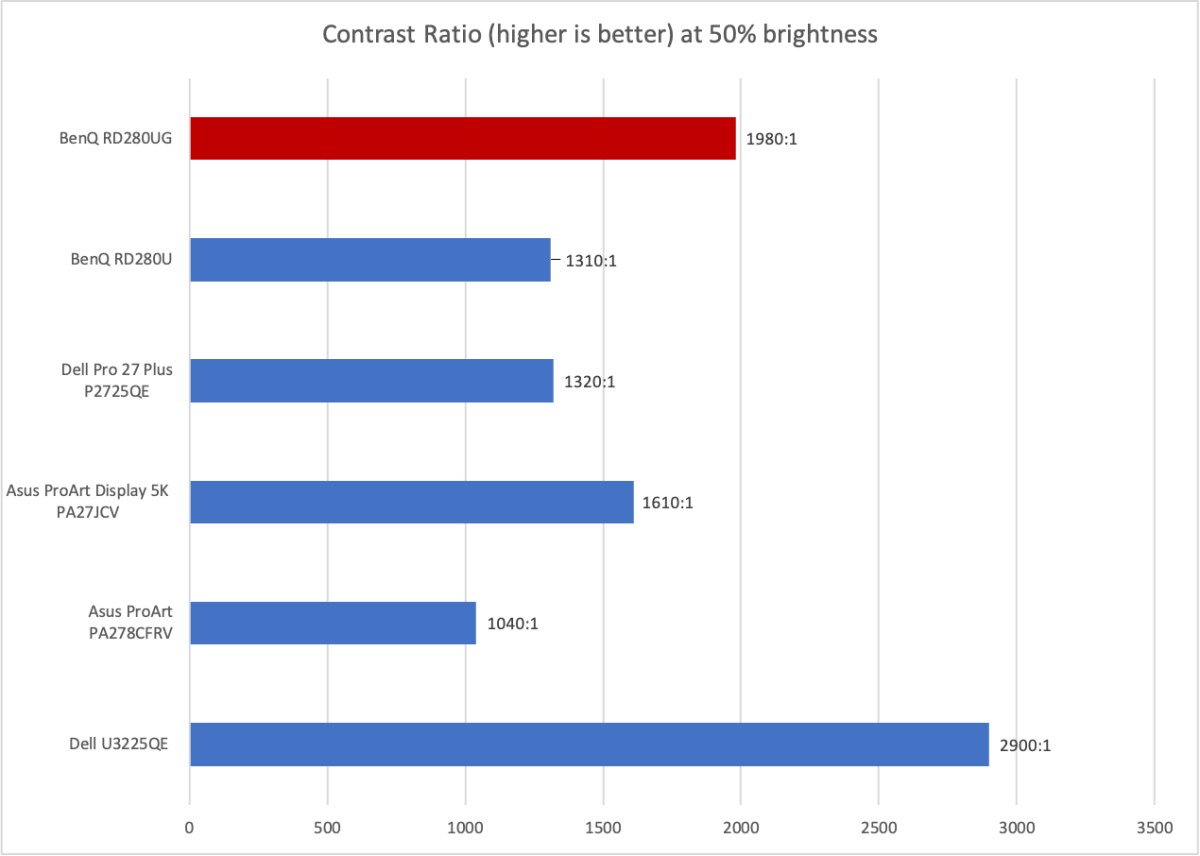
The BenQ RD280UG promises improved contrast over its predecessor, and it delivers. I measured a contrast ratio of 1980:1, which is a significant improvement over the prior monitor’s contrast ratio of 1310:1.
It also compares well to similar monitors, many of which have a contrast ratio around 1000:1 to 1500:1.
In practice, this means the BenQ RD280UG has a reasonably deep, rich, and immersive look. However, some backlight glow will still be visible when viewing dark images in a very dark room.
Matthew Smith / Foundry
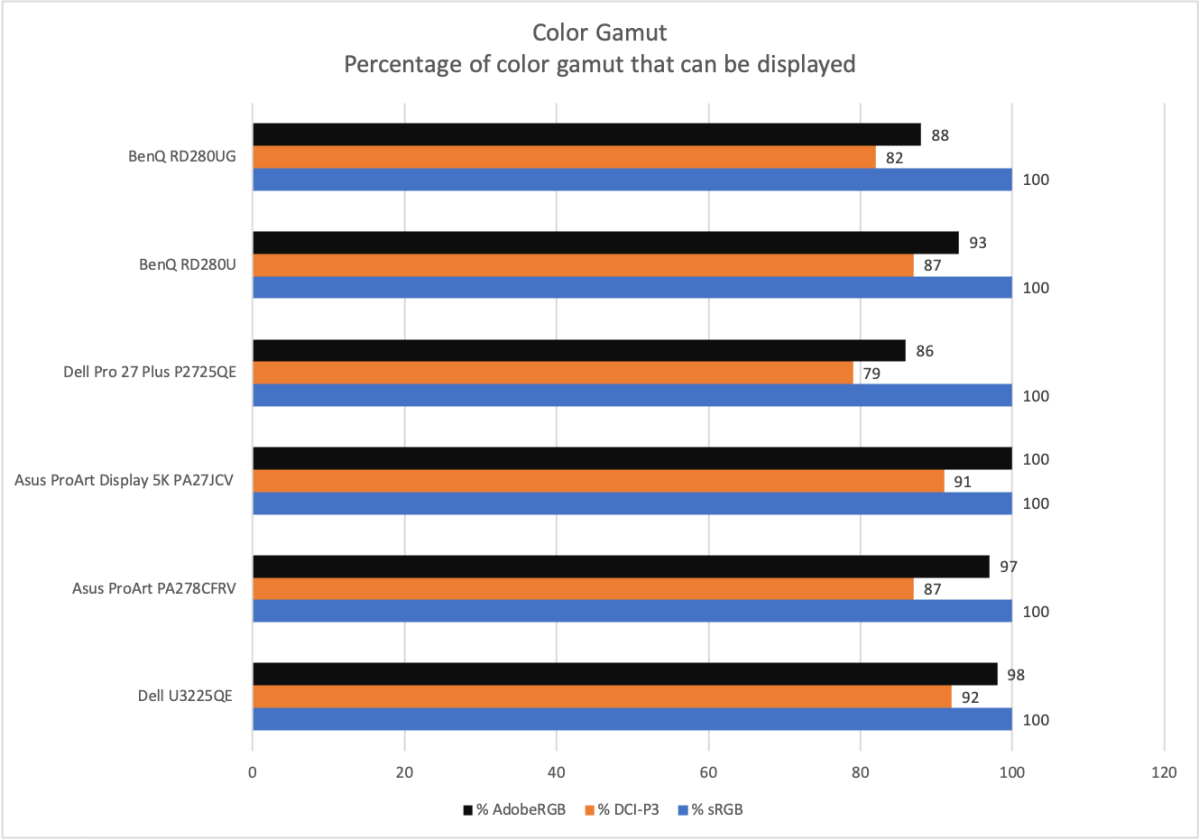
Next up is color gamut, which is the range of colors the monitor can display. Here, we see a weakness of the BenQ RD280UG, and an area where the BenQ RD280UG doesn’t perform as well as its predecessor. The new RD280UG was able to display 88 percent of DCI-P3 and 82 percent of AdobeRGB, while the old model displayed 93 percent and 87 percent, respectively.
This is not a major issue, as the BenQ RD280UG’s color gamut is still enough that it appears vivid at a glance. However, when compared to better monitors, it looks less saturated and alluring. You won’t notice it when coding or working with documents, but it can be noticeable in photos and videos.
Matthew Smith / Foundry
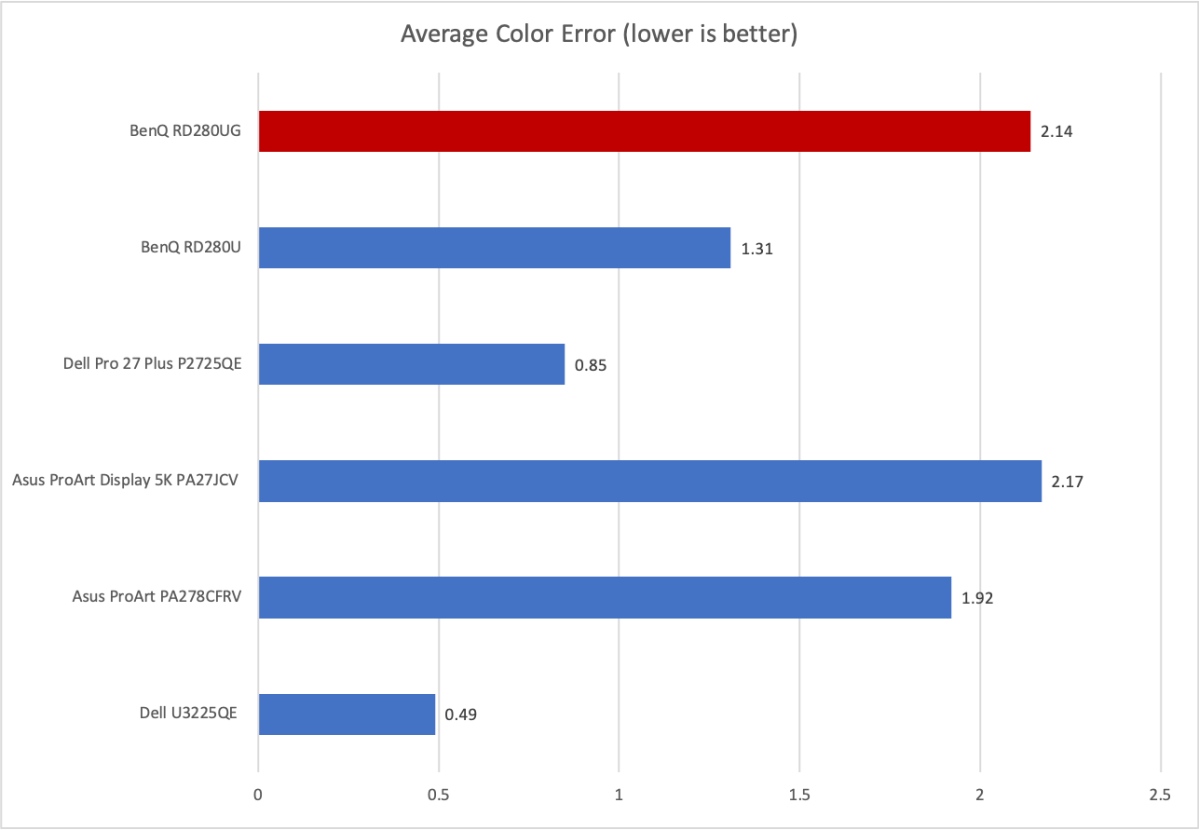
Color accuracy is also so-so, as the RD280UG has an average color error that’s higher than many competitive monitors—particularly those from Dell. The average color error is expressed across many colors, rather than any single color. The RD280UG is not meant to be a monitor for creative professionals, and for the price, would not be a good pick for that use.
The RD280UG’s color temperature came in at 6700K, slightly off our target of 6500K. That means the image is a bit cooler than ideal, and it’s a noticeable difference, but not punch-you-in-the-face obvious. Gamma, meanwhile, was good with an on-target gamma curve of 2.2. The monitor provides a range of gamma presets in case you feel the need to change to another gamma setting. Together, these results contribute to a well-balanced presentation of the RD280UG’s image.
Sharpness is a perk. The RD280UG provides 3840×2560 resolution, which is a higher total pixel count than a 4K widescreen monitor. However, because the monitor is also physically larger, this still works out to a pixel density of about 164 pixels per inch. Most 27-inch 4K monitors have a similar pixel density. Still, this is an excellent level of sharpness for a computer monitor. Small text looks crisp and detailed, which is important, since coders often view small text.
The RD280UG’s overall image quality is not exceptional but seems well-suited for the monitor’s intended purpose. Programmers care most of all about sharpness when viewing small fonts and a well-balanced, reasonably accurate image. The RD280UG provides that.
BenQ RD280UG HDR image quality
The BenQ RD280UG is capable of HDR and is VESA DisplayHDR 400 certified, but I wouldn’t recommend it for viewing HDR. The monitor lacks the brightness and contrast to truly do HDR justice and generally won’t look much better than SDR—just different. On top of that, the monitor lacks the sort of HDR brightness and image adjustment features that you’ll find on a high-end gaming and entertainment monitor, such as the Asus ROG Swift OLED PG27AQWP-W.
BenQ RD280UG motion performance
BenQ’s RD280UG can reach a refresh rate up to 120Hz. That’s an improvement over the RD280U, which could only achieve 60Hz. It also allows the BenQ to catch up with recent Dell Ultrasharp and Asus ProArt monitors, many of which achieve a refresh rate of at least 120Hz.
Whether the 120Hz refresh rate is adequate will depend on your expectations. The quickest monitors can now hit refresh rates up to 1,000Hz, and 240Hz monitors are extremely common, so 120Hz is a long way from cutting edge. However, many monitors meant specifically for coding or productivity are still stuck at 60Hz, and improving the RD280UG’s refresh rate to 120Hz delivers a big improvement.
Refresh rate is often thought of as a feature for PC gaming but, in this context, it provides better text clarity when scrolling through code, as well as a more responsive feel when navigating a desktop, apps, or an integrated development environment.
The monitor also supports variable refresh rates. It does not state official support for VESA AdaptiveSync, AMD FreeSync, or Nvidia G-Sync. However, in my testing, AMD FreeSync did function with the RD280UG.
Should you buy the BenQ RD280UG?
The BenQ RD280UG is one of the most unusual monitors on the market right now, yet in many ways, it makes perfect sense.
It’s designed for coding and, to that end, it provides more screen real estate, an ultra-sharp image, and multiple modes and features designed to either reduce eye strain or make working in a dark room more enjoyable. The BenQ RD280UG also provides important upgrades from its predecessor, the RD280U, including a leap from a 60Hz to 120Hz refresh rate.
The RD280UG’s retail price of $759.99 is expensive, and because you can code well enough on just about any display, it won’t make sense for everyone. However, if you have strong opinions on how a display you use for coding should function and look, the RD280UG will be ideal for you.






