ChatGPT Gets a Major Upgrade: Say Goodbye to Plain Text Emails
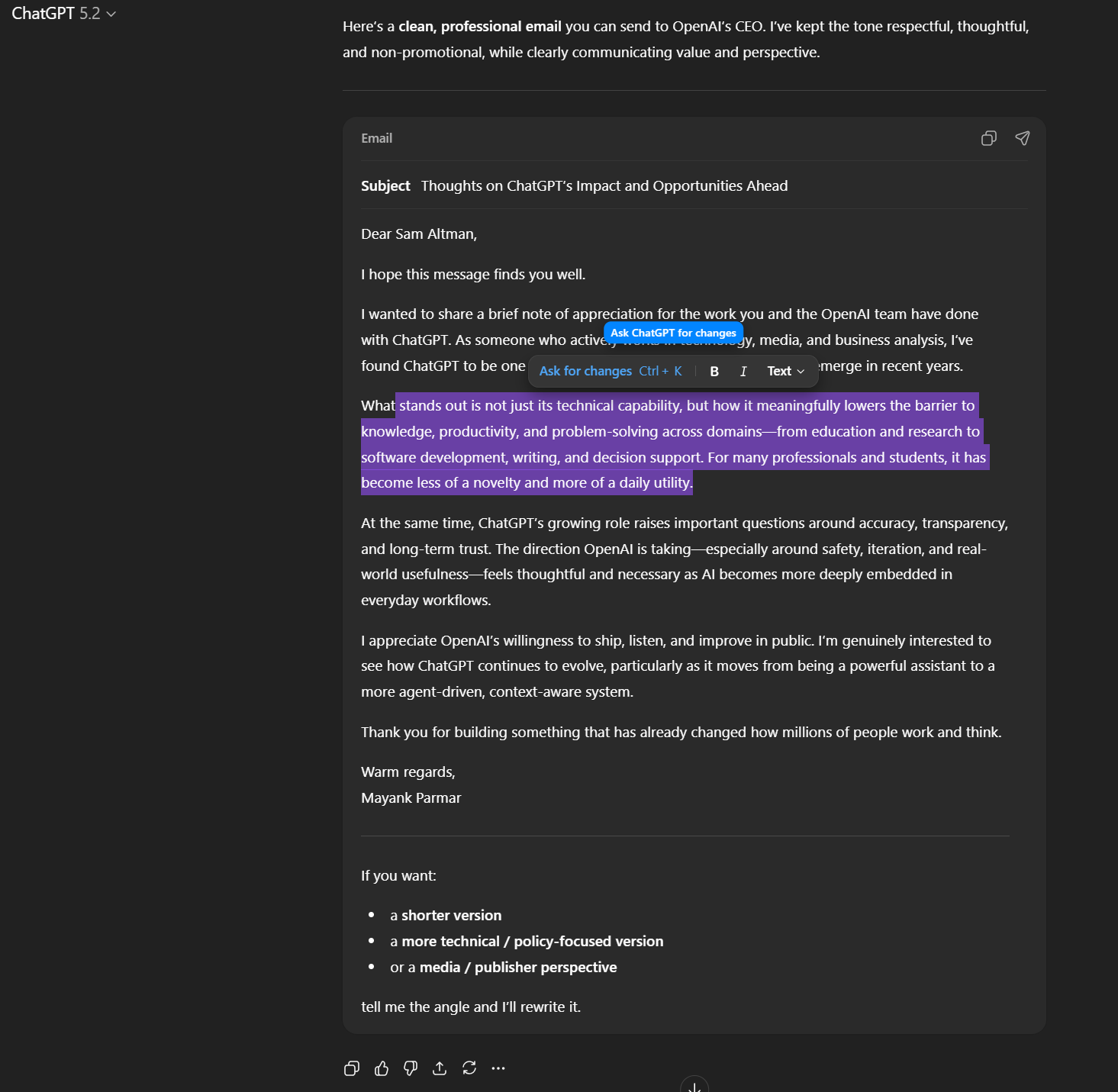
For a long time,using ChatGPT to draft emails or blog posts felt… a little clunky. It would generate the content, but present it as simple text, just like any other chat message. While perfectly functional, it wasn’t the most intuitive experience. Now, OpenAI is changing that with a smart new feature designed to streamline your writing workflow.
This isn’t about making ChatGPT better then other large language models; itS about refining the user experience to be more seamless and powerful. The goal? To give you more control and a more familiar editing habitat.
Introducing the Formatting Toolbar
Imagine highlighting text within a ChatGPT draft – an email, a blog outline, anything created in the newer rich-text areas. Now, a mini editor toolbar appears. This “formatting box” gives you speedy access to tools you’d expect in a word processor or email client.
Think bolding,italics,lists,and more – all right within ChatGPT.
This means you’re no longer staring at a wall of plain text. Instead, you’re viewing your draft as a formatted document, ready for refinement. You can edit it directly, just as you would in Word or Gmail.
What Does This Mean for You?
This update fundamentally changes how you interact with ChatGPT for writing tasks. Here’s how it benefits you:
* Enhanced Editing: You gain precise control over formatting, making revisions faster and easier.
* Familiar Interface: The toolbar mimics tools you already use, reducing the learning curve.
* Improved Workflow: You can move from generation to editing without switching applications.
* More Polished Results: Your final drafts will look more professional and refined.
A Gradual Rollout with Future Expansion
The new formatting toolbar is currently rolling out to users. Don’t worry if you don’t see it immediately. OpenAI plans to add support for even more formatting options in the future, further expanding the feature’s capabilities.
This update demonstrates OpenAI’s commitment to continually improving ChatGPT, making it an even more valuable tool for anyone who writes – whether you’re crafting a quick email or a detailed report.It’s a step towards a more intuitive and powerful AI writing experience, designed to help you create your best work.