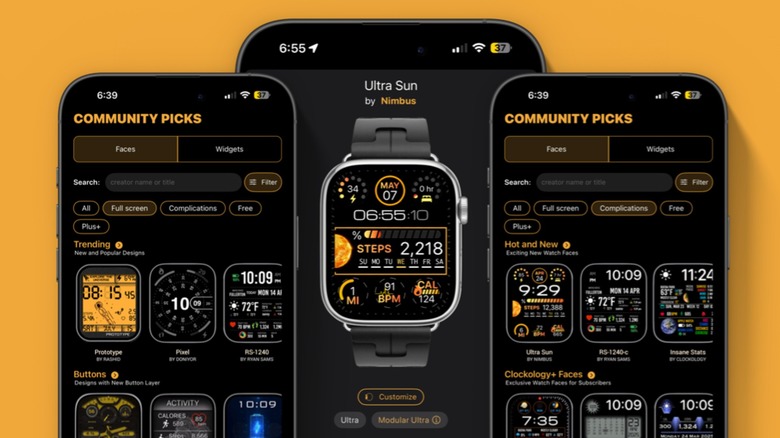
For many Apple Watch users, the built-in library of watch faces, while polished, can eventually feel restrictive. Enter Clockology, a third-party application that has earned a reputation as a “cult hit” among enthusiasts looking to push the boundaries of personalization on their wrists. By providing access to thousands of developer-designed options, the app allows users to move beyond standard layouts into a world of highly stylized, unique aesthetics.
As a technology editor who has spent nearly a decade analyzing consumer electronics and software, I have seen many attempts to bypass the closed ecosystem of Apple’s watchOS. Clockology represents one of the most popular paths for those prioritizing visual flair over native integration. Yet, using Clockology Apple Watch faces is not a seamless replacement for the system’s default experience; it is more of a visual overlay that comes with specific technical trade-offs.
The application extends its reach beyond just the wrist, offering widgets and faces for iPhone, iPad, and CarPlay. Recent updates, specifically versions 3.4.3 and 3.4.4, have expanded the library further with the introduction of “Golden Hours” and “Solar Dials,” ensuring that the app continues to evolve alongside user preferences for high-fidelity design via Clockology.
The Allure of Developer-Designed Customization
The primary draw of Clockology is its vast library. Unlike the first-party faces provided by Apple, which follow strict design guidelines for readability and utility, Clockology faces are often works of art. These faces frequently feature complex animations and integration with user activity data, allowing the watch to look like a luxury timepiece, a retro digital clock, or a futuristic interface.
Because the app relies on a community of developers, the variety is nearly endless. This allows users to find a style that matches their specific mood or outfit, a level of granularity that is rarely found in standard settings. For those getting started, the app is accessible via a free download, though a monthly subscription option is available for users seeking additional premium features via Wareable.
Critical Limitations and User Experience
While the visual appeal is undeniable, prospective users must understand that Clockology does not “replace” the Apple Watch home screen in a traditional sense. The app functions as a layer on top of the OS, which leads to several significant functional limitations that impact daily usability.
The most prominent issue is the behavior of the Digital Crown. Even when a Clockology face is active, pressing the Digital Crown will immediately transport the user back to the standard Apple Watch home screen. This means the custom face cannot act as a true, permanent default in the way a native face does.
the interactivity of these custom faces is limited. Users should be aware of the following constraints:
- Lack of Complications: Users cannot add standard Apple Watch complications (such as weather, calendar events, or heart rate) to a Clockology face.
- Restricted Navigation: Standard gestures, such as swiping to access the Control Center or viewing notifications, are not available while the Clockology face is active.
- Static Interactivity: While animations may be present, the faces are not “interactive” in the sense that they do not launch native apps or provide the deep system integration found in first-party offerings.
Evaluating Performance and Compatibility
User feedback for the app is often polarized, reflecting the gap between those who value aesthetics and those who prioritize functionality. Some users describe the app as “the best” for Apple Watch customization, praising its potential and the variety of available dials. Conversely, other users have reported issues with compatibility or have rated the experience moderately, often citing the aforementioned limitations as a reason for a lower score.
For those who are technically inclined, the process of installing these faces is straightforward, but it requires a willingness to accept that the watch will behave differently than it does with a standard face. The “cult hit” status of the app stems from this willingness to trade system efficiency for a unique visual identity.
Key Takeaways for New Users
- Visuals Over Utility: Choose Clockology if you desire a unique look; stick to native faces if you rely heavily on complications and quick-swipe notifications.
- Digital Crown Behavior: Be prepared for the watch to revert to the standard home screen whenever the Digital Crown is pressed.
- Cost Structure: The app is available as a free download, but premium options may require a monthly subscription.
- Broad Ecosystem: The app’s capabilities extend to iPhone, iPad, and CarPlay, not just the Apple Watch.
As Apple continues to update watchOS, the tension between third-party customization and system stability remains. For now, Clockology remains a premier choice for users who view their Apple Watch as much as a fashion statement as a productivity tool. The next major evolution for the app will likely depend on how it adapts to future iterations of Apple’s hardware and software constraints.
We welcome your thoughts on the balance between customization and functionality. Do you prefer the stability of native faces or the creativity of third-party apps? Share your experience in the comments below.