
As the digital landscape continues to evolve, WhatsApp has become a cornerstone of global communication, connecting billions of users across borders. However, this ubiquity has also attracted malicious actors seeking to exploit the platform for financial gain and data theft. Understanding how to identify common WhatsApp scams is no longer just a technical necessity; it is a fundamental aspect of digital literacy for anyone navigating today’s hyper-connected world.
For users, the primary defense against these threats lies in recognizing the tactics used by bad actors. Whether it is an unexpected request for a verification code, a solicitation for money from a supposedly familiar contact, or links leading to phishing sites, the strategies employed are designed to bypass critical thinking through urgency or fear. According to the official WhatsApp Help Center, users should exercise extreme caution with messages that appear suspicious or sound too good to be true, and they are advised against tapping, sharing, or forwarding such content.
Recognizing the Patterns of Deception
Most scams on messaging platforms follow a predictable psychological pattern. Attackers often impersonate trusted entities—such as family members, official customer support representatives, or even government agencies—to gain the victim’s confidence. Once rapport is established, the scammer typically attempts to move the conversation toward a specific goal, such as obtaining a six-digit authentication code, which could allow them to hijack a user’s account.
It is important to remember that WhatsApp account security hinges on keeping your verification codes private. Never share these codes with anyone, even if the person requesting them claims to be a friend or a family member who “accidentally” sent it to you. If you suspect your account has been compromised, or if you receive a message requesting sensitive information, the safest course of action is to verify the identity of the sender through an alternative communication channel, such as a direct phone call.
Common Tactics and Defensive Strategies
Phishing remains a prevalent threat, where attackers distribute deceptive links that mimic legitimate websites. These links often lead to portals designed to capture login credentials, banking details, or personal identification data. Because these links are often disguised behind shortened URLs or misleading previews, users should verify the legitimacy of any URL before clicking. If a message creates a sense of artificial urgency—such as claiming your account will be deleted or that you have won a prize—it is almost certainly a red flag.
Beyond phishing, there is the “friend in need” scam. In this scenario, a fraudster gains access to an account or creates a spoofed profile to message contacts, claiming to be in an emergency and needing immediate financial assistance. Always verify the status of the person in question before taking any action involving money transfers. As noted by the WhatsApp security guidelines, the platform encourages users to report suspicious messages directly through the app, which helps in identifying and mitigating the impact of these malicious campaigns.
How to Protect Your Digital Identity
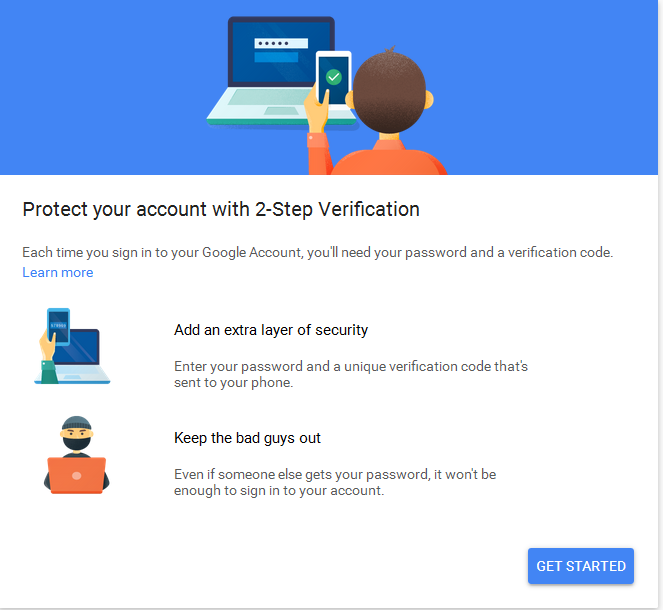
Securing your WhatsApp presence involves more than just vigilance; it requires leveraging the built-in security features provided by the platform. Enabling two-step verification adds a critical layer of defense, requiring a secondary PIN whenever you register your phone number with WhatsApp. This simple step can prevent attackers from accessing your account even if they manage to obtain your SMS verification code.
managing your privacy settings can significantly reduce your exposure to unwanted messages and potential scams. By limiting who can see your profile photo, status, and last seen information, you reduce the amount of data available to strangers who may be scraping profiles for social engineering purposes. Regularly reviewing your connected devices in the “Linked Devices” section of the app also ensures that you remain the only person with access to your message history.
Key Security Best Practices
- Enable Two-Step Verification: This represents the most effective way to secure your account against unauthorized access.
- Verify Unknown Senders: If you receive a message from an unknown number, do not click links or download attachments.
- Report and Block: Utilize the in-app tools to report spam and block numbers that exhibit suspicious behavior.
- Maintain Privacy: Restrict your profile visibility to contacts only to minimize your footprint for potential scammers.
Staying Informed and Vigilant
The nature of online threats is fluid, and staying informed about the latest security advisories is essential. WhatsApp frequently updates its official help pages to address emerging trends in platform abuse. Users should periodically check the official support resources to remain updated on best practices for account safety and reporting procedures. By fostering a proactive approach to security, users can continue to enjoy the benefits of instant messaging while keeping their personal information shielded from those who intend to exploit it.
As we look ahead, the responsibility for digital safety remains a shared effort between service providers and the user base. While platforms continue to invest in encryption and automated spam detection, the human element—our ability to pause, verify, and question suspicious interactions—remains the final and most vital firewall. If you have questions about specific security settings or need further guidance, I encourage you to share your experiences in the comments section below, where we can continue this important conversation on digital safety.