
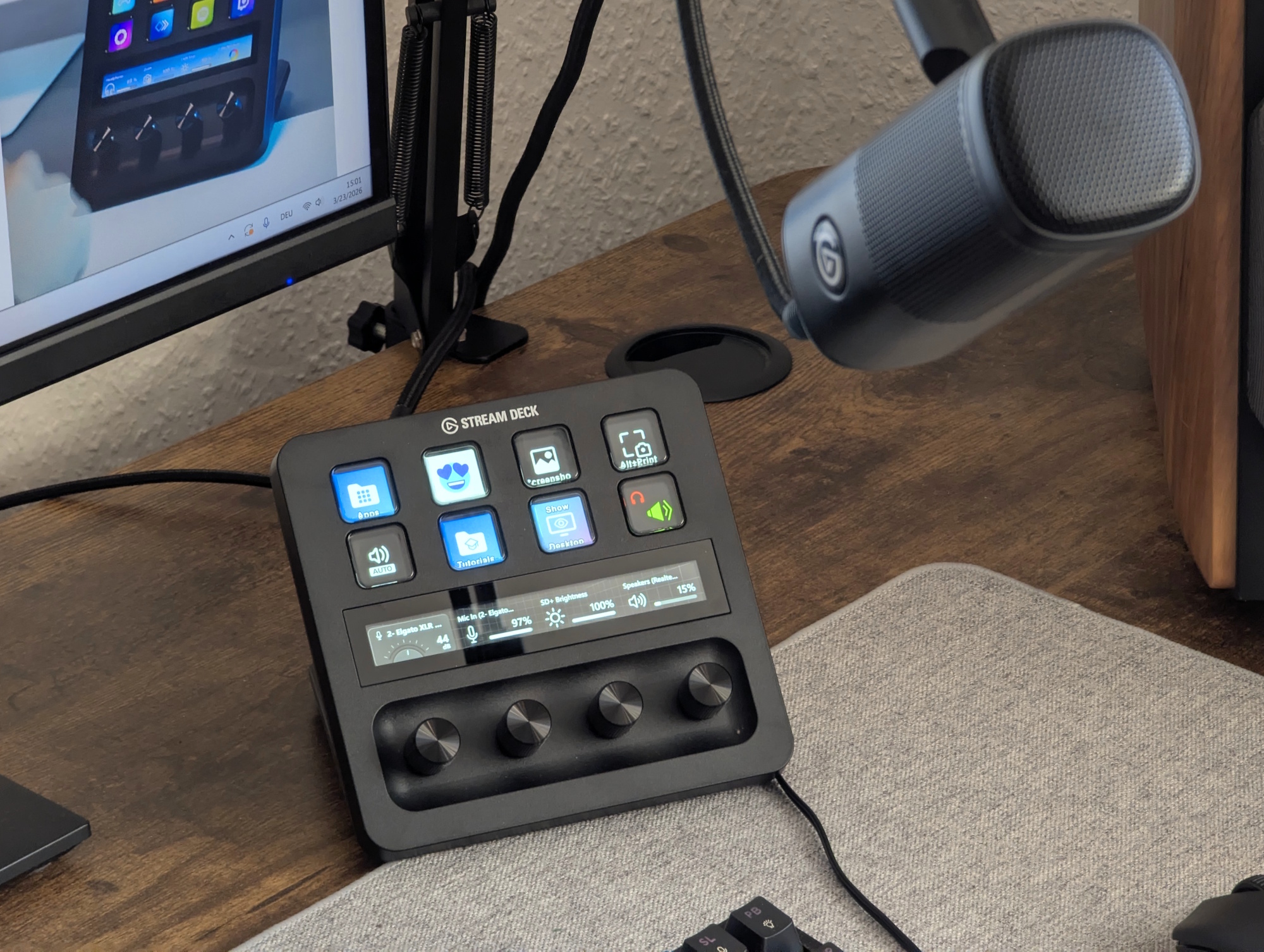
For years, the “perfect” desktop audio setup usually required a sprawling array of hardware: a dedicated audio interface, a separate mixing console, and a plethora of cables that inevitably cluttered the workspace. However, the release of the Elgato Stream Deck+ with XLR Dock MK.2 changes that equation, transforming a standard PC workstation into a professional-grade audio hub without the traditional footprint of a recording studio.
This combination is not merely a bundle of accessories but a deeply integrated ecosystem designed to bridge the gap between hardware tactile control and software flexibility. By pairing the Stream Deck+—a device known for its customizable dials and keys—with the XLR Dock MK.2, users gain an immediate, high-fidelity audio path that integrates directly into their digital workflow.
The synergy between these devices is anchored by the recently announced Wave Next ecosystem. Launched on March 3, 2026, Wave Next introduces a suite of integrated products including the Wave Link 3.0 software, the Wave:3 MK.2, Wave XLR MK.2, and the Stream Deck + XL, all designed to streamline how modern creators and professionals manage sound.
For anyone looking to upgrade their PC experience, this setup offers more than just “better sound”—it provides a centralized command center for audio, applications, and complex workflows, making it a compelling investment for both content creators and power users who demand precision and efficiency.
The Hardware Powerhouse: XLR Dock MK.2
At the heart of this audio upgrade is the XLR Dock MK.2, a specialized interface designed specifically for the Stream Deck+. Unlike standalone interfaces that sit as separate blocks on a desk, the XLR Dock MK.2 fits directly into the Stream Deck+, creating a unified audio station. This integration saves significant desk space while providing studio-grade preamps that ensure clear audio without the need for external boosters or lifters.

The technical specifications of the XLR Dock MK.2 are designed to handle a wide variety of professional microphones. It provides 48V phantom power, which is essential for bringing condenser microphones to life, and offers 80dB of gain to support microphones that require more power to reach an audible level. One of the most critical features for those who record high-energy content is Clipguard 2.0, which prevents distortion even when the speaker shouts, ensuring an “unclippable” voice.
Monitoring is another area where the MK.2 excels. It supports zero-latency monitoring, allowing users to hear themselves in real time. It is crucial to note, however, that this zero-latency capability applies specifically to onboard DSP effects. VST effects may introduce latency depending on the specific computer setup used.
The device is powered by a single USB cable, simplifying the connection process and reducing cable clutter. Internally, it utilizes a Wave FX Processor with built-in DSP and Clipguard protection, allowing for a continuous signal path that flows through onboard processing and VST effects seamlessly.
Wave Link 3.0: The Software Brain
Hardware is only half the story; the true utility of the Elgato Stream Deck+ and XLR Dock MK.2 setup is unlocked through Wave Link 3.0. As part of the Wave Next announcement, Elgato has made Wave Link 3.0 free for everyone on Windows and macOS, removing the previous barrier to entry for those who wanted a professional mixing platform and expanding its compatibility to virtually any microphone, mixer, or audio interface.
Wave Link 3.0 functions as a virtual mixer, unifying hardware sources and software inputs into a single application. This allows users to create up to five independent submixes. This means a user can route their voice, music, chat, and game audio into separate outputs tailored for different needs—such as one mix for a live stream, another for a recording, and a third for a private call—all without needing to restart their software or manually change system settings.
The software also supports per-channel effects processing, meaning every individual source can be shaped using VST plugins. When combined with the physical dials of the Stream Deck+, these software controls become tactile. A user can turn a dial to adjust a VST effect in real time or press a button to trigger a specific mix, effectively turning the Stream Deck+ into a physical manifestation of the Wave Link software.
Why This Setup Improves Any PC Workflow
While the marketing for these products often focuses on “creators,” the practical application of the Stream Deck+ and XLR Dock MK.2 extends to any professional who spends significant time on a PC. The primary benefit is the reduction of “cognitive load”—the amount of mental effort required to manage tools while trying to focus on a task.
In a traditional setup, adjusting the volume of a Discord call, changing the gain on a microphone, and muting a music player requires navigating through multiple software menus or clicking through different application windows. With this setup, those actions are mapped to physical dials and buttons. For example, a user can turn a dial to adjust headphone volume or use a button to trigger a “push to talk” function in Discord without ever leaving their primary operate window.
The integration of the Wave FX Processor means that the “heavy lifting” of audio processing happens at the source. This reduces the reliance on the PC’s CPU for basic audio cleanup, ensuring that the system remains responsive even when running demanding software. The ability to customize keys and dials to trigger effects or switch mixes means that the user is in total control of their sonic environment at all times.
Key Technical Specifications at a Glance
| Feature | Specification / Capability |
|---|---|
| Gain | 80dB |
| Phantom Power | 48V (for condenser mics) |
| Distortion Protection | Clipguard 2.0 |
| Monitoring | Zero-latency (onboard DSP) |
| Connectivity | Single USB cable |
| Processor | Wave FX Processor with built-in DSP |
Integration and Ecosystem Synergy
The strength of the Elgato approach lies in the ecosystem. The XLR Dock MK.2 is not a standalone product but a piece of a larger puzzle. By fitting it into the Stream Deck+, the device transforms the controller into a uniquely powerful audio station. This is a departure from the standard audio interface model, where the “control” (knobs/sliders) and the “interface” (the electronics) are often separate or fixed in a way that cannot be customized.
Because the Stream Deck+ allows for complete customization of its buttons and dials, the user defines what the “audio interface” does. One person might use a dial for microphone gain and another for Spotify volume, while a third might use a button to switch between a “broadcast” mix and a “private” mix. This flexibility is what makes the setup adaptable to different industries, from podcasting and gaming to remote corporate leadership and software development.
the inclusion of VST effect integration means that the system can grow with the user. As a user discovers new plugins for noise suppression, equalization, or compression, those effects can be layered into the signal path, all while being controlled by the physical hardware on the desk.
The broader Wave Next ecosystem, as detailed by TechPowerUp, ensures that these devices work in harmony. Whether a user is using the Wave:3 MK.2 or the Wave XLR Pro, the software backbone provided by Wave Link 3.0 remains consistent, allowing for a seamless transition as a user upgrades their hardware over time.
With the Wave Next ecosystem now officially announced and the software made free for all users, the barrier to achieving professional audio control has dropped significantly. The next step for users is the implementation of these tools into their specific workflows, as Elgato continues to expand the capabilities of the Wave platform.
Do you use a dedicated audio interface or a software-based mixer for your PC setup? Share your experience in the comments below.