
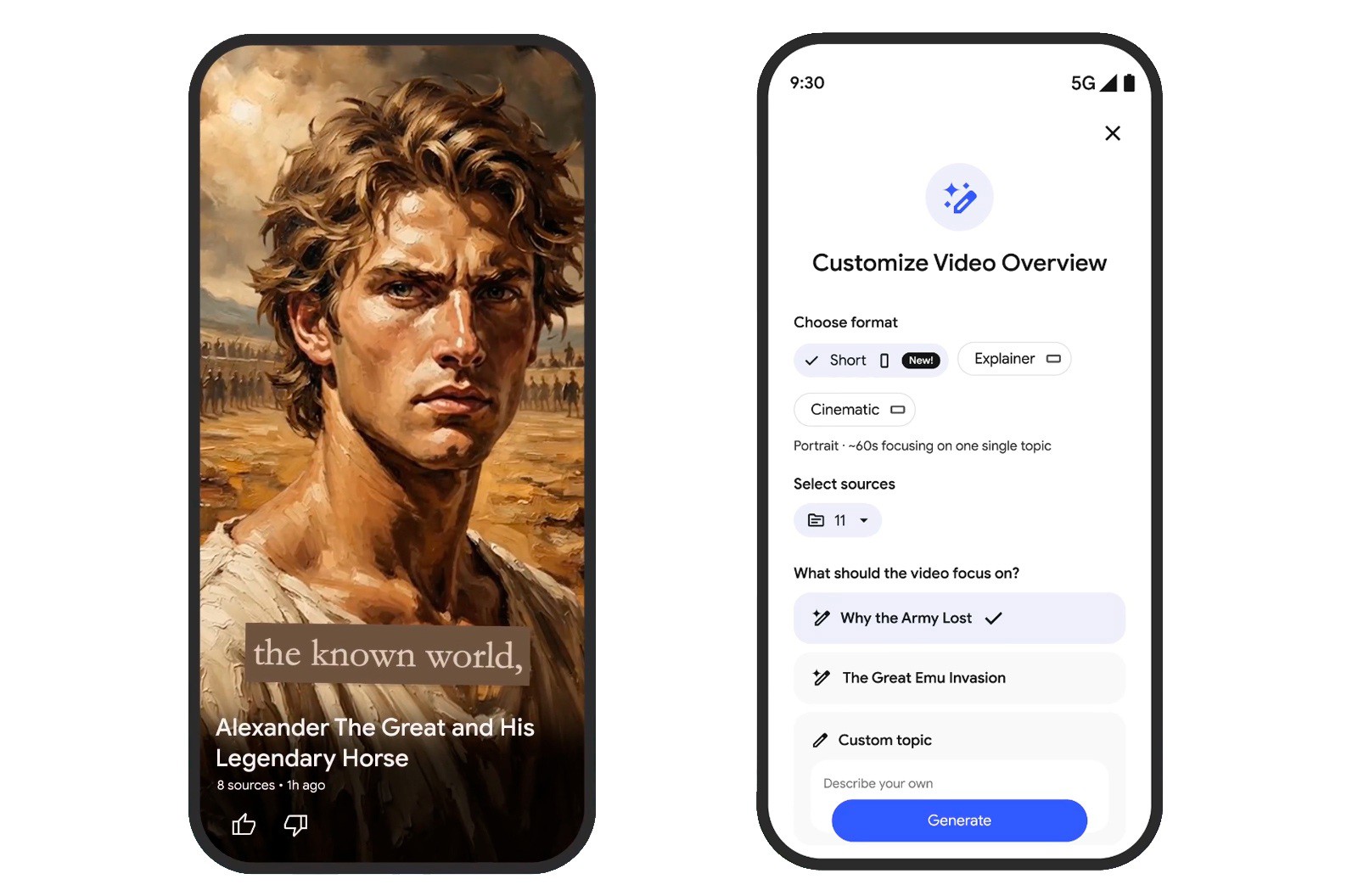
Google has expanded the functionality of NotebookLM, its AI-powered research assistant, by introducing the ability to generate short, video-style summaries from user-provided documents and notes. This update allows users to transform text-heavy research, such as PDFs or lecture transcripts, into structured, digestible clips that mimic the format of popular short-form video platforms like TikTok.
The feature functions as an extension of the tool’s existing “Audio Overview” capability, which previously focused on generating conversational podcasts between two AI hosts. By leveraging Google’s Gemini 1.5 Pro model, the platform analyzes uploaded source material to synthesize key insights into concise, visual-friendly formats. According to official documentation from Google’s NotebookLM support hub, these tools are designed to assist students and professionals in distilling complex information into more accessible media.
How the new summary format works
At its core, the new video-style summary feature aims to solve the “information overload” problem often associated with dense academic or technical documentation. Users upload their source files—which can include Google Docs, PDFs, text files, or website URLs—and the AI identifies the most critical themes. The tool then organizes this data into a sequence that highlights essential takeaways, effectively creating a structured narrative that can be reviewed quickly.

While the interface mirrors the pacing and brevity of social media trends, it remains tethered to the user’s specific source material. Unlike generative AI models that pull from the open web, NotebookLM is constrained by a “source-grounding” mechanism. This ensures that the generated summaries remain strictly relevant to the documents the user has provided. This distinction is critical for academic integrity, as it reduces the likelihood of “hallucinations” or information that is not supported by the uploaded files, as noted in the original product release overview from Google.
Editing and customization capabilities
A significant addition to the platform is the enhanced control users now have over the output. Recent updates to the interface allow for the manual editing of automatically generated flashcards and summaries. This gives users the ability to refine the AI’s output, ensuring that the terminology and emphasis align with their specific study or project requirements. These features are currently available across both web and mobile versions of the service at no additional cost.

The integration of these editing tools addresses a long-standing user request for more transparency in AI workflows. By allowing human intervention in the summary process, Google has moved toward a “co-pilot” model rather than a fully automated replacement. This hybrid approach is particularly useful for students who need to verify facts against textbooks or researchers who must ensure that technical data remains accurate after the summarization process.
The role of Gemini in research
The underlying architecture of these updates relies on the Gemini 1.5 Pro model, which features a significantly large “context window.” This allows the model to process up to 1.5 million tokens, enabling it to ingest entire books, lengthy research papers, or dozens of disparate documents simultaneously. This technical capacity is what allows the AI to draw connections between different parts of a document that a human might otherwise miss.

For users, this means the AI can synthesize a 60-second summary that incorporates data from the first page of a document and the conclusion simultaneously. This capability is detailed in the Gemini developer documentation, which outlines how the model manages long-context retrieval to maintain factual consistency across large datasets. As the platform evolves, the focus remains on enhancing these retrieval-augmented generation (RAG) capabilities to provide more precise and useful summaries.
Practical applications for users
The shift toward short-form visual summaries has several immediate applications for different user groups:
- Students: Quickly reviewing lecture notes or academic journals before exams by transforming them into “micro-learning” segments.
- Researchers: Condensing high-volume literature reviews into manageable snapshots that highlight core hypotheses and findings.
- Content Creators: Using the tool to extract key points from long-form transcripts to assist in scripting or storyboarding new content.
Despite these advancements, experts suggest that users should continue to treat AI-generated summaries as secondary tools. Because the system relies on the quality of the input, the accuracy of the summary is inherently linked to the clarity and completeness of the original documents provided. Users are encouraged to cross-reference the AI’s output with their primary sources, particularly for critical academic or professional work.
What comes next for NotebookLM
Google has not yet announced a specific date for the next major feature release, but the company continues to update the platform based on feedback gathered from the “NotebookLM Experiments” page. Users interested in testing new, unreleased features can opt into the testing program via the official NotebookLM dashboard. As of late 2024, the service remains a primary focus for Google’s efforts to integrate AI into personal productivity workflows.
Future updates are expected to focus on deeper integration with the broader Google Workspace ecosystem, allowing for more seamless transitions between NotebookLM and applications like Google Drive and Gmail. For those looking to stay informed, checking the official Google blog or the dedicated product support pages remains the most reliable way to track upcoming changes. Readers are invited to share their experiences with the new summary features in the comments section below.