
Google has officially launched Wear OS 7, the newest version of its smartwatch operating system, marking a significant update for users of compatible devices. The rollout coincides with the broader Android 17 ecosystem update, introducing performance enhancements, new health and fitness features, and improved app compatibility. According to Google’s official announcement, the update is now available for supported smartwatches, including models from brands like Fossil, Garmin, and Motorola.
Wear OS 7 builds on the foundation of its predecessor, Wear OS 3, by addressing key pain points for smartwatch users—such as battery life, app responsiveness, and customization. The update also introduces deeper integration with Google services, including Google Maps for turn-by-turn navigation directly on the watch face and expanded health tracking capabilities. For developers, the new software development kit (SDK) promises better tools for building and optimizing apps for wearables.
This release comes as the smartwatch market continues to evolve, with wearables increasingly blending fitness tracking, digital payments, and smart home control. Wear OS 7 aims to solidify Google’s position in this competitive space by offering a more polished, feature-rich experience. However, adoption may vary depending on device compatibility, as not all Wear OS-enabled smartwatches will receive the update immediately.
Key Features of Wear OS 7
Wear OS 7 introduces several standout features designed to enhance usability and functionality. Here’s a breakdown of the most notable updates:
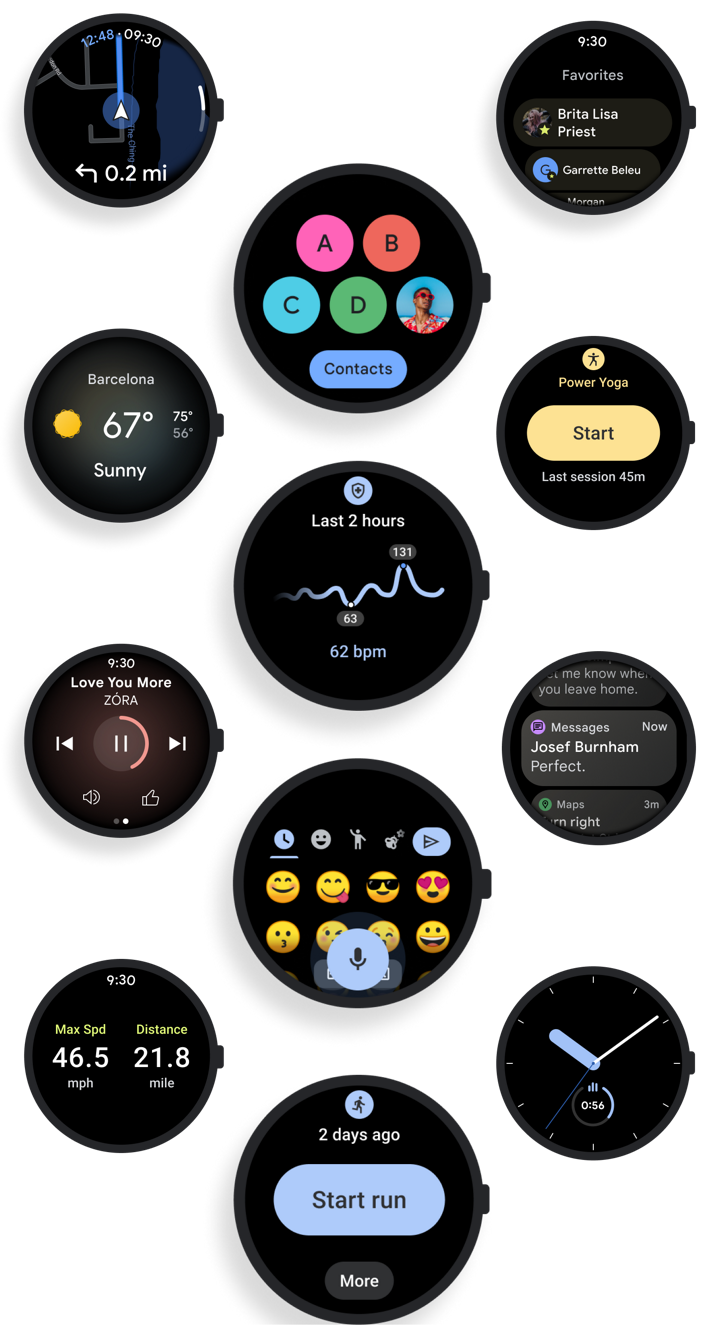
- Improved Performance: Google reports up to 30% faster app launches and smoother transitions between screens, thanks to optimizations in the underlying software architecture. “We’ve focused on making the system more responsive, especially for users who rely on their smartwatches for quick access to apps and notifications,” a Google spokesperson stated in the official blog post.
- Enhanced Health and Fitness Tracking: New sensors and algorithms provide more accurate heart rate monitoring, sleep analysis, and workout insights. Users can now track metrics like VO2 max and recovery time, with data synced seamlessly to Google Fit.
- Customizable Watch Faces: The update introduces a new “Watch Face Studio” tool, allowing users to design and download custom watch faces directly from their phones. This feature was previously limited to developers but is now accessible to all users.
- Deeper Google Integration: Wear OS 7 integrates more tightly with Google Assistant, enabling voice commands for a wider range of tasks, including sending messages, setting reminders, and controlling smart home devices. The update also includes offline support for Google Maps, making it easier to navigate without relying on a connected phone.
- Battery Life Improvements: Google claims that supported devices will see up to 15% longer battery life, thanks to optimizations in power management. This is particularly important for users who rely on their smartwatches for extended periods without charging.
How Wear OS 7 Compares to Wear OS 3
Wear OS 7 represents a significant leap forward from its predecessor, Wear OS 3, which was released in 2021. While Wear OS 3 laid the groundwork for modern smartwatch functionality, Wear OS 7 refines and expands on those features. Below is a comparison of key areas:
| Feature | Wear OS 3 (2021) | Wear OS 7 (2024) |
|---|---|---|
| Performance | Basic optimizations; occasional lag in app launches | Up to 30% faster app launches; smoother UI transitions |
| Health Tracking | Basic heart rate and step tracking | Advanced metrics like VO2 max, recovery time, and sleep analysis |
| Customization | Limited watch face options; developer-only customization tools | Watch Face Studio for user-designed faces; expanded themes |
| Google Integration | Basic Assistant commands; limited offline functionality | Deeper Assistant integration; offline Google Maps support |
| Battery Life | Average battery life of 1–2 days | Up to 15% longer battery life on supported devices |
Which Devices Support Wear OS 7?
Not all Wear OS-enabled smartwatches will receive the update immediately. Google has confirmed that the following devices are compatible with Wear OS 7:
- Fossil Gen 6
- Garmin Venu 3
- Motorola Moto 360 (2024)
- Samsung Galaxy Watch 6
- Huawei Watch GT 4
- Skagen Falster 3
- Emporio Armani AR100
Users should check the official Wear OS support page to confirm if their device is eligible. Those with older models may need to wait for a future update or consider upgrading to a compatible device.
What’s Next for Wear OS?
Google has not yet announced a timeline for additional updates or new features, but the company has hinted at further improvements in future releases. Key areas of focus are likely to include:
- Expanded App Ecosystem: More third-party developers are expected to optimize their apps for Wear OS, particularly in fitness, productivity, and entertainment categories.
- Enhanced Wearables Integration: Future updates may include deeper compatibility with other Google services, such as Google Pay and Google Photos.
- AI-Powered Features: As Google continues to integrate AI across its platforms, Wear OS could see more personalized recommendations and automated assistance.
For now, users are encouraged to install Wear OS 7 as soon as it becomes available on their devices. The update can be installed via the Google Play Store or directly on the watch, depending on the manufacturer’s process.
How to Update Your Wear OS Smartwatch
Updating to Wear OS 7 is straightforward, but the process may vary slightly depending on your device. Here’s a general guide:
- Check Compatibility: Ensure your device is listed as compatible with Wear OS 7. You can find the full list on Google’s support page.
- Connect to Wi-Fi: Make sure your watch is connected to a stable Wi-Fi network to avoid interruptions during the update.
- Update via Play Store: Open the Google Play Store on your phone, go to the “My apps & games” section, and look for the Wear OS update. Tap “Update” to begin the process.
- Update Directly on Watch: Some manufacturers allow direct updates on the watch. Navigate to “Settings” > “System” > “System updates” and follow the prompts.
- Wait for Completion: The update may take several minutes to complete. Avoid using the watch during this time to prevent errors.
Frequently Asked Questions
Here are answers to some common questions about Wear OS 7:

- Will my old Wear OS device get this update?
Not necessarily. Google and manufacturers prioritize newer models for updates. Check the official compatibility list to confirm.
- Can I customize my watch face with Wear OS 7?
Yes! The new “Watch Face Studio” tool allows users to design and download custom watch faces directly from their phones.
- Does Wear OS 7 support offline Google Maps?
Yes, one of the key improvements in Wear OS 7 is offline navigation support, making it easier to use your smartwatch for directions without a connected phone.
- How much longer will my battery last with Wear OS 7?
Google claims up to 15% longer battery life on supported devices, though actual results may vary based on usage.
Wear OS 7 represents a meaningful step forward for Google’s smartwatch platform, addressing many of the frustrations users have faced in previous versions. While adoption may be gradual, the update’s focus on performance, health tracking, and customization positions Wear OS as a strong contender in the wearable market.
For the latest updates and official announcements, visit Google’s Wear OS website. Users are encouraged to share their experiences with the update in the comments below or on social media using #WearOS7.
Related reading