macOS Tahoe Beta 2: what to Expect in This Latest Release
The second public beta for macOS Tahoe is now available, and it brings a refined experience for those eager to test Apple’s upcoming operating system. If past releases are any indication, this beta mirrors the developer build released yesterday – meaning you’ll notice some immediate visual updates.
A Fresh Look for Your Macintosh HD
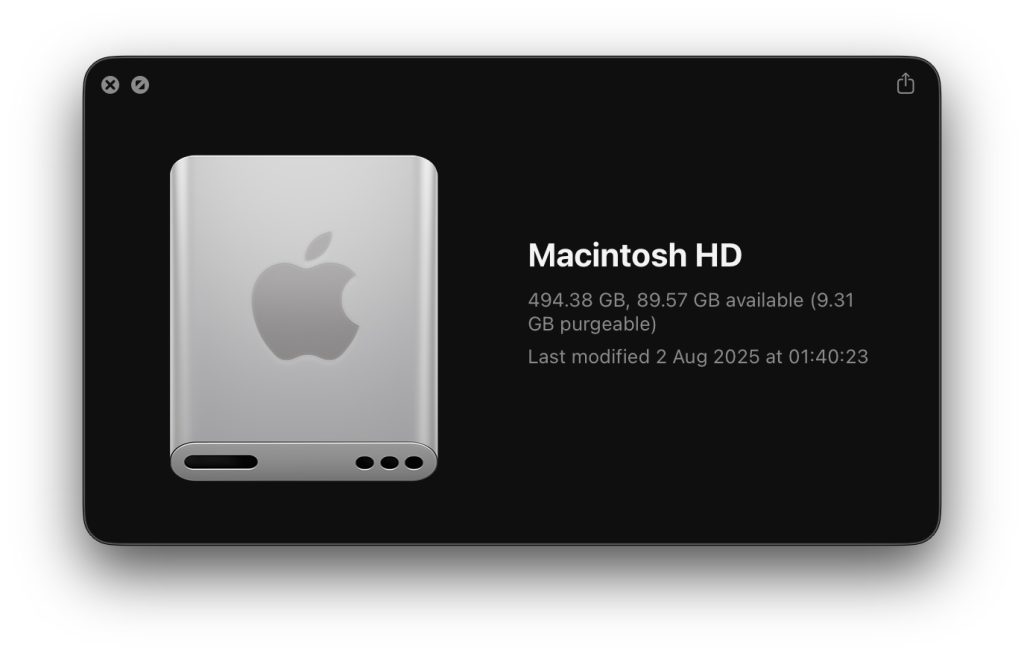
One of the first things you’ll spot is a redesigned Macintosh HD icon. It’s a subtle but significant change, swapping the classic spinning hard drive illustration for a more contemporary representation of a solid-state drive (SSD). This reflects the modern storage technology found in most Macs today.
!macOS Tahoe Macintosh HD Icon
Under-the-Hood Improvements and Bug Fixes
While this release doesn’t introduce a wave of new, user-facing features like some previous betas, Apple appears to be focusing on stability and performance. Expect a host of behind-the-scenes improvements and bug fixes designed to refine the overall macOS experience. This is a crucial step in ensuring a smooth launch for the final version.
What’s New in macOS Tahoe?
If you’re upgrading from an older macOS version, you’ll discover a wealth of exciting features with macOS Tahoe. Here’s a quick overview:
Liquid Glass: experience a stunning new visual aesthetic with a dynamic,layered look. Desktop Widgets: Bring information to your fingertips with interactive widgets directly on your desktop.
Customizable Control Center: Tailor your Control Center to access the settings you use most frequently.
iPhone Live Activities: Stay informed with real-time updates from your iPhone, displayed conveniently on your menu bar via continuity.
Enhanced Spotlight: discover information faster and more efficiently with a redesigned and more powerful Spotlight search.
These features, combined with ongoing refinements, are shaping macOS Tahoe into a significant update.
Is the Public Beta Right for You?
Participating in the public beta program allows you to contribute to the growth of macOS. Though, remember that beta software can sometimes be unstable. It’s always a good idea to back up your Mac before installing any beta software.
Are you currently running the macOS Tahoe public beta? Share your experiences and feedback in the comments below - your insights are valuable!
Find Great Deals on Macs
Disclaimer: We may earn revenue through affiliate links. Learn more here.*