
Microsoft is aggressively integrating artificial intelligence into its ecosystem, positioning Microsoft 365 Copilot as a central pillar for workplace productivity. By embedding AI directly into the apps users already rely on—such as Word, Excel, and PowerPoint—the company aims to transform raw data into actionable insights and streamline complex professional workflows.
At the core of this strategy is “Perform IQ,” a specialized intelligence layer designed to personalize the AI experience. According to Microsoft, Work IQ allows Copilot to understand a user’s specific job, company context, and individual habits by connecting organizational knowledge with personal work patterns. This system leverages data from emails, files, meetings, and chats to tailor AI agents and instructions for specific business tasks.
The Copilot ecosystem is designed to be multifaceted, offering a secure AI chat for uncovering insights, an enterprise search tool that moves beyond simple keywords, and a variety of agents. These agents, available through an Agent Store, are intended to automate common tasks and can be either ready-to-use versions from Microsoft and its partners or custom-built solutions tailored to unique business needs.
Despite these technical capabilities, the transition from a traditional productivity suite to an AI-powered environment involves a significant shift in how users interact with their data. The current iteration of the Microsoft 365 Copilot app serves as a hub where users can summarize documents, draft content, and visualize data—such as creating bar charts for energy consumption—while maintaining the security and compliance standards expected of enterprise software.
The Architecture of Work IQ and AI Integration
The effectiveness of Microsoft 365 Copilot depends heavily on the “Work IQ” layer. This intelligence framework is built on three primary pillars: data, context, and skills. By capturing how work is performed across an organization, Work IQ utilizes memory to learn a user’s unique style and preferences, adapting to their patterns over time to provide more relevant assistance.
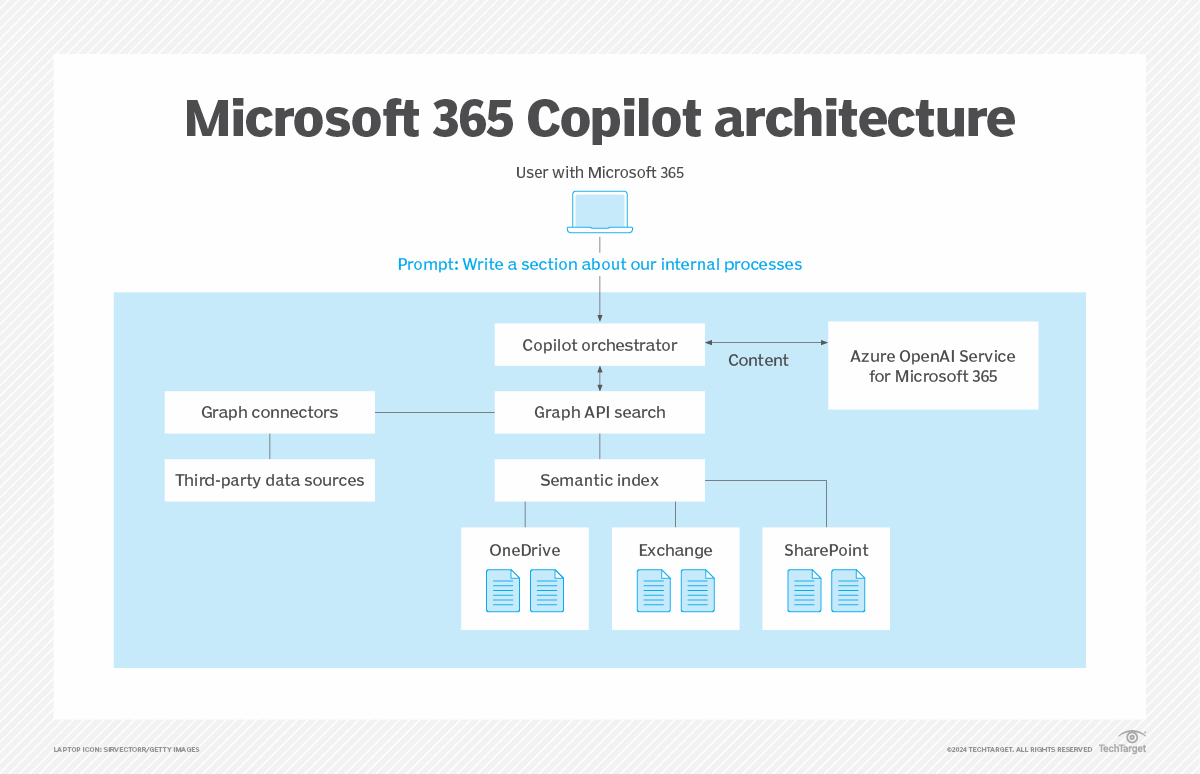
This integration extends across the entire Microsoft 365 suite. Users can access AI assistance within Outlook for email management, Word for document creation, and Excel for data analysis. The goal is to keep the AI “in the flow of work,” reducing the demand for users to switch between different applications to achieve a specific result.
Beyond simple chat interfaces, the platform emphasizes “AI-powered enterprise search.” This feature allows users to describe what they are looking for using phrases or commands, with Work IQ surfacing results from work content and apps that go beyond basic keyword matching. This is intended to solve the common corporate struggle of locating specific information buried within vast archives of files, and communications.
Expanding Capabilities: From Chat to Autonomous Agents
Microsoft is pushing the boundaries of AI assistance by moving from reactive chat to proactive agents. These agents are designed to work on a user’s behalf, automating repetitive tasks that previously required manual intervention. The availability of these tools through the Agent Store suggests a move toward a marketplace of specialized AI skills.
The versatility of the tool is highlighted by the variety of prompts users are encouraged to try. These range from professional writing improvements—making text less verbose—to creative tasks like designing images of databases in colored pencil. The system is also positioned as a tool for professional development, such as generating interview questions for software engineering roles or providing stress-reduction tips.
The transition of the Microsoft Office app into the Microsoft 365 Copilot app reflects a broader shift in the company’s identity. While the familiar applications like Word and PowerPoint remain accessible under the “Apps” section, the primary interface is now centered on the AI’s ability to organize information and execute tasks.
Key Components of the Microsoft 365 Copilot Ecosystem
| Feature | Primary Function | Powered By |
|---|---|---|
| Copilot Chat | Summarizing, drafting, and analyzing ideas | Work IQ |
| Enterprise Search | Finding files and info via natural language | Work IQ |
| Copilot Agents | Automating common tasks and workflows | Work IQ / Agent Store |
| App Integration | AI assistance in Word, Excel, PowerPoint, Outlook | Microsoft 365 Ecosystem |
The Path to Enterprise Adoption
For many organizations, the appeal of Copilot lies in its promise of efficiency. The ability to “turn data into insights” within known applications lowers the barrier to entry for AI adoption. However, the shift toward a paid AI model requires users to discover tangible value in the productivity gains offered by the subscription service.
The security and compliance aspect remains a critical selling point for enterprise clients. By keeping the AI within the trusted boundary of the Microsoft 365 subscription, the company addresses concerns regarding data privacy and the handling of sensitive corporate information. This is particularly important as Work IQ processes “all the rich knowledge” in a company’s emails and transactions.
As the AI landscape evolves, the focus is shifting toward “multi-model intelligence,” with references to Copilot Cowork and Researcher in Frontier. This suggests that Microsoft is continuing to iterate on the underlying models to improve the accuracy and utility of the AI, aiming to move beyond general assistance into specialized research and collaborative roles.
The ongoing development of the platform means that users can expect continuous updates to the Agent Store and the intelligence capabilities of Work IQ. The next phase of adoption will likely depend on how effectively these tools can demonstrate a return on investment for the average business user.
For those looking to explore these tools, official information regarding plans and pricing is available through the Microsoft 365 Copilot homepage.
We invite our readers to share their experiences with AI integration in the workplace. How has the shift toward AI-powered productivity affected your daily workflow? Let us know in the comments below.