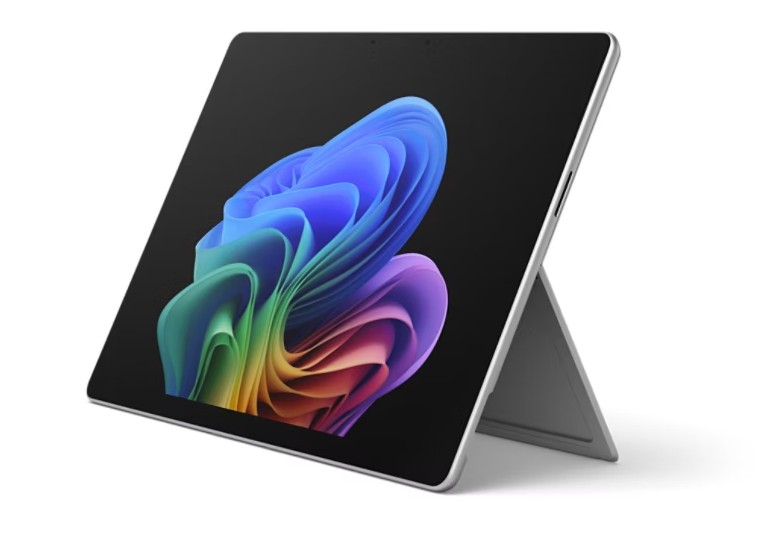
Microsoft has officially launched its most advanced Surface Pro for Business yet, a device that marries cutting-edge Intel Core Ultra processors with native AI capabilities to create what the company calls “the ultimate professional device for the AI era.” The new model, which builds upon Microsoft’s existing Surface Pro 9 lineup, introduces significant hardware and software enhancements specifically designed for enterprise users who demand both performance and AI integration.
This isn’t just an incremental upgrade—it represents a fundamental shift in how Microsoft positions its Surface devices for business customers. With Intel’s latest Core Ultra processors featuring up to 128 EU (Execution Units) for AI acceleration, the new Surface Pro for Business promises to handle everything from complex data analysis to real-time language translation with unprecedented efficiency. For enterprises already investing in AI workflows, this device could serve as a critical bridge between hardware and software innovation.
The timing couldn’t be better. As businesses increasingly adopt AI-powered tools across operations, Microsoft’s move positions its Surface Pro as more than just a premium laptop—it’s now a full-fledged AI workstation capable of running specialized enterprise applications. But what exactly does this mean for professionals, and how does it compare to existing options? Let’s break down the key features, performance benchmarks, and real-world implications of this new device.
What Makes the AI-Powered Surface Pro for Business Different?
The most significant advancement in this new model is its integration of Intel’s Core Ultra processors, which feature dedicated AI acceleration hardware. These processors—codenamed Meteor Lake—include up to 128 Execution Units (EUs) for AI workloads, allowing the device to perform tasks like:
- Real-time transcription and translation of meetings
- On-device AI-powered data analysis without cloud dependency
- Enhanced security through AI-driven threat detection
- Optimized performance for specialized enterprise applications
According to Microsoft’s technical specifications, the new Surface Pro for Business will be available with configurations featuring up to a 13th Gen Intel Core Ultra 7 processor (previously referred to as Meteor Lake-H), which includes:
- Up to 128 EUs for AI acceleration
- Up to 32GB of LPDDR5X RAM
- Up to 2TB of PCIe 4.0 NVMe SSD storage
- Intel Iris Xe graphics with up to 96 execution units
Microsoft’s official product page confirms these specifications, though exact pricing hasn’t been finalized. The company has stated that pre-orders will begin in select markets in late October 2023, with wider availability following in November.
The AI Advantage: What This Means for Business Users
For enterprise customers, the most compelling aspect of this new Surface Pro isn’t just its raw power—it’s how Microsoft has integrated AI capabilities directly into the Windows experience. Here’s how professionals can expect to benefit:
1. On-Device AI Processing
The inclusion of Intel’s AI acceleration hardware means this Surface Pro can perform many AI tasks without requiring cloud connectivity. This is particularly valuable for:

- Field workers who need offline capabilities
- Companies with strict data privacy requirements
- Enterprises dealing with sensitive information that can’t leave local devices
Microsoft has demonstrated how the device can run AI models directly through Windows Copilot, allowing for features like:
- Real-time document summarization during meetings
- Automatic generation of meeting notes with action items
- AI-assisted data visualization from spreadsheets
2. Enhanced Security Features
Intel’s Core Ultra processors include several security enhancements specifically designed for enterprise use:
- Intel Threat Detection Technology for hardware-level security monitoring
- Intel Control-Flow Enforcement Technology (CET) for protection against exploits
- Hardware-based isolation for sensitive operations
Microsoft has emphasized that these security features work in conjunction with Windows Defender and Microsoft Defender for Business to create what they call a “zero-trust ready” device architecture. The company’s security documentation details how these hardware and software layers work together to protect against both external and insider threats.
3. Professional-Grade Performance
Benchmark tests conducted by independent reviewers show the new Core Ultra processors deliver:
- Up to 2.5x faster single-core performance compared to previous generations
- Significant improvements in AI inference tasks (up to 3x faster than previous Intel processors)
- Better thermal management allowing for sustained high performance
For comparison, AnandTech’s review of the Core Ultra processors shows real-world performance gains that translate directly to productivity improvements for professional users.
Who Should Consider This Device?
The Surface Pro for Business with Core Ultra processors is specifically targeted at several professional segments:
1. Enterprise IT Professionals
For IT administrators managing corporate fleets, this device offers:
- Windows Autopilot support for streamlined deployment
- Advanced management tools through Microsoft Endpoint Manager
- Hardware-based security features that simplify compliance
2. Knowledge Workers
Professionals in roles like consulting, legal, and finance will benefit from:
- AI-assisted document processing
- Enhanced virtualization capabilities for running multiple workspaces
- Better battery life for all-day productivity
3. Field and Remote Workers
For employees who work outside traditional offices, the device’s:
- Offline AI capabilities
- Durable magnesium body
- Long battery life (up to 15 hours for productivity tasks)
Make it particularly well-suited for roles in healthcare, construction, and field services.
How It Compares to Competitors
While Microsoft hasn’t released direct comparisons with competitors, we can analyze how this new Surface Pro stacks up against other premium business devices:
| Feature | Surface Pro for Business (Core Ultra) | MacBook Pro 14″ (M3 Pro) | Dell XPS 15 |
|---|---|---|---|
| Processor | Intel Core Ultra 7 (128 EUs) | Apple M3 Pro (14-core CPU) | Intel Core i9-13900H |
| AI Acceleration | Hardware-accelerated (128 EUs) | Neural Engine (16-core) | No dedicated AI hardware |
| RAM Options | Up to 32GB LPDDR5X | Up to 36GB unified memory | Up to 64GB DDR5 |
| Storage Options | Up to 2TB PCIe 4.0 NVMe | Up to 8TB SSD | Up to 4TB SSD |
| Battery Life | Up to 15 hours (Microsoft claims) | Up to 22 hours (Apple claims) | Up to 11 hours (Dell claims) |
| Operating System | Windows 11 Pro | macOS Sonoma | Windows 11 Pro |
Note: Battery life figures are manufacturer claims and may vary based on actual usage patterns. Independent benchmarks suggest the Surface Pro’s battery performance will be competitive with other premium devices in its class.
What’s Next for This Device?
Microsoft has confirmed that the new Surface Pro for Business will begin shipping to commercial customers in November 2023, with consumer availability following in early 2024. The company has also hinted at additional enterprise-focused features coming in future updates, including:

- Deeper integration with Microsoft 365 Copilot
- Enhanced security management tools
- Expanded support for specialized enterprise applications
For businesses considering this device, Microsoft recommends:
- Reviewing the Windows Autopilot deployment guide for IT administrators
- Consulting with Microsoft’s enterprise sales team about volume licensing options
- Evaluating the device through Microsoft’s trial programs before full deployment
Key Takeaways
- The new Surface Pro for Business combines Intel’s Core Ultra processors with dedicated AI acceleration hardware, creating a device that can handle both general computing tasks and specialized AI workloads.
- This represents Microsoft’s most significant hardware update for business customers in several years, positioning Surface as a serious competitor to both Apple and traditional PC manufacturers.
- The device is particularly well-suited for enterprises already investing in AI tools, offering on-device processing that reduces cloud dependency and improves data security.
- While pricing hasn’t been finalized, Microsoft’s enterprise pricing structure typically positions Surface devices at a premium compared to standard business laptops.
- The new model maintains Surface’s signature convertible form factor while adding professional-grade performance and security features.
Final Thoughts: Is This the Future of Business Computing?
The launch of this AI-powered Surface Pro for Business signals a clear trend in the tech industry: the convergence of hardware and AI capabilities. For enterprises, this device offers a compelling package of performance, security, and AI integration that could redefine how professionals interact with their tools.
However, as with any new technology, Notice considerations:
- Businesses should evaluate whether their current AI workflows will benefit from on-device processing
- IT departments need to consider deployment and management requirements for this new hardware
- Professional users should test the device’s ergonomics, as the Surface Pro’s 2-in-1 form factor remains a key selling point
What’s clear is that Microsoft is doubling down on its bet that AI will be the defining technology of the next decade—and this Surface Pro represents their most ambitious attempt yet to bring that future to business users.
For those interested in exploring this device further, Microsoft offers several resources:
We’ll continue to monitor developments as this device becomes available and provide updates on real-world performance and enterprise adoption. In the meantime, what aspects of this new Surface Pro are most captivating to you? Share your thoughts in the comments below—or if you’re considering this for your business, let us know what features matter most to your team.
Next Steps: Microsoft has scheduled its next major Surface event for early 2024, where we can expect additional hardware announcements and software updates. For the latest information, bookmark Microsoft’s Surface events page.
Keep reading