
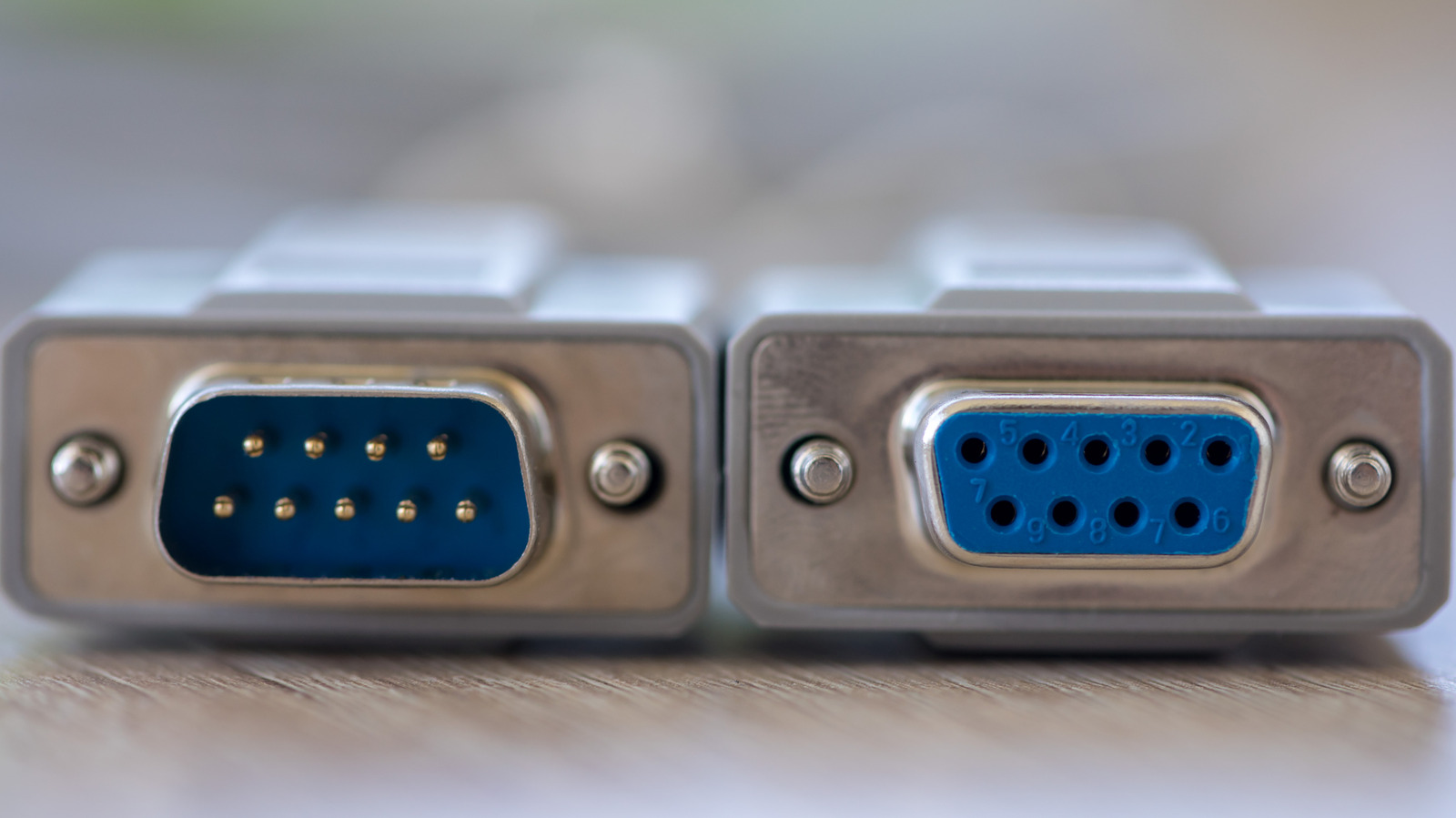
If you have ever spent a few minutes auditing the ports on the back of your television, you likely encountered a mysterious connector labeled “RS-232.” For most homeowners, this port is a digital ghost—a relic of an older era of computing that seems entirely out of place next to high-speed HDMI 2.1 ports and USB-C connectors.
While it may look like a dormant piece of hardware, the RS-232 port on TV hardware serves a very specific, high-utility purpose. It isn’t designed for streaming movies or connecting game consoles; instead, it is a dedicated communication channel that allows external devices to “talk” directly to the television’s internal processor.
For the average consumer, this port will likely remain unplugged for the life of the device. However, for professional AV installers, corporate IT managers, and high-end home automation enthusiasts, it is an indispensable tool for stability and precision control. Understanding what this port does requires a brief dive into the history of serial communication and the difference between consumer convenience and professional-grade reliability.
What Exactly is the RS-232 Port on Your TV?
RS-232 stands for “Recommended Standard 232.” At its core, it is a standard for serial communication—a method of transmitting data one bit at a time over a cable. Unlike a parallel port, which sends multiple bits of data simultaneously across several wires, a serial connection uses a single line to send a stream of data. While this sounds primitive by today’s standards, the simplicity of RS-232 is precisely why it persists.
In the context of a television, the RS-232 port acts as a command gateway. When a device is connected to this port, it can send specific text-based strings (commands) to the TV. For example, a command might look like a simple line of code that tells the TV to “Power On,” “Switch to HDMI 2,” or “Mute Volume.” Because these commands are sent electrically through a wire rather than via an infrared (IR) beam, they are not subject to interference, line-of-sight obstructions, or signal degradation.
Depending on the manufacturer, the physical appearance of the RS-232 port varies. Older or larger commercial displays often feature the classic DB-9 connector (a D-shaped port with nine pins). However, most modern consumer televisions use a 3.5mm mini-jack that looks identical to a headphone port. To use these, a specialized adapter cable is required to convert the 3.5mm jack into a standard serial interface that a computer or controller can recognize.
Why Your TV Has a Port from the 1960s
It may seem counterintuitive for a 4K OLED TV to include a communication standard that dates back decades. The reason lies in the distinction between “Consumer Electronics” and “Professional AV (Audio-Visual) Integration.”
Commercial and Enterprise Use
In environments like hotel rooms, airport lounges, and corporate boardrooms, TVs are rarely operated by a person with a handheld remote. Instead, they are managed by centralized control systems. If a hotel manager needs to update the welcome screen on 500 televisions simultaneously, or if a corporate office needs to ensure every screen in a building turns off at 6:00 PM, they cannot rely on IR remotes.
RS-232 provides a “hardwired” guarantee. By connecting each TV to a central controller via serial cables, technicians can ensure that commands are executed instantly, and reliably. This is why RS-232 is a mandatory feature for “Commercial Displays” or “Digital Signage” panels, and why many high-end consumer TVs retain the port to remain compatible with professional installation standards.
Diagnostics and Service
Beyond user control, the RS-232 port is a critical tool for repair technicians. When a TV suffers a catastrophic software failure that prevents the screen from turning on, the standard user interface is useless. Technicians can connect a laptop to the RS-232 port to access a “serial console.” This allows them to see the TV’s boot logs in real-time, diagnose hardware failures, and push firmware updates directly to the motherboard without needing the TV’s internal menus to be functional.
RS-232 vs. Modern Alternatives: HDMI-CEC and IP Control
If you have a modern smart TV, you might wonder why you need RS-232 when you already have HDMI-CEC or Wi-Fi control. While these newer technologies are more convenient, they operate differently and offer different levels of reliability.

- HDMI-CEC (Consumer Electronics Control): This allows devices to control each other over HDMI cables (e.g., turning on your TV when you turn on your PlayStation). While convenient, CEC is notoriously “buggy.” Different brands often implement the standard slightly differently, leading to situations where a device might unexpectedly turn on or fail to respond to a command.
- IP Control (Network/Wi-Fi): Most smart TVs can be controlled via an app or a network command. This is incredibly flexible but relies on the local network. If the Wi-Fi router crashes or the TV loses its IP address, the control is lost. Network latency can cause a noticeable delay between pressing a button and the TV responding.
- RS-232: This is the “gold standard” for reliability. There is no network to crash, no pairing process to fail, and no signal interference. It is a direct, physical link. In high-stakes environments—such as a government briefing room or a luxury home cinema—the reliability of a wired serial connection is preferred over the convenience of a wireless one.
Can the Average Home User Actually Use This?
For 99% of users, the answer is no. However, if you are venturing into the world of high-end home automation, the RS-232 port becomes a powerful asset. Systems like Control4, Crestron, or Savant often utilize RS-232 to integrate the TV into a larger ecosystem.
For example, a “Movie Night” scene in a smart home might involve the following simultaneous actions:
- The motorized curtains close.
- The lights dim to 10%.
- The AV receiver switches to the Blu-ray player.
- The TV powers on and switches to the correct HDMI input via RS-232.
Using RS-232 for the TV portion of this sequence ensures that the screen responds every single time, regardless of whether the Wi-Fi is acting up or the IR receiver is blocked by a soundbar.
To attempt this at home, a user would typically need a USB-to-RS-232 adapter for their computer, the correct 3.5mm-to-DB9 cable for their specific TV brand, and software capable of sending the manufacturer’s specific “hex codes” (the unique strings of characters the TV recognizes as commands). Because these codes are often not listed in the owner’s manual, enthusiasts usually rely on community databases or professional integration guides.
Comparison of TV Control Methods
| Method | Connection Type | Reliability | Ease of Setup | Primary Use Case |
|---|---|---|---|---|
| Infrared (IR) | Wireless (Line-of-Sight) | Moderate | Very Easy | Daily consumer use |
| HDMI-CEC | HDMI Cable | Low/Moderate | Easy | Basic device syncing |
| IP/Network | Wi-Fi/Ethernet | Moderate | Moderate | Smart apps & remote control |
| RS-232 | Serial Cable | Very High | Difficult | Professional AV & Automation |
Frequently Asked Questions
Will plugging something into the RS-232 port damage my TV?
If you use the correct cable and a properly configured controller, it is perfectly safe. However, you should never plug a standard audio cable or a random power adapter into this port. The RS-232 port expects specific voltage levels; introducing an incompatible electrical signal could potentially damage the TV’s communication board.

Why does my TV have this port if it’s “Smart”?
Being “Smart” refers to the TV’s ability to run apps and connect to the internet. The RS-232 port is about hardware management. Even the smartest TV in the world can have a software crash that freezes the network chip; the RS-232 port provides a secondary, hardware-level way to manage the device.

Can I use RS-232 to improve my picture quality?
No. The RS-232 port is strictly for control and diagnostic data. It has no impact on the video or audio signals passing through your HDMI or coaxial ports.
Is RS-232 the same as a COM port?
Essentially, yes. In Windows computing, “COM” (Communication) ports are the software designations for serial ports. When you connect an RS-232 cable to your PC via a USB adapter, your computer will assign it a COM port number (e.g., COM3) to facilitate the data exchange.
Final Thoughts
The RS-232 port is a testament to the idea that “newer” isn’t always “better.” While we have moved toward a world of wireless convenience and cloud-based control, the industrial world still relies on the unwavering stability of the serial connection. For the vast majority of us, the RS-232 port will remain a curious, empty hole on the back of our screens.
However, knowing its purpose helps demystify the hardware we bring into our homes. It reminds us that our consumer gadgets are often built upon professional foundations, ensuring that whether the TV is in a living room or a corporate boardroom, it can be managed with precision.
If you are planning a professional home theater installation or looking to integrate your TV into a custom automation system, check your manual for the RS-232 protocol specifications. It may be the key to a truly seamless smart home experience.
Do you have a “mystery port” on your electronics that you’ve never used? Let us know in the comments, and share this guide with anyone currently building their dream home cinema!