
Microsoft is accelerating its deployment cycle for Windows 11, pushing a series of rapid updates that highlight the central role of the Windows Insider Program in the operating system’s evolution. As of April 2026, the ecosystem is seeing a dual-track release strategy with the rollout of both Version 25H2 and the newer 26H1 build, signaling a shift toward more frequent, iterative improvements for global users.
For the millions of professionals and home users navigating these updates, the distinction between these versions and the channels used to test them has become critical. The current release landscape is dominated by Version 25H2, known as the Windows 11 2025 Update, while the cutting-edge 26H1 build has already begun appearing in official release channels as of late March via Wikipedia.
This aggressive update cadence underscores Microsoft’s commitment to the Windows NT architecture, ensuring that the OS remains competitive in an era of AI-driven computing and evolving hardware specifications. By leveraging a tiered testing structure, the company can refine system performance and stability before features reach the general public.
Navigating the Windows Insider Program Channels
The Windows Insider Program serves as the primary engine for OS development, allowing users to opt into various levels of stability and feature exposure. The program is currently segmented into four primary channels, each serving a specific purpose in the development lifecycle of builds like 26H1 and 25H2.
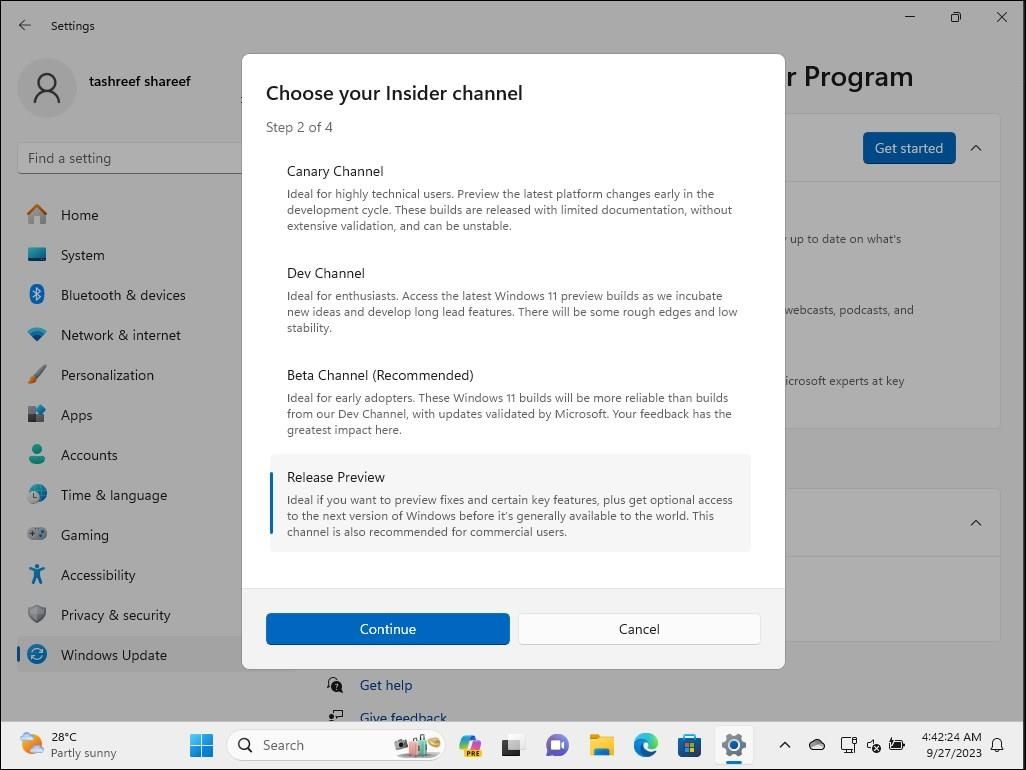
The Canary Channel represents the most experimental tier. We see used for the earliest versions of fresh features, often containing builds that are not yet fully polished. For instance, the Canary Channel saw the deployment of 26H1 build 10.0.29553.1000 on April 3, 2026 via Wikipedia.
The Dev Channel provides a more stable environment than Canary but still focuses on early-stage features. It currently hosts Version 25H2 (build 10.0.26300.8155), which was updated on April 3, 2026 via Wikipedia. This channel is ideal for developers who need to see where the OS is heading without the extreme volatility of the Canary builds.
The Beta Channel is designed for users who want a preview of features that are nearly ready for general availability. It focuses on quality and reliability, with the latest 25H2 build (10.0.26220.8148) released on April 3, 2026 via Wikipedia.
Finally, the Release Preview Channel is the final stop before a build reaches the general public. It allows Insiders to test the exact version of the OS that will be deployed to the wider population, such as the 25H2 build 10.0.26200.8116 released on March 26, 2026 via Wikipedia.
Hardware Requirements and Upgrade Paths
As Windows 11 continues to evolve, the hardware barrier for entry remains a significant point of discussion. To maintain system security and performance, Microsoft enforces strict minimum system requirements. These are not merely recommendations but are hard requirements for the official installation process via Microsoft.
The most critical of these is the Trusted Platform Module (TPM) version 2.0, which provides a hardware-based security foundation. Without TPM 2.0, the standard upgrade path is blocked. The system must support UEFI and Secure Boot to ensure the integrity of the boot process via Microsoft.
From a performance standpoint, the minimum specifications include:
- Processor: A compatible 64-bit processor or System on a Chip (SoC) running at 1 gigahertz (GHz) or faster with 2 or more cores.
- Memory: A minimum of 4 GB RAM.
- Storage: A storage device with 64 GB or more capacity.
- Graphics: A card compatible with DirectX 12 or later with a WDDM 2.0 driver.
- Display: A high definition (720p) display larger than 9 inches diagonally, supporting 8 bits per color channel.
For users upgrading from an older version of the OS, the Windows 11 Installation Assistant provides the most streamlined path. However, this tool is exclusively supported for PCs using x64 processors and does not run on Arm-based PCs via Microsoft. To apply the assistant, a PC must have Windows 10, version 2004 or higher installed, and at least 9 GB of free disk space available for the download via Microsoft.
Understanding the Impact of Version 25H2 and 26H1
The coexistence of Version 25H2 and 26H1 in the current release cycle represents a strategic approach to software deployment. Version 25H2, the “2025 Update,” serves as the stable baseline for most users, incorporating the refined features and security patches developed throughout the previous year. Its general availability is supported by a wide array of language options, available in 88 different languages via Wikipedia.
The introduction of 26H1, which reached a major milestone on March 26, 2026, suggests that Microsoft is moving toward a more fluid update model. Rather than one massive annual overhaul, the OS is seeing a steady stream of feature injections. This allows the company to respond more quickly to user feedback and emerging technology trends, such as the integration of more sophisticated AI tools within the shell.
For the average user, So that the “upgrade” experience is becoming less about a single, disruptive event and more about continuous improvement. By checking for updates through the Update & Security menu in Settings, users can determine if their specific hardware is eligible for the latest builds via Microsoft.
Comparison of Current Windows 11 Build Status
| Build/Version | Status | Key Date | Primary Target |
|---|---|---|---|
| 26H1 (10.0.28000.1764) | Latest Release | March 26, 2026 | General Availability |
| 25H2 (10.0.26200.8117) | Current Release | March 31, 2026 | General Availability |
| 26H1 (10.0.29553.1000) | Preview | April 3, 2026 | Canary Channel |
| 25H2 (10.0.26300.8155) | Preview | April 3, 2026 | Dev Channel |
| 25H2 (10.0.26220.8148) | Preview | April 3, 2026 | Beta Channel |
What This Means for the Future of Personal Computing
The current trajectory of Windows 11 updates indicates a broader shift in how Microsoft manages its flagship operating system. By diversifying the Insider Program into distinct risk-levels—Canary, Dev, Beta, and Release Preview—the company has created a sophisticated filter for bugs and performance regressions. This ensures that by the time a build like 26H1 reaches the general public, it has been vetted by thousands of users across diverse hardware configurations.
the insistence on TPM 2.0 and UEFI Secure Boot highlights a permanent shift toward “Security by Design.” While these requirements were initially controversial, they have enabled Microsoft to implement deeper security layers that protect against firmware-level attacks, a necessity in an increasingly volatile cybersecurity landscape.
For users still on Windows 10, the window for a seamless transition is narrowing. The requirement of version 2004 or higher to run the Installation Assistant serves as a reminder that the foundation for Windows 11 is built upon the later stages of Windows 10’s lifecycle via Microsoft. As more hardware is manufactured with native TPM 2.0 and 64-bit SoC architectures, the transition to Windows 11 will move from a choice to a standard.
The next confirmed checkpoint for the OS will be the continued rollout of 26H1 features to the wider public and the subsequent updates to the Beta and Dev channels throughout April 2026. Users are encouraged to monitor the official Windows release information status for known issues that may affect their specific device configurations before initiating an upgrade.
Do you use the Windows Insider Program to test new features, or do you prefer waiting for the general release? Share your experience in the comments below.
Keep reading