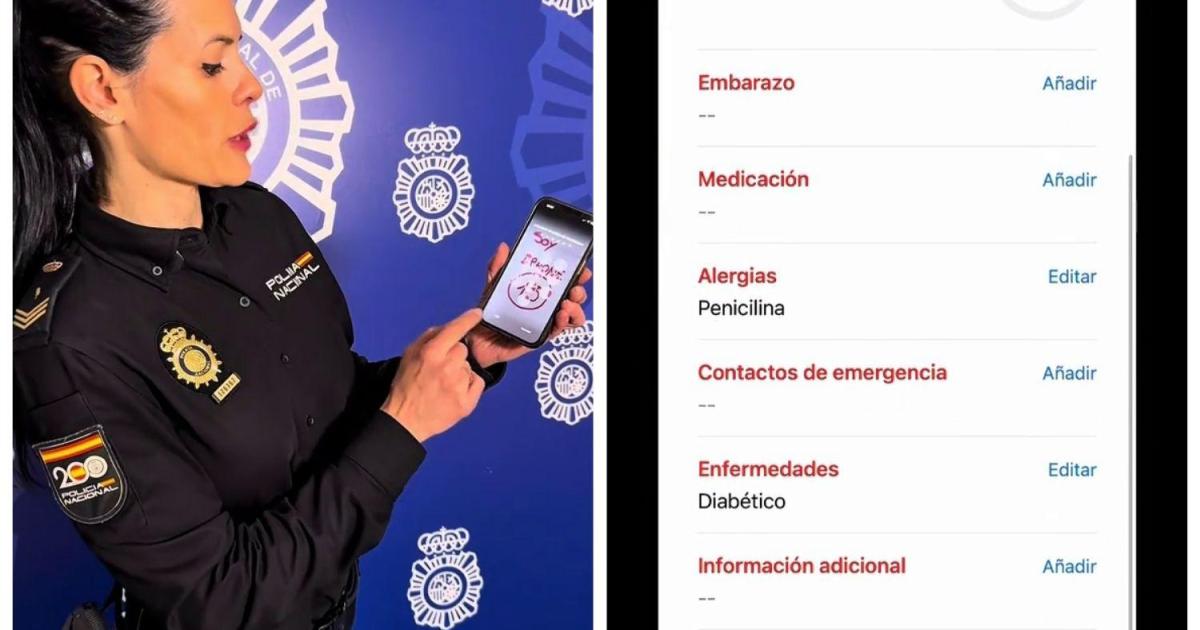
Life-Saving Phone Feature: Accessing Medical Information in Emergencies
In critical medical emergencies where an individual is unable to communicate, every second counts. Recognizing this, authorities are increasingly emphasizing a vital, yet often overlooked, feature on modern smartphones: the ability to access crucial medical information even when the device is locked. This functionality, now a standard offering on both Android and iOS devices, can be the difference between effective treatment and potentially life-threatening complications. The ability to quickly provide first responders with details about allergies, medical conditions, and emergency contacts is proving invaluable as public awareness grows.
The urgency stems from the reality that many emergencies occur when individuals are alone or incapacitated. Traditional methods of conveying medical information – a medical ID bracelet, a wallet card – rely on the person being conscious and able to alert others. Smartphones, however, are almost always present, offering a readily available source of potentially life-saving data. This feature isn’t about bypassing privacy; it’s about providing essential information to those who need it most, when it matters most.
The Spanish National Police recently launched an information campaign to raise awareness about this critical tool, highlighting its potential to significantly improve emergency response times and outcomes. The campaign underscores the importance of proactively entering accurate and up-to-date medical information into your phone’s settings. This isn’t simply a technological convenience; it’s a proactive step towards personal safety and preparedness.
How It Works: Accessing Emergency Information on Your Smartphone
The specific method for accessing this information varies slightly depending on the smartphone’s operating system. On iPhones, the feature is called “Medical ID” and is integrated within the “Health” app. Android devices utilize a similar function known as “Emergency Information,” typically found within the device’s security settings. Crucially, accessing this information does not require knowing the phone’s passcode or unlocking the device.
First responders and medical personnel can access the emergency information directly from the lock screen, usually by tapping an “Emergency” button. This provides immediate access to pre-entered details, allowing them to tailor treatment accordingly. The design prioritizes privacy by limiting access to only this designated medical information, preventing unauthorized access to the rest of the phone’s contents.
@policia ¿Sabías esto? 🚨Activar esta función te llevará muy poco tiempo y podría ser de gran ayuda en casos de #emergencia 🆘Porque muchas veces somos los primeros en llegar a un #accidente o emergencia ¿Sabías esto? 🚨Activar esta función te llevará muy poco tiempo y podría ser de gran ayuda en casos de #emergencia 🆘Porque muchas veces somos los primeros en llegar a un o emergencia 📲¿Cómo hacerlo? ➡️Android: Ajustes -Seguridad y emergencias – Información médica ➡️iPhone: App salud – Ficha médica – Activar «mostrar bloqueado» Alergias, enfermedades, medicación o contactos pueden marcar la diferencia en una emergencia #sos #salud ♬ Human – Instrumental Version – Rex Banner
Setting Up Medical ID on iPhone
To configure Medical ID on an iPhone, open the “Health” app and select “Medical ID” located in the bottom right corner. Tap “Edit” and complete the relevant fields. It is essential to activate the “Show When Locked” option to ensure the information is accessible without unlocking the device. The available fields include date of birth, medical conditions, allergies, medications, emergency contacts, and additional notes. Providing comprehensive information significantly enhances the potential for appropriate medical care in an emergency.
Configuring Emergency Information on Android
The process for Android devices varies slightly depending on the manufacturer, but generally, you can access the feature through “Settings,” then “Security or Privacy,” and finally “Emergency Information.” Users of Samsung, Xiaomi, or Huawei devices will find this option in similar locations within their customized interfaces. As with iPhones, it’s crucial to enable the setting that allows the information to be displayed on the lock screen. This ensures that first responders can quickly access vital details without needing a passcode.
What Information Should You Include?
The most valuable information to include in your phone’s emergency settings encompasses details that could directly impact medical treatment. This includes your blood type, any allergies (especially to medications), chronic conditions such as diabetes or epilepsy, a list of current medications, and emergency contact information for family members or close friends. Providing accurate and comprehensive information can significantly aid medical professionals in delivering the most appropriate care.
Beyond medical conditions and medications, consider including any relevant medical history, such as previous surgeries or significant injuries. Also, clearly indicate any advance directives or healthcare proxies you have in place. The more information available, the better equipped first responders will be to make informed decisions in a time-sensitive situation.
Beyond the Basics: Additional Emergency Features
While the Medical ID/Emergency Information feature is a crucial step, it’s important to be aware of other emergency features available on smartphones. Many Android phones and newer iPhones also offer the ability to quickly call emergency services by pressing the power button multiple times. The Spanish National Police recently highlighted this feature, explaining that pressing the power button five times consecutively will initiate an emergency call after an eight-second countdown, allowing time to cancel if the activation was accidental.
both iOS and Android devices offer emergency SOS features that automatically contact emergency services and notify your emergency contacts. These features can be invaluable in situations where you are unable to make a call yourself. Familiarizing yourself with these features and ensuring they are properly configured can provide an added layer of security and peace of mind.
Key Takeaways
- Proactive Setup is Crucial: Take the time to enter accurate and up-to-date medical information into your smartphone’s emergency settings.
- Accessibility Without Unlocking: Ensure the “Show When Locked” (iOS) or equivalent setting is enabled to allow access to information without a passcode.
- Comprehensive Information: Include details about allergies, medical conditions, medications, blood type, and emergency contacts.
- Explore Additional Features: Familiarize yourself with other emergency features on your phone, such as emergency SOS and quick emergency call activation.
The ability to provide critical medical information in an emergency can be a life-saver. By taking a few minutes to configure these features on your smartphone, you are proactively preparing for the unexpected and potentially empowering first responders to deliver the best possible care. The Spanish National Police will continue its public awareness campaign throughout 2026, aiming to reach a wider audience and encourage widespread adoption of this vital safety feature. Stay informed about updates to these features and best practices for emergency preparedness by checking official government and public safety websites.
What steps will you take today to ensure your smartphone can speak for you in an emergency? Share your thoughts and experiences in the comments below, and please share this article with your friends and family to help spread awareness.
Worth a look