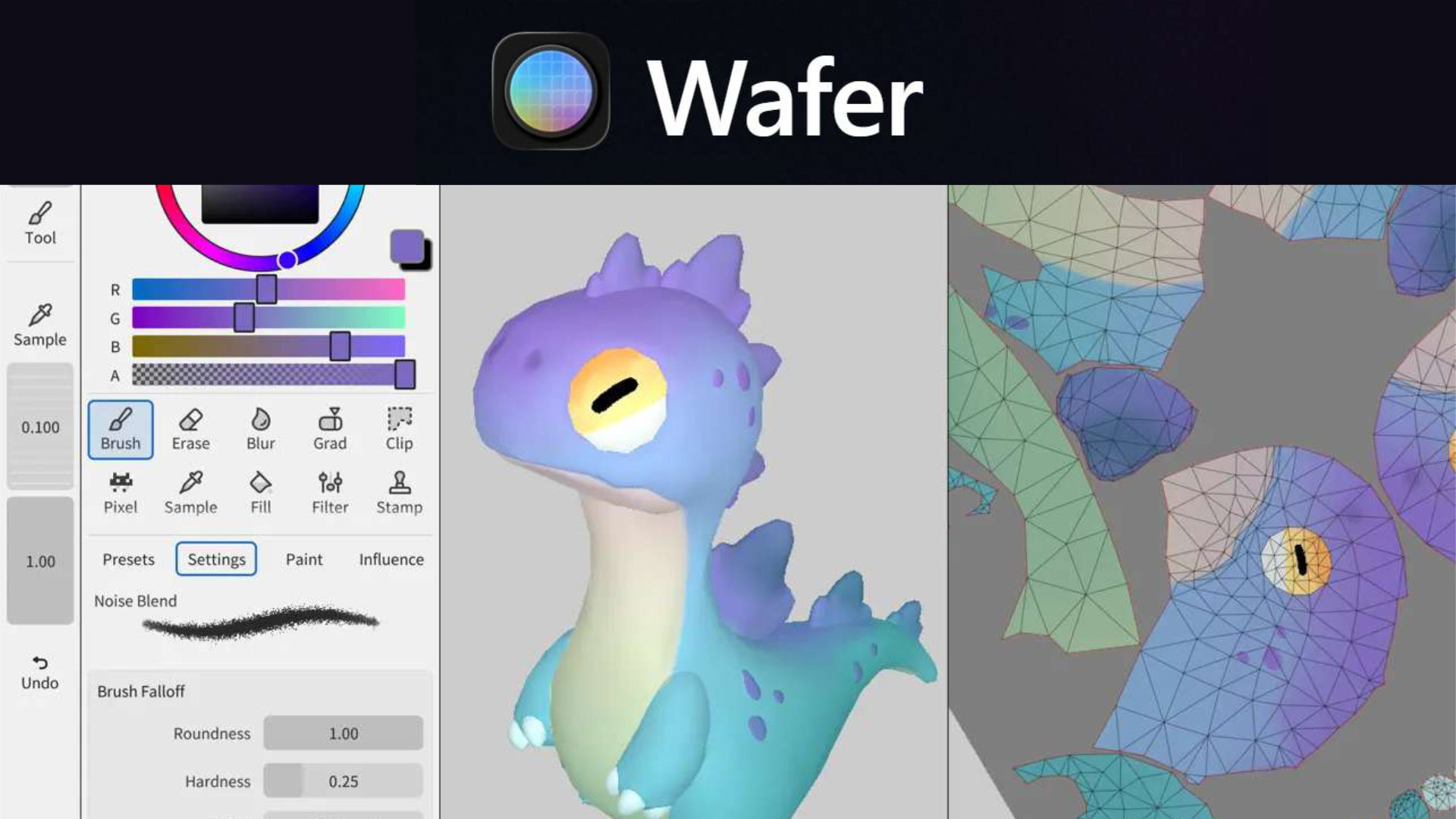
San Francisco, CA – A fresh iPad application, Wafer, is poised to reshape the landscape of 3D texturing, offering artists and designers a powerful tool for creating detailed, stylized assets. Developed by Sparseal SL, Wafer distinguishes itself through its focus on performance, compatibility and support for high-resolution textures, up to 24K on compatible iPad Pro models. The app, released on March 8, 2026, caters to professionals and hobbyists alike, providing a comprehensive suite of tools for painting directly onto 3D models.
Wafer’s arrival addresses a growing need for robust 3D texturing capabilities on mobile platforms. Although existing software often struggles with performance limitations when handling complex models and high-resolution textures, Wafer is engineered for efficiency. This allows artists to function seamlessly on intricate projects without sacrificing speed or responsiveness. The application’s unique architecture and optimized code base enable it to maintain a consistent brush speed regardless of texture resolution or layer count, a significant advantage for detailed work. The ability to work with textures up to 24K on the iPad Pro 3rd generation (2018) and 16K on other compatible iPads sets a new standard for mobile 3D painting.
A Familiar Workspace, Reimagined for 3D
Sparseal SL has intentionally designed Wafer to feel familiar to artists already proficient in 2D painting software. The interface incorporates core elements like brushes, layers, and masks, arranged in a layout that mirrors popular illustration programs. This minimizes the learning curve and allows artists to quickly adapt to the 3D workflow. The app boasts a comprehensive drawing toolset, including brushes with full pressure and tilt support, lasso tools, gradients, wet painting, and blur effects. These tools operate directly on 3D geometry, providing a natural and intuitive painting experience.
Layers are central to Wafer’s workflow, offering a full layer system with canvas and procedural fills. Artists can paint on layer masks for non-destructive editing and utilize color blend modes and opacity controls to achieve a wide range of effects. The symmetry tools, available in both 3D and 2D modes with configurable pivots, further streamline the texturing process, allowing for efficient creation of symmetrical designs. According to Sparseal, the app’s performance is stable and predictable, even with high texture resolutions and numerous layers.
PBR Workflows and Multi-Channel Painting
Wafer fully supports Physically Based Rendering (PBR) workflows, a standard in modern game development and visual effects. Artists can paint across multiple PBR channels – color, roughness, and metallic – simultaneously with any tool. This streamlines the texturing process and ensures consistency across different rendering engines. Beyond standard PBR channels, Wafer also allows for the definition of custom shader domain inputs per layer, opening up possibilities for stylized shaders and non-photorealistic rendering (NPR). The app’s capabilities in this area are highlighted in its App Store description.
The painting system itself is designed for precision and control. Artists can choose to paint directly on the 3D mesh or utilize the 2D UV view. The 3D brush falloff is engineered to eliminate seam artifacts, ensuring smooth and seamless textures. This is achieved through spherical and prism brush falloff computed in world space, a technique that avoids the projection issues common in other 3D painting applications.
Performance and Compatibility: A Focus on Accessibility
Sparseal SL emphasizes Wafer’s commitment to performance and accessibility. The application is optimized to run smoothly on a wide range of iPad models, including older devices. This is achieved through efficient resource management and a focus on minimizing power consumption, allowing for extended painting sessions without significant battery drain. The developers state that Wafer requires no special GPU or CPU features, delivering strong painting performance on devices with as little as 256 MB of RAM and OpenGL 2.0 support. This broad compatibility ensures that a large number of artists can benefit from Wafer’s capabilities.
The app’s ability to handle large textures is particularly noteworthy. Wafer supports textures up to 16K on any compatible iPad and up to 24K on the iPad Pro 3rd generation (2018). This high-resolution support is crucial for creating detailed and realistic textures for demanding projects. The performance remains consistent regardless of texture resolution or layer count, thanks to the app’s optimized architecture. Sparseal’s website details these performance features.
Project Management and Export Options
Wafer allows artists to work on multiple meshes and texture sets within a single document, facilitating complex projects. The application offers a configurable exporter that allows users to pack channels into any desired texture setup. This flexibility is essential for integrating textures into various game engines and rendering pipelines. The exporter also allows for control over resolution, format, texture content, and packing options.
Beyond the core painting tools, Wafer includes several additional features designed to enhance the creative workflow. A built-in image reference board allows artists to easily access and organize inspiration. An influence system enables control over tool effects based on factors such as normals, topology, UV islands, or custom maps. An asset library provides a collection of stencils, triplanar projections, brush alphas, and decals to jumpstart projects.
Recent Updates and Improvements
Sparseal SL is actively developing and improving Wafer, with recent updates addressing stability and functionality. Version 1.1.2, released two days ago (March 11, 2026), fixed an issue where topology was lost on import and a crash that occurred when using the fill tool in the 2D view. Version 1.1.1, released five days ago (March 8, 2026), addressed a crash related to smudge samples accessing off-screen pixels. A new feature introduced in version 1.1.1 is support for transparent objects with filtered textures, expanding the app’s versatility.
The Future of Mobile 3D Texturing
Wafer represents a significant step forward in mobile 3D texturing. Its combination of performance, compatibility, and a user-friendly interface positions it as a compelling option for artists seeking a powerful and portable solution. The app’s support for high-resolution textures and PBR workflows makes it suitable for a wide range of projects, from game development to visual effects. As Sparseal SL continues to refine and expand Wafer’s capabilities, It’s likely to become an increasingly important tool for 3D artists worldwide.
The release of Wafer comes at a time when the demand for skilled 3D artists is growing rapidly. The app’s accessibility and ease of employ could support to lower the barrier to entry for aspiring artists, fostering a new generation of talent. The ability to create high-quality textures on an iPad opens up new possibilities for on-the-go creativity and collaboration.
The app is currently available for download on the App Store. Users can expect ongoing updates and improvements as Sparseal SL continues to develop and refine the application. The future looks bright for Wafer and the mobile 3D texturing landscape.
Keep an eye on Sparseal’s website for future updates and feature announcements. What are your thoughts on Wafer? Share your comments and experiences below!
Worth a look