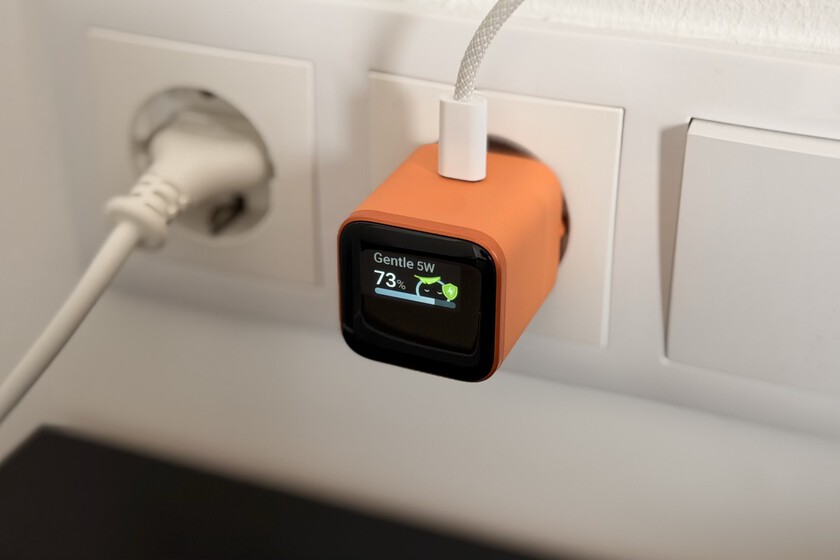
The Anker Nano Charger with a built-in display provides real-time wattage monitoring for connected devices, allowing users to track charging speeds and battery health directly from the power brick. According to official product specifications from Anker, this integration transforms a passive accessory into a diagnostic tool by visualizing the actual power draw of smartphones, tablets, and laptops.
Most modern chargers operate as “black boxes,” where users rely on device-side software or simple LED indicators to guess if a device is fast-charging. The Anker Nano with display replaces this ambiguity with a digital readout of the current wattage. This is particularly useful for verifying if a device has successfully negotiated a Power Delivery (PD) handshake or if a faulty cable is throttling the charging speed.
The charger utilizes Gallium Nitride (GaN) technology, which allows for higher efficiency and smaller physical dimensions compared to traditional silicon-based chargers. By reducing heat loss and energy waste, GaN components enable Anker to fit both the power circuitry and the digital display into a compact form factor that remains portable for travel.
Technical Specifications and Power Delivery Performance
The Anker Nano series focuses on high power density. Depending on the specific model variant, these chargers typically support USB-C Power Delivery (PD), ensuring compatibility with a wide range of electronics from iPhones to MacBook Airs. The integrated display monitors the output in watts (W), providing a live stream of data as the device moves through different charging stages—from the rapid “bulk” phase to the slower “trickle” charge as the battery nears 100%.
This transparency reveals how different devices manage power. For instance, a smartphone might start at 20W but drop to 5W as the battery fills to prevent overheating and preserve long-term cell health. According to technical documentation on Anker’s official site, the GaN architecture minimizes the footprint of the device while maintaining the thermal stability required to sustain high wattage without throttling.
The display serves as a hardware-level validator. If a user expects 30W charging but the screen reads 10W, it immediately signals a bottleneck—either the device’s internal battery management system is limiting the intake, or the USB-C cable lacks the necessary e-marker chip to support higher currents.
Practical Utility of Real-Time Wattage Monitoring
For the average consumer, the display is a convenience. For power users and tech enthusiasts, it is a diagnostic instrument. The ability to see the exact wattage helps identify “phantom” charging issues where a device appears to be plugged in but is not actually gaining charge. By checking the display, a user can confirm if the charger is delivering power or if the connection is dead.
Furthermore, the display provides insight into the efficiency of different charging cables. Not all USB-C cables are created equal; some are rated for 60W while others can handle 100W or 240W. By swapping cables while watching the Anker Nano display, users can empirically determine which cables in their collection are performing to spec and which are underperforming.
The compact design ensures that the addition of a screen does not significantly increase the bulk of the charger. It remains small enough to fit in a pocket or a small tech pouch, maintaining the “Nano” branding’s promise of portability without sacrificing the utility of a full-sized desktop power meter.
Comparison: Display Chargers vs. Standard GaN Bricks
Standard GaN chargers offer the same raw power and efficiency as the Nano with display, but they lack the feedback loop. In a standard setup, the only way to verify charging speed is through third-party apps (which may not be accurate) or by timing the charge from 0% to 100%.
The Anker Nano with display removes this guesswork. While it may carry a slight price premium over the non-display versions, the value lies in the data. Users can see exactly when a device enters a “slow charging” mode, which is often a sign that the device is overheating or that the power source is insufficient for the device’s peak demand.
From a safety perspective, seeing a sudden drop in wattage can alert a user to a loose connection or a failing cable before it causes a short circuit or damages the device’s charging port. This level of visibility is typically reserved for expensive laboratory power supplies, now miniaturized for consumer use.
The next anticipated development in this product line is the further integration of smarter power distribution across multi-port versions of these chargers, potentially showing individual wattage for each port simultaneously. Anker continues to update its product lineup to meet evolving USB-C standards.
Do you use power monitoring to track your battery health, or do you prefer a simple “plug and forget” experience? Share your thoughts in the comments below.
Keep reading