
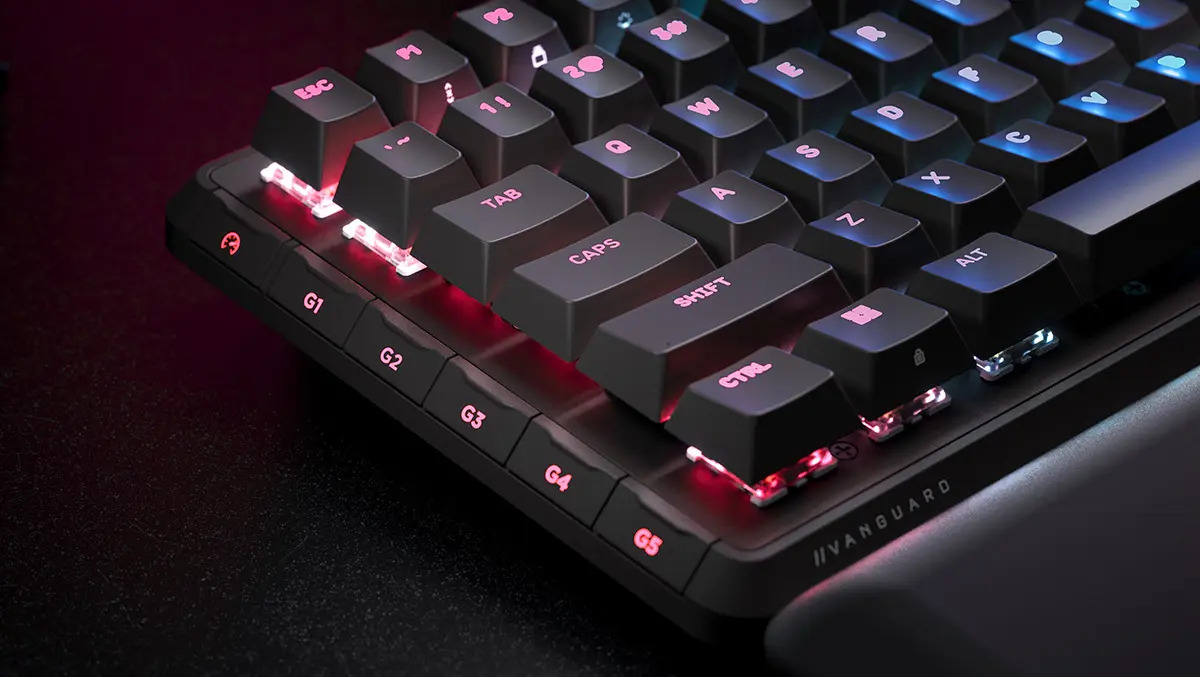
Corsair Vanguard pro 96 Review: The Gamer’s Keyboard, Reimagined
The competitive gaming landscape demands precision, customization, and a setup that doesn’t compromise desk space. Corsair, a long-standing leader in gaming peripherals, directly addresses these needs with the Vanguard Pro 96 wired gaming keyboard. building upon the legacy of their acclaimed K70 series, the Vanguard Pro 96 isn’t simply an iteration - it’s a thoughtful redesign that prioritizes functionality and a streamlined user experience. This review delves into the features, performance, and overall value of this compelling new keyboard, offering a detailed assessment for gamers of all levels.
A New Naming Convention & Compact Design: Solving a Long-Standing Issue
for years, Corsair’s keyboard naming system has been a source of confusion. The Vanguard Pro 96 signals a welcome shift, adopting a more intuitive approach that clearly reflects the product’s specifications. The “96” denotes a 96% layout – a sweet spot between full-size functionality and the space-saving benefits of tenkeyless (TKL) designs.
Crucially, the Vanguard Pro 96 isn’t just a smaller keyboard. It boasts a 25% reduction in footprint compared to standard keyboards, freeing up valuable desk real estate for mouse movement and othre essential peripherals. This is achieved without sacrificing core functionality; it retains the full complement of keys and adds six dedicated macro keys on the left side, providing immediate access to crucial commands.
Feature-Rich Innovation: LCD Screen, Rotary Dial & Integrated AI Access
Corsair hasn’t stopped at a compact layout. The Vanguard Pro 96 is packed with innovative features:
* Integrated 19″ LCD Screen (320 x 170): This vibrant screen isn’t a gimmick. It displays system monitoring details, custom images, GIFs, or even integrates with streaming software. Updating the screen’s content is easily managed through Corsair’s web-based hub (more on that later).
* Multifunction Rotary Dial: positioned prominently, the dial defaults to volume control but is fully customizable. Gamers can map it to frequently used functions, offering tactile control without lifting their hands from the keyboard.
* Elgato Streamdeck Integration: A dedicated key launches the Elgato Virtual Streamdeck, transforming the LCD screen into a programmable control panel for streaming and content creation. Note: This feature was in beta during testing and will be fully functional with a subsequent software patch.
* CoPilot AI Access: Pressing the same key (with the FN key modifier) instantly activates the Microsoft CoPilot AI app, bringing the power of artificial intelligence directly to your fingertips. This integration mirrors the functionality found in certified Microsoft CoPilot laptops, offering on-demand assistance and information.
* Adjustable Comfort: A comfortable wrist rest is included, and adjustable feet allow users to customize the keyboard’s angle for optimal ergonomics.
MGX Hyperdrive switches: Precision and Customization
At the heart of the Vanguard pro 96 lies Corsair’s MGX hyperdrive hall effect magnetic switches. These switches represent a significant advancement over conventional mechanical switches. Instead of physical contact, they utilize magnetic sensors, resulting in:
* Enhanced Durability: Magnetic sensors eliminate the wear and tear associated with mechanical contacts, extending the lifespan of the switches.
* Customizable Actuation: Users can fine-tune the actuation point – the distance a key needs to be pressed to register – and sensitivity of each key,tailoring the keyboard to their individual preferences.
* Hot-Swappability: The switches are hot-swappable, compatible with both 3-pin and 5-pin mechanical switches, allowing for easy customization and replacement. A key extraction tool is included for seamless switch swapping.
* Surprisingly Quiet Operation: Despite being mechanical, the Vanguard Pro 96 offers a surprisingly muted typing experience. Soundproofing layers dampen the typical “clack” of mechanical keyboards, making it a more considerate option for shared spaces.
Software & Connectivity: A Move Towards Web-Based Control
Corsair is transitioning towards a web-based hub for managing its newer devices, eliminating the need to download and install the often-bloated iCUE request. Accessing the hub through a web browser allows for easy customization of RGB lighting, macro programming, actuation sensitivity, and LCD screen content. Firmware updates are also delivered seamlessly through the web interface.
While this approach offers convenience, it currently presents a slight drawback for users with a diverse Corsair ecosystem. As of this review,the Vanguard Pro





