firefox Sharpened: New Protections Block Sophisticated Fingerprinting Techniques
Mozilla continues to lead the charge in online privacy with the latest update to Firefox, rolling out enhanced fingerprinting protections in version 145. These aren’t your average cookie blockers; we’re talking about defenses against increasingly clever methods websites use to identify you – even without cookies.This article breaks down what’s happening, why it matters, and how you can benefit.
Why Fingerprinting Matters – And Why Its Different
Your likely familiar with tracking cookies. But as users become more privacy-conscious and block these cookies,websites have turned to a more insidious technique: browser fingerprinting.This involves collecting a vast array of details about your system – far beyond just your IP address – to create a unique “fingerprint” that identifies you across the web.
Think of it like this: cookies are a name tag, easily discarded. Fingerprinting is more like a detailed physical description, much harder to change.
What Information Are Trackers Gathering?
It’s surprisingly detailed. Trackers aren’t just looking at your browser version. They’re digging into:
* fonts: The fonts installed on your system.
* Hardware Specs: CPU core count, multitouch support, and even the dimensions of your screen (including the dock or taskbar).
* Canvas Rendering: How your browser renders images using the <canvas> element.
* Scripts: Details about your hardware and software habitat.
This data is combined to create a profile unique to your browser and device. It’s used for targeted advertising, but also for more concerning purposes like price discrimination or even security profiling.
Firefox’s New Arsenal Against Fingerprinting
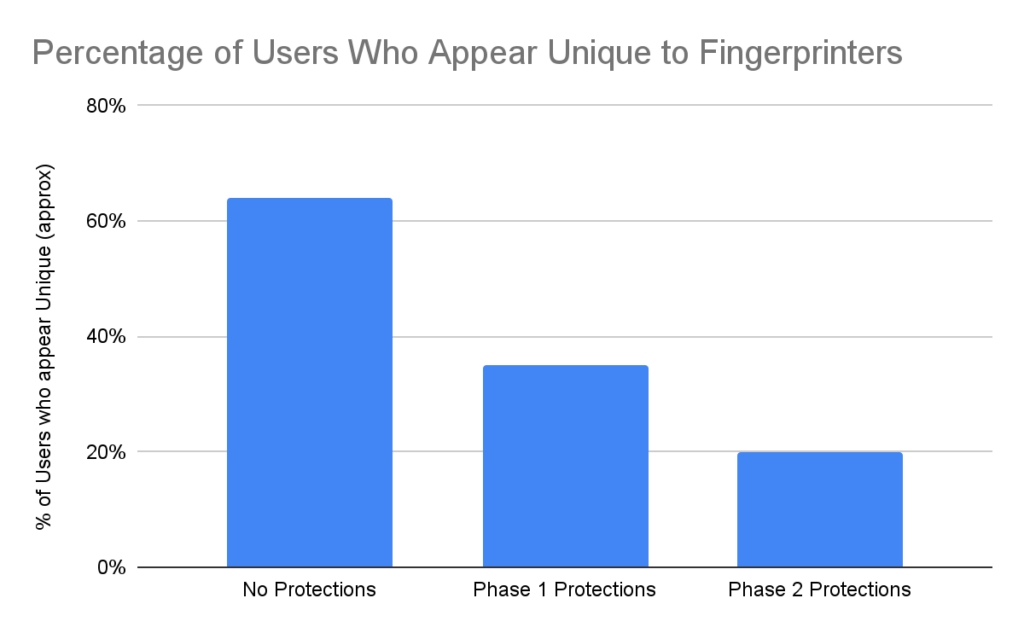
Firefox 145 introduces a suite of techniques to disrupt this fingerprinting process. Mozilla isn’t simply blocking this information outright, which could break website functionality.Instead, they’re strategically altering the data reported to trackers. Here’s how:
* Canvas Randomization: When a website tries to read data from a canvas element (used for image manipulation), Firefox injects random noise. This makes the fingerprint less accurate. If the website simply displays the image, you won’t notice a difference.
* font Masking: Firefox won’t use locally installed fonts for rendering web pages, preventing websites from identifying you based on your font choices.
* Multitouch Support Obfuscation: Firefox reports limited multitouch support: 0, 1, or 5 touches, regardless of your device’s actual capabilities.
* Screen Resolution Adjustment: The reported screen resolution excludes the dock or taskbar.
* CPU Core Reporting: Firefox reports either 4 or 8 CPU cores, regardless of your actual processor.
These changes are subtle enough to maintain website compatibility, but meaningful enough to throw off fingerprinting algorithms.
How to Activate enhanced Fingerprint Protection
The good news is you don’t need to be a tech expert to benefit. These protections are not enabled by default to avoid potential website compatibility issues. Though, activating them is simple:
* Private Browsing Mode: Fingerprint protection is automatically enabled in private Browsing.
* Strict Enhanced Tracking Protection: Set your Enhanced Tracking Protection to “Strict” in Firefox’s settings.(Settings > Privacy & Security > Enhanced Tracking Protection).
[Image of Firefox Enhanced Tracking Protections settings]
Building on Existing Protections
This update builds on Firefox’s already robust privacy features, including:
* Total Cookie Protection: Prevents cross-site tracking cookies from following you around the web.
* Social Media Tracker Blocking: Blocks trackers from major social media platforms.
* Cryptominer Blocking: Protects against malicious cryptomining scripts.
* Fingerprinter Blocking: Blocks known fingerprinting scripts.
Get the Update & Stay Protected
Firefox 145 is available now. You can download it directly from Mozilla’s FTP servers.
By embracing these new protections, you’re taking a significant step towards reclaiming your online privacy. Mozilla’s commitment to user privacy is a welcome change in a digital landscape increasingly dominated by tracking and data collection.
Further Reading:
*[[[[
Worth a look