Take Control of Your android Devices: Google Play’s New Remote App Uninstall Feature
Are you tired of digging through multiple Android devices to uninstall apps you no longer need? Google is about to make managing your app library significantly easier. A new update to the Google Play Store will soon allow you to remotely uninstall apps from any device linked to your Google account – without even touching that device.This is a game-changer for users with multiple phones, tablets, or Chromebooks.
What’s Changing with the Google Play Store?
the update, rolling out as version 48.8 (as of November 10, 2023, according to the Google System Release Notes), introduces a long-awaited feature: remote app uninstallation. Currently, Google Play allows remote installation of apps. this new functionality simply extends that convenience to the other side of the app lifecycle.
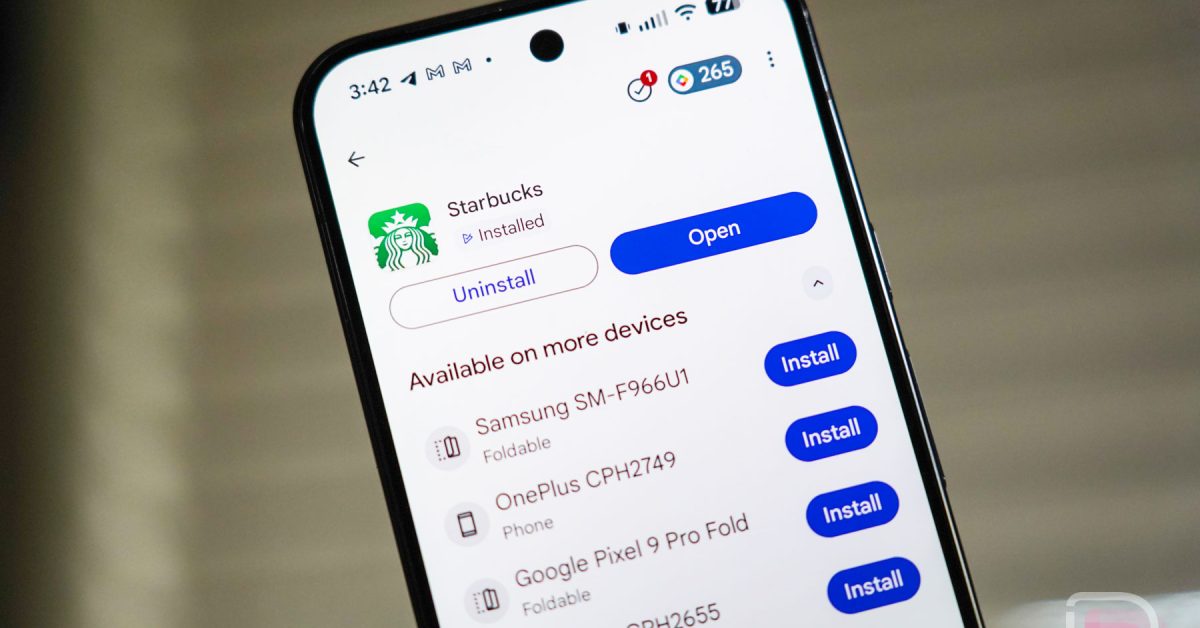
Instead of needing physical access to each device or navigating through the “Manage apps” section, you’ll soon find an “Uninstall” option directly on the app listing page within the Play Store. This will be presented alongside the option to choose which device you want to uninstall the app from.
How Will This Work in Practice?
Here’s a breakdown of how the feature is expected to function:
* Locate the App: Open the Google Play Store on any of your android devices.
* Navigate to the listing: Find the app you wish to remove.
* Select Your Device: Look for the “Uninstall” option.A list of devices where the app is installed will appear.
* Confirm Uninstall: Choose the target device and confirm the uninstallation.
This streamlined process eliminates the frustration of managing apps across multiple devices, saving you valuable time and effort. It’s a important improvement over the current method, which can be cumbersome, especially for users with a large number of installed apps.
Why This Matters: Benefits for Android Users
This update isn’t just about convenience; it addresses several key pain points for Android users:
* Simplified Device Management: Easily declutter apps across all your devices from a single location.
* Enhanced Security: Quickly remove perhaps harmful or unwanted apps from any device, improving your overall security posture.
* Optimized Storage: Free up storage space on devices you rarely use without needing to physically access them.
* Improved User Experience: A cleaner, more organized app library leads to a smoother and more enjoyable Android experience.
Recent data from Statista shows that the average smartphone user has approximately 40 apps installed on their device. Managing this many apps can quickly become overwhelming, making this feature incredibly valuable.
beyond Uninstalling: Related App Management features
Google has been steadily improving app management within the Play Store. Here are a few related features to be aware of:
* Remote App Installation: As mentioned, you can already install apps on other devices from an app’s listing page.
* App Updates: Manage app updates across all your devices from the “Manage apps & device” section.
* Google Play Pass: A subscription service offering access to a curated library of apps and games without ads or in-app purchases.
* Family library: Share purchased apps with up to five family members.
Troubleshooting & What to Do If You Don’t See the Update
The rollout of the v48.8 update is gradual.If you haven’t received it yet, don’t worry! Here are a few things you can try:
* Check for Updates: Manually check for updates in the Google Play Store (Profile icon > Settings > About > Play Store version).
* Clear Cache: Clear the cache and data of the google Play Store app (Settings > Apps > Google Play Store > Storage).
* Restart Your Device: A simple restart can sometimes trigger the update process.
Addressing Common Questions About Remote App Uninstall
Let’s tackle some frequently asked questions:
**Q:
Keep reading