In the rapidly evolving landscape of consumer electronics, the choice between connectivity standards often leaves users weighing the benefits of legacy reliability against modern flexibility. As we navigate the technological ecosystem of 2026, the debate surrounding USB-C versus HDMI for display connectivity remains a central consideration for professionals, gamers, and casual users alike. Understanding the nuances of these interfaces is essential for optimizing your digital workspace and ensuring seamless data transmission and power delivery.
The Universal Serial Bus (USB) standard, developed by the USB Implementers Forum (USB-IF), has undergone significant transformation since its introduction in 1996. While originally designed to standardize the connection of peripherals—replacing legacy interfaces like serial and parallel ports—the modern USB-C connector has evolved into a comprehensive solution for power, data, and video signals. This shift marks a pivotal moment in how we interact with hardware, moving toward a more unified and simplified connection architecture across laptops, displays, and peripheral devices.
The Evolution of Connectivity: From Legacy Ports to USB-C
To appreciate the current state of hardware connectivity, one must look at the trajectory of the USB standard. Over the last three decades, the USB-IF has refined the specification through four primary generations: USB 1.x, USB 2.0, USB 3.x, and the current USB4 standard. Each iteration has expanded the capabilities of the interface, transitioning from simple data transfer to robust power delivery—capable of handling up to 240W in the latest configurations—and high-bandwidth video output.
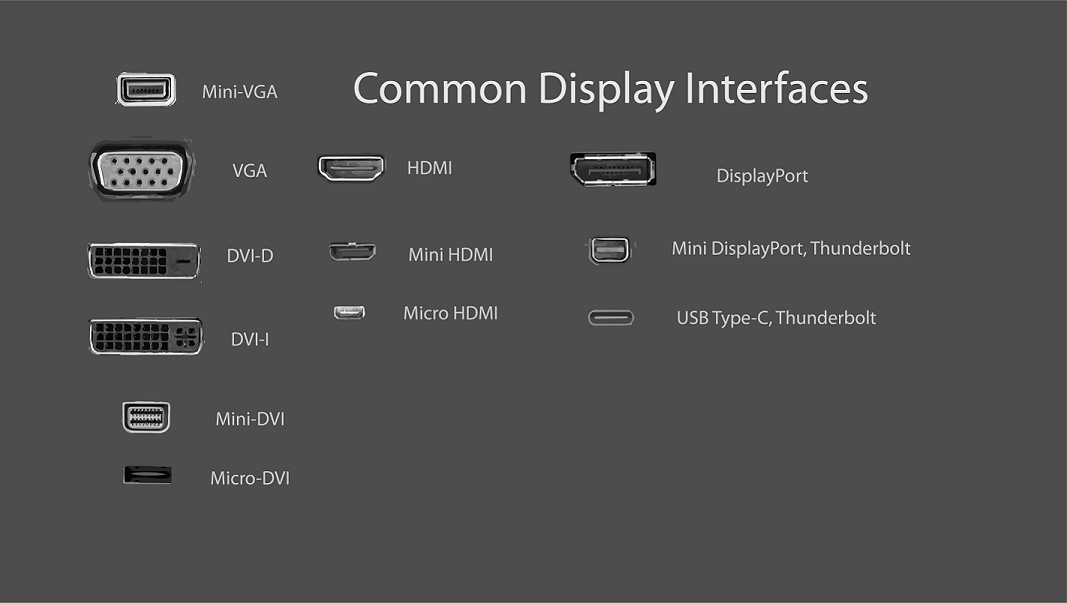
The transition toward USB-C is not merely about physical shape; it is about functional convergence. By integrating DisplayPort Alt Mode, USB-C allows for the transmission of video signals over the same physical medium used for charging and data transfer. This capability has effectively repositioned the port as a “do-it-all” solution, reducing cable clutter and simplifying the desk setup for many users. For those operating in a mobile-first environment, this versatility is a significant advantage, as it enables a single-cable docking experience where a laptop is charged while simultaneously driving a high-resolution display.
HDMI: The Dedicated Standard for Multimedia
While USB-C offers unparalleled versatility, HDMI (High-Definition Multimedia Interface) maintains a dominant position as the industry standard for dedicated audio and video transmission. HDMI was specifically engineered for home theater and professional multimedia environments, prioritizing the reliable delivery of high-definition video and multi-channel audio. Its ubiquity across televisions, gaming consoles, and projectors ensures that it remains the most compatible option for non-computer-specific displays.
For users who do not require the power delivery or data transfer features of USB-C, HDMI remains a highly effective, “plug-and-play” solution. Because HDMI is a dedicated video protocol, it often avoids the complexity associated with USB-C’s tiered capabilities, where not every USB-C port supports video output or the same data speeds. When selecting a display connection, it is crucial to verify the specific capabilities of your hardware ports, as the physical shape of a USB-C connector does not guarantee support for high-resolution video transmission.
Comparing Performance and Utility in 2026
When choosing between these standards, the primary factor should be the nature of your workspace. If you are building a workstation that requires frequent laptop docking, high-speed data transfer to external storage, and power delivery via a single cable, USB-C—specifically when paired with a compatible hub—is the superior choice. Its ability to act as a multipurpose interface aligns with the modern trend of minimalist, efficient desk setups.
Conversely, if your primary goal is connecting a gaming console, a media player, or a stationary display where power delivery is not a requirement, HDMI offers a straightforward, robust connection. The dedicated nature of HDMI ensures that you are utilizing a protocol built exclusively for video and audio, which can sometimes provide a more stable experience in fixed multimedia environments.
Key Considerations for Your Setup
- Versatility: USB-C is the winner for users who want a single-cable solution for power, data, and video.
- Compatibility: HDMI remains the most widely supported standard for televisions and home entertainment devices.
- Hardware Requirements: Always check your device specifications to ensure your USB-C port supports “DisplayPort Alt Mode,” as this is required for video output.
- Cable Quality: Regardless of the standard, using high-quality cables is essential to ensure that you are not bottlenecking your signal or power delivery.
As we move further into 2026, the reliance on these standards will likely continue to shift as hardware manufacturers integrate more USB4-compliant ports, potentially narrowing the gap between general-purpose data ports and dedicated video outputs. Staying informed about the capabilities of your specific hardware is the best way to ensure you are getting the most out of your peripherals.
We encourage our readers to share their experiences with different display connectivity standards in the comments section below. Have you transitioned to a full USB-C setup, or do you prefer the reliability of traditional HDMI? Your insights help our community navigate the complexities of modern tech integration.
Keep reading