
For many Android users, a sudden dip in available storage can be a source of frustration, especially when the culprit is a system service they didn’t explicitly install. Recently, a growing number of users have noticed that Android AICore—the system component responsible for powering on-device generative AI—occasionally consumes a significant and unexpected amount of disk space.
As the industry shifts toward local processing to enhance privacy and reduce latency, the footprint of these AI models has become a primary point of contention. Google has now provided a more detailed explanation for why these storage spikes occur, centering on the inherent size of the models and the way they are updated and managed on the device.
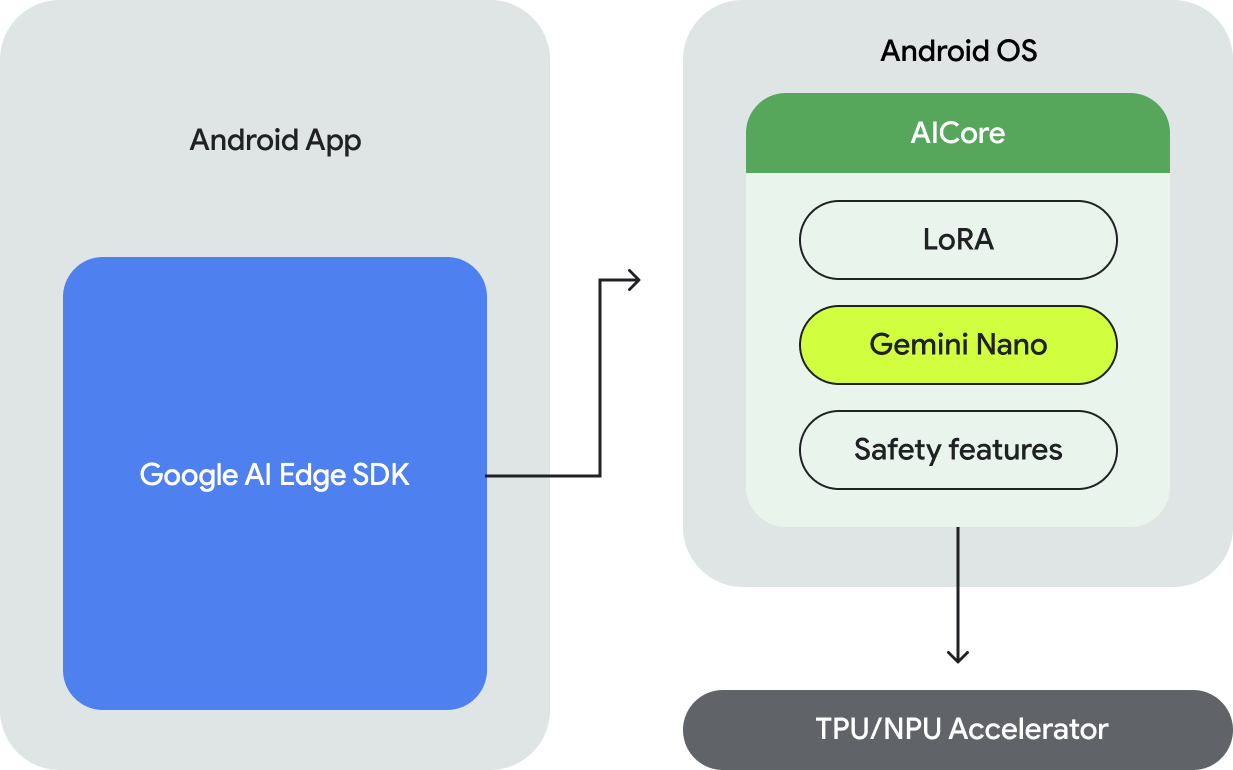
Android AICore is the architectural backbone that allows devices to run generative AI features directly on your Android phone or tablet’s hardware
. By leveraging the device’s NPU (Neural Processing Unit) and GPU, it enables features like smart replies and text summarization without needing to send data to a remote cloud server. However, the “brain” behind these features—specifically models like Gemini Nano—requires substantial storage to function.
The Mechanics of the Storage Spike
The primary reason for the occasional storage spikes is the nature of the Large Language Models (LLMs) that AICore manages. Gemini Nano, the foundation model used for on-device tasks, is designed to be efficient, but it remains a massive file. When Google pushes an update to the model to improve accuracy, safety, or language support, the system must often download a latest version of the model even as the old one is still active.
This “double-buffering” effect can lead to a temporary surge in storage usage. Until the system successfully verifies the new model and purges the outdated version, both may reside on the disk simultaneously. For users on devices with limited internal storage, this can manifest as a sudden loss of several gigabytes of space.
AICore is not a static application but a system service that evolves. According to Google’s Android Developers documentation, AICore leverages device hardware to keep the model up-to-date, ensuring that the on-device AI remains current without requiring a full operating system update.
Balancing Privacy and Disk Space
The decision to move these models on-device is a strategic trade-off. By running Gemini Nano locally, Google can offer features that work without a network connection and provide stronger privacy safeguards, as sensitive data does not depart the device. However, the cost of this privacy is the “storage tax” paid by the user.
For developers and power users, the impact is even more pronounced. The AICore Developer Preview program allows users to opt in via the Play Store to test preview models. This enables the downloading of experimental models for early prototyping, which can further inflate the storage requirements of the AICore service as detailed in the ML Kit documentation.
Who is affected by AICore storage usage?
- Pixel and High-End Android Users: Those with devices powerful enough to support Gemini Nano are the primary users of AICore.
- Users with Limited Storage: Individuals with 128GB or 256GB variants of devices may feel the impact of multi-gigabyte AI models more acutely.
- Early Adopters: Those enrolled in developer previews who download multiple versions of AI models for testing.
What Happens Next for Android AI?
As Google continues to refine its on-device AI strategy, the focus is shifting toward model compression and more efficient delivery mechanisms. The goal is to reduce the “spike” during updates and minimize the overall footprint of Gemini Nano without sacrificing the quality of the generative output.
While there is currently no official “toggle” in the standard settings to disable AICore without affecting AI-driven features, users can monitor their storage usage in the system settings to see how much space is being allocated to the service. As Android evolves, It’s expected that more granular controls over which AI models are downloaded and kept on-device will be introduced.
The next major milestone for on-device AI integration is expected to coincide with the wider rollout of Android 16, which aims to further optimize how system services manage large-scale machine learning assets.
Do you find that AI features are worth the storage trade-off on your device? Share your experience with Android AICore in the comments below.
Keep reading