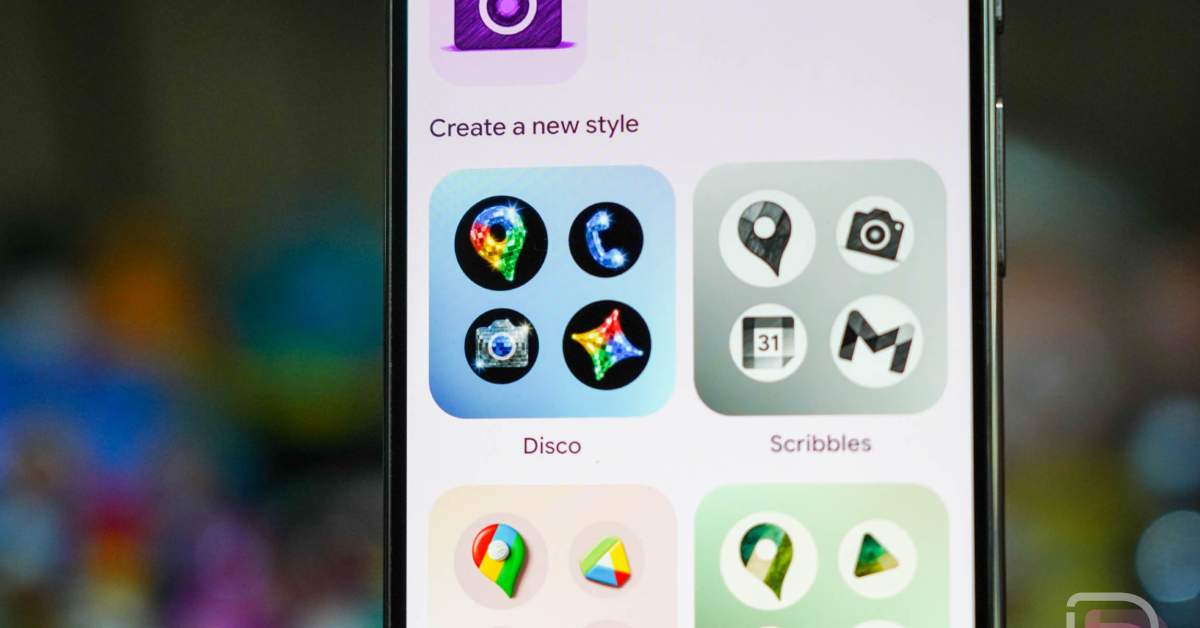
For Google Pixel users, the aesthetic customization of the home screen has long been a delicate balance between Google’s curated design language and the user’s desire for personal expression. Today, the tech giant expanded its official, first-party customization options by introducing a new “Disco” icon style. This update marks the latest evolution in the company’s approach to system-level theming, which first debuted earlier this year as part of a broader push to offer generative-style icon packs directly through the Android interface.
The “Disco” pack, as the name suggests, applies a shimmering, disco-ball-inspired aesthetic to the app icons on your Pixel device. This addition follows the initial rollout of custom icon styles in March 2026, which provided users with a handful of Google-approved themes. While many in the Android enthusiast community continue to advocate for native, unrestricted support for third-party icon packs—a feature standard on many other Android launchers—Google has maintained a strategy of providing a limited, high-quality selection of internally developed styles.
To access the new Disco icons, users can navigate to their home screen, perform a long-press, and select the “Wallpaper & style” menu. From there, selecting “Icons” and then the “Create” button will bring up the interface where the Disco option is now available. After selecting the style, users simply tap the download button located in the top right corner to apply the theme to their device.
Understanding the Shift in Pixel Customization
The introduction of the Disco theme highlights Google’s ongoing commitment to “Material You,” the design philosophy that emphasizes dynamic color and shape customization based on a user’s wallpaper. By controlling the icon packs directly, Google ensures that the visual experience remains cohesive and performs reliably across various Pixel hardware configurations. This controlled environment, while restrictive to some power users, provides a seamless “plug-and-play” experience that does not require the installation of third-party launcher software.

Interestingly, the rollout of the Disco style has coincided with the removal of the Spongebob-themed icons that were released during the initial March rollout. This suggests that Google is managing these icon packs as rotating, seasonal, or limited-time assets rather than a permanent, static library. For users who prefer a consistent home screen, this rotation keeps the interface feeling fresh, though it does mean that favorite themes may eventually be retired to make room for new additions.
Practical Tips for Managing Your Pixel Icons
If you are looking to customize your device, it is significant to remember that these tools are integrated directly into the system settings. The process is straightforward, but applying these styles will affect all compatible apps on your home screen. As of this writing, Google has not provided an official timeline for the next set of icon styles or hinted at whether it plans to open the platform to community-created themes.
For those who find the current selection insufficient, the community expectation remains that Google might eventually offer a more robust API for icon integration. However, as the company continues to focus on “agentic” capabilities and AI-driven experiences—such as the recent updates to Search intelligence and Gemini-powered features announced at Google I/O—the focus on manual customization may remain secondary to these broader AI-first initiatives. You can stay updated on the latest software developments for your device by checking the official Google Pixel Support portal.
What Comes Next for Pixel Personalization?
As Google shifts its internal focus toward more complex AI-driven interactions, the role of simple aesthetic updates like the Disco icon pack acts as a bridge between functional utility and user-focused design. While the tech community speculates on what might replace the current rotation of icons, there has been no official confirmation regarding future themes or potential changes to the “Wallpaper & style” menu functionality.

The next major checkpoint for Google’s mobile software ecosystem remains the upcoming quarterly feature drop, where users typically receive system-wide performance improvements and new interface capabilities. We will continue to monitor the “Wallpaper & style” menu for any further, unannounced additions to the library. We invite our readers to share their thoughts on the new Disco icons in the comments section below—do you prefer Google’s curated approach, or are you still holding out for full third-party icon pack support?
Worth a look