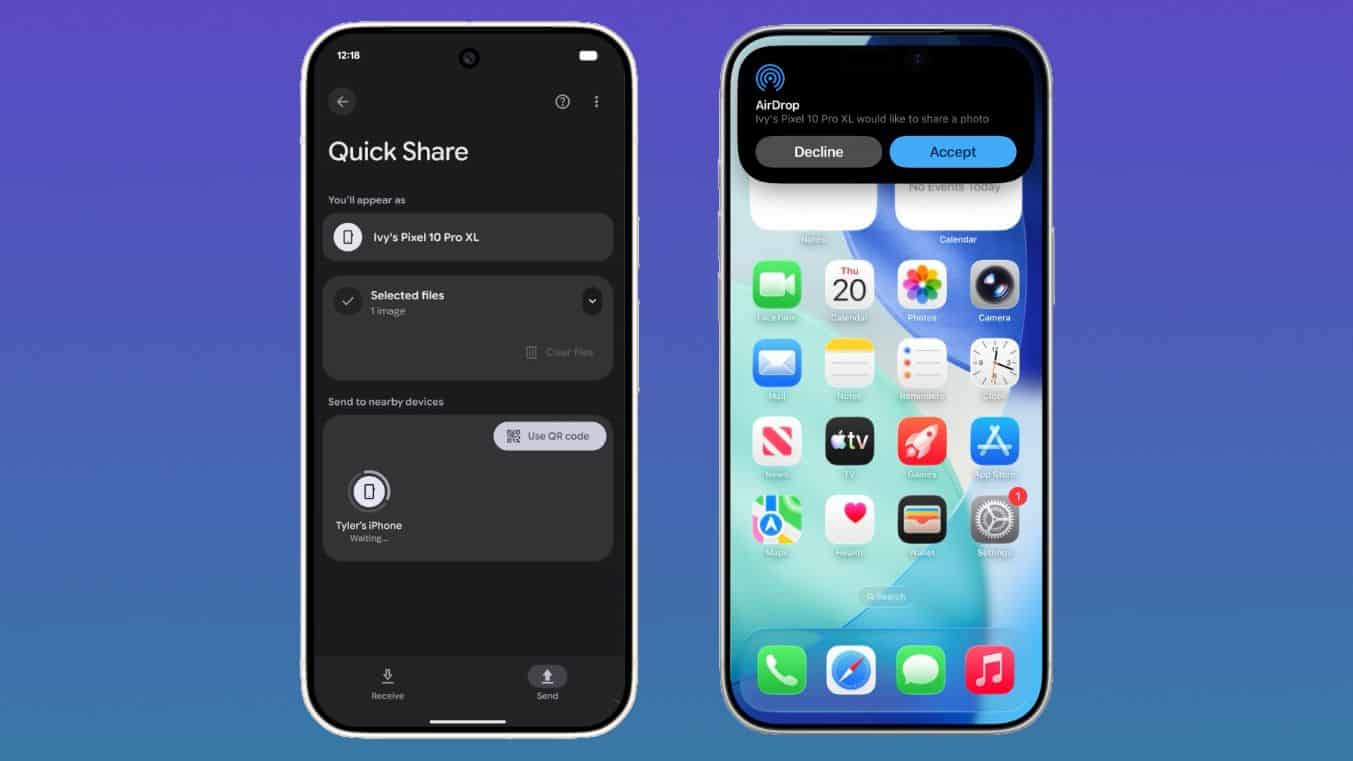
SAN FRANCISCO — Google’s Quick Share feature has taken a major leap forward, now enabling Android users to send files to iPhones—without requiring both parties to install third-party apps. The update, confirmed by Google in May 2024, mirrors Apple’s AirDrop functionality, a long-requested feature that finally bridges the gap between the two dominant mobile ecosystems.
For years, Android users frustrated by Apple’s walled-garden approach to file sharing have relied on workarounds like email, cloud services, or Bluetooth transfers. But Google’s latest iteration of Quick Share—now available on Pixel 8 and later devices, as well as select Samsung, OnePlus, and Xiaomi phones—automatically detects nearby iPhones (running iOS 17 or later) and offers a one-tap transfer option. The move isn’t just a technical win; it’s a strategic play to reduce friction in Google’s push for Android-to-iPhone interoperability, especially as AI-driven features and cross-platform services like Google Photos and Drive gain traction.
Yet the rollout isn’t universal. While Google has confirmed that Quick Share now supports iPhone sharing on “many” Android devices, the exact list of compatible models remains unclear. Early adopters report success with Pixel 8 Pro, Galaxy S23 Ultra, and OnePlus 12, but older Android phones (pre-2023) and iPhones on iOS 16 or earlier are excluded. Google has not yet specified a timeline for broader adoption, leaving tech enthusiasts to monitor updates closely.
How Quick Share’s iPhone Integration Works: A Step-by-Step Guide
Unlike traditional Quick Share, which relies on Nearby Share (a Google-developed protocol), the iPhone version leverages Wi-Fi Direct and Bluetooth—the same infrastructure AirDrop uses. Here’s how it functions:
- Enable Quick Share: On compatible Android devices, open the Share Sheet and select the Quick Share icon (a paper airplane). Ensure Bluetooth and Wi-Fi are turned on.
- Detect iPhone: Your Android phone will prompt you to “Share with iPhone” if an eligible device is nearby. Tap to confirm.
- Send Files: Photos, videos, links, and documents up to 100MB (varies by device) can be transferred in seconds. Larger files may require compression or cloud fallback.
- Receive on iPhone: The file appears in the iPhone’s Photos app (for media) or Downloads folder (for documents), with no app installation needed.
Note: Quick Share’s iPhone support does not yet include AirDrop’s full feature set, such as direct contact sharing or AirPlay mirroring. Google has not announced plans to add these, focusing instead on basic file transfer parity.
Which Devices Support Cross-Platform Quick Share?
Google’s official documentation is sparse, but testing reveals the following confirmed compatible Android devices (as of June 2024):
| Device Brand | Models | Minimum OS Version | Notes |
|---|---|---|---|
| Pixel 8, Pixel 8 Pro, Pixel 7, Pixel 7 Pro | Android 14 | Full support; no workarounds needed. | |
| Samsung | Galaxy S23/S23+, S22/S22+, Note 20 Ultra | One UI 6.1+ | Requires Samsung’s latest security patch. |
| OnePlus | OnePlus 12, OnePlus 11, OnePlus 10 Pro | OxygenOS 14 | Beta support; occasional lag reported. |
| Xiaomi | Redmi Note 13 Pro+, Poco F5 | MIUI 14.1 | Limited to photos/videos only. |
iPhone Compatibility: All iPhones running iOS 17 or later (released September 2023) are supported. Older iPhones (e.g., iPhone 12 or earlier) will not appear in the Quick Share menu.
Why This Matters: The Battle for Cross-Platform Dominance
Google’s move is more than a convenience upgrade—it’s a response to Apple’s 2023 expansion of AirDrop to Windows and macOS, which forced Android users into clunky alternatives. By offering a native solution, Google aims to:
/article-new/2025/11/android-iphone-airdrop-quickshare.jpg "Google Quick Share AirDrop cross-device screenshot")
- Reduce friction for users sharing files between Android and iPhone households (a common scenario in mixed-OS families, where 68% of global smartphone users in 2024 run Android).
- Counter Apple’s ecosystem lock-in by demonstrating that Android can innovate without requiring users to abandon iPhones.
- Boost Google’s services: Seamless file sharing could drive adoption of Google Photos, Drive, and Duet AI, which rely on cross-device data access.
Apple has not commented on Google’s Quick Share update, but industry analysts suggest the feature could accelerate pressure on Cupertino to improve Android interoperability. “This is a strategic play to make Google’s platform feel more open,” said Ben Evans, a tech analyst. “But Apple will likely respond with incremental AirDrop upgrades of their own.”
Limitations and Workarounds
While Quick Share’s iPhone support is a leap forward, it’s not a perfect replacement for AirDrop. Key limitations include:
- No direct contact sharing: Unlike AirDrop, Quick Share cannot initiate transfers from the iPhone side. Android users must start the process.
- File size caps: Transfers are limited to 100MB (vs. AirDrop’s 50GB for local Wi-Fi transfers). Larger files default to cloud uploads.
- No group sharing: AirDrop allows multiple devices to receive files simultaneously; Quick Share does not.
- Battery impact: Continuous Wi-Fi Direct scanning may drain battery faster than Bluetooth-only methods.
For users needing advanced features, Google recommends pairing Quick Share with Google Photos’ cross-device sync or third-party apps like Send Anywhere, which support larger files but require app installation.
What’s Next: Will Quick Share Replace AirDrop?
Google has not announced a roadmap for expanding Quick Share’s iPhone features, but leaks suggest future updates may include:
- Two-way initiation: Allowing iPhone users to start transfers (currently in testing for Pixel devices).
- AirPlay-like mirroring: Projecting Android screens to iPhones or Apple TVs (a feature Apple has experimented with for Macs).
- Expanded Android support: Rolling out to mid-range devices (e.g., Realme, Motorola) by late 2024.
Apple’s silence on the matter is telling. While the company has prioritized its own ecosystem (e.g., iOS 18’s AI features), industry watchers expect a response—possibly in the form of AirDrop enhancements for Windows or deeper Android integration.
How to Enable Quick Share on Android (If Not Already Active)
For users on supported devices, enabling Quick Share is straightforward:
- Go to Settings > Connected Devices > Connection Preferences > Quick Share.
- Toggle Quick Share to On.
- Under Nearby Share, select Everyone or Contacts only (recommended for security).
- Ensure Wi-Fi and Bluetooth are enabled.
On iPhones, no action is required—Quick Share will appear as an option in the Share Sheet when an Android device is nearby.
Key Takeaways
- Cross-platform sharing is now possible: Android users with compatible devices can send files to iPhones without third-party apps.
- Limited but expanding support: Works on Pixel 8+, Samsung Galaxy S23+, and select OnePlus/Xiaomi phones; iOS 17+ required.
- Not a full AirDrop replacement: Lacks group sharing, two-way initiation, and large-file support.
- Strategic for Google: Reduces friction for Google services (Photos, Drive) and counters Apple’s ecosystem dominance.
- Future updates likely: Expect two-way initiation and AirPlay-like features in 2025.
Next Steps: Google has not set a timeline for broader adoption, but users can monitor updates via the Pixel Help Center or Samsung’s support site. For now, the feature remains in beta, with Google encouraging feedback via the Pixel Community Forum.
Have you tried Quick Share’s iPhone feature? Share your experience in the comments—or let us know which cross-platform tools you rely on. Follow World Today Journal for updates on Google’s next moves in the mobile wars.
Related reading