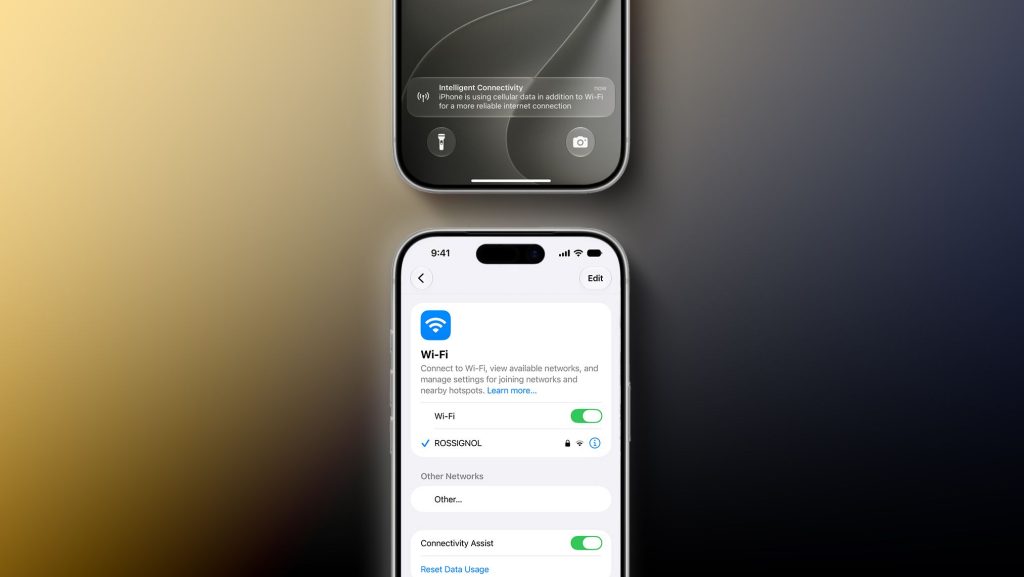
Apple is reportedly developing new network management tools for its mobile operating system, including a feature to rename Wi-Fi networks and a system dubbed “Connectivity Assist” designed to improve signal transitions. These updates aim to provide users with more granular control over their network environments and ensure more stable connections when moving between Wi-Fi and cellular data. While specific release dates remain unconfirmed, the features are expected to appear in upcoming software iterations.
Technical observers and recent software leaks suggest that Apple is prioritizing the stability of the “handover” process—the moment a device switches from a Wi-Fi network to a cellular signal. This transition is a common point of failure for mobile users, often resulting in dropped video calls, interrupted streaming, or lost data packets. The reported “Connectivity Assist” feature is intended to mitigate these interruptions by managing the handoff more intelligently than the current “Wi-Fi Assist” mechanism.
New Wi-Fi management tools reported for Apple’s mobile operating system
According to recent reports regarding upcoming software updates, Apple is working to simplify how users interact with their wireless network settings. One of the most anticipated changes involves the ability to rename Wi-Fi networks directly within the iOS settings menu. Currently, users must typically access their router’s administrative interface or a dedicated mobile app from their Internet Service Provider (ISP) to change a Service Set Identifier (SSID).
Directly renaming a network within the device settings would allow for easier organization of known networks, particularly for users who manage multiple access points or frequently travel. This capability would bring iOS more in line with the management flexibility found in desktop operating systems and certain Android distributions, where network profile customization is more accessible.
The addition of these management tools suggests a broader shift in how Apple approaches “connectivity hygiene.” As smart homes become more complex with dozens of connected devices, the ability for a primary controller—the iPhone—to manage and identify specific network segments becomes increasingly important for user experience and troubleshooting.
How “Connectivity Assist” aims to stabilize mobile data transitions
The rumored “Connectivity Assist” feature represents an evolution of Apple’s existing “Wi-Fi Assist” tool. While Wi-Fi Assist currently switches a device to cellular data when a Wi-Fi signal is deemed poor, it has often been criticized for being either too aggressive or too slow to react, leading to unnecessary data usage or connection drops.
Technical analysts suggest that “Connectivity Assist” will utilize more sophisticated predictive algorithms to monitor signal quality. Instead of waiting for a Wi-Fi connection to fail entirely, the system would likely monitor metrics such as:
- Latency (Ping) spikes: Identifying when a network is technically “connected” but too slow for real-time tasks.
- Packet loss rates: Detecting the degradation of data flow before the user perceives a total disconnection.
- Signal-to-Noise Ratio (SNR): Measuring the clarity of the wireless signal to predict an imminent drop.
By analyzing these metrics, the system can initiate a “soft handover.” This process prepares the cellular radio to take over the data stream before the Wi-Fi connection is severed, theoretically allowing for a seamless transition in high-bandwidth activities like VoIP calls or online gaming.
This improvement is particularly relevant as mobile users increasingly rely on 5G networks. The high speeds of 5G provide a much more viable fallback for Wi-Fi than previous LTE generations, making a more intelligent switching mechanism more effective than ever before.
The technical benefits of Wi-Fi network renaming
While renaming a network may seem like a cosmetic change, it serves several functional purposes in modern networking environments. For power users and IT professionals, the ability to manage SSIDs directly from a mobile device provides several advantages.

In environments with multiple bands—such as 2.4GHz, 5GHz, and the newer 6GHz band used in Wi-Fi 6E and Wi-Fi 7—renaming networks helps users distinguish between different performance tiers. A user might rename their 2.4GHz band “Home_Legacy” and their 6GHz band “Home_HighSpeed” to ensure their most demanding devices are connected to the optimal frequency.
Furthermore, the ability to rename networks simplifies the process of managing guest networks or IoT (Internet of Things) segments. As users create dedicated, isolated networks for smart home devices to improve security, having a clear, renamed identifier within the iOS interface allows for faster verification of which network a device is currently utilizing.
Comparison of current and reported connectivity management
The following table outlines the projected differences between the current iOS networking capabilities and the features reported in upcoming updates.
| Feature | Current iOS Capability | Reported/New Capability |
|---|---|---|
| Wi-Fi Renaming | Requires router/ISP interface access | Directly via iOS Wi-Fi settings |
| Network Transition | Basic “Wi-Fi Assist” (reactive) | “Connectivity Assist” (predictive) |
| Handover Logic | Triggered by signal loss | Triggered by latency and packet loss |
| User Control | Standard on/off toggles | Granular network profile management |
Frequently asked questions about iOS network updates
Can I rename my Wi-Fi network on my current iPhone?
No, standard iOS versions do not allow you to change the SSID (the name of the network) directly in the settings. You must log in to your router’s web interface or use your provider’s management app to make this change.

What is the difference between Wi-Fi Assist and Connectivity Assist?
Wi-Fi Assist is a reactive feature that switches to cellular data when Wi-Fi is weak. Connectivity Assist is reported to be a more proactive, predictive system that monitors network health (like latency and packet loss) to ensure a smoother transition between Wi-Fi and cellular networks.
Will these features improve my battery life?
While not explicitly stated, a more intelligent switching mechanism could potentially improve battery life. By avoiding “searching” for a failing Wi-Fi signal and switching more decisively to a stable cellular connection, the device may reduce the power consumed by the wireless radio during reconnection attempts.
Apple has not yet provided an official timeline for the deployment of these specific networking enhancements. Users can typically expect to see new connectivity features tested in developer beta cycles before a general public release.
What do you think about these proposed changes? Will more granular Wi-Fi control improve your mobile experience? Let us know in the comments below and share this article with your fellow tech enthusiasts.
Keep reading