Chrome Takes on Notification Overload: A Smarter Approach to Web Alerts
We’ve all been there. A constant stream of notifications vying for our attention - from breaking news to promotional offers, and everything in between. While web notifications can be useful, the sheer volume often becomes overwhelming, turning a helpful feature into a frustrating distraction. As someone who spends thier days optimizing digital experiences, I frequently encounter users battling this very issue.
For years, the ease of allowing notifications has far outweighed the difficulty of managing them. One click to subscribe, and suddenly your screen is flooded. Finding the settings to regain control? That’s often a frustrating scavenger hunt. Google recognizes this pain point, and is taking significant steps to address it.
A History of Quieter Notifications
Google first attempted to tackle notification fatigue back in 2020 with “quieter notifications” in Chrome 80. While a step in the right direction, it wasn’t enough to stem the tide. Now, they’re implementing a more proactive and clever solution.
Google’s New Automatic Notification Management
Announced on the Chromium Blog, Google’s latest initiative aims to create a “quieter browsing experience” by automatically managing your notification subscriptions. Here’s how it works:
* Automatic Unsubscribes: Chrome will now automatically unsubscribe you from notifications from websites you haven’t visited recently.This isn’t a blanket removal; it’s a smart system designed to prune notifications from sources that are likely no longer relevant.
* Cross-platform Rollout: This change will affect both Chrome on Android and the desktop version, providing a consistent experience across devices.
* Data-Driven Decision: Google’s decision isn’t arbitrary. They’ve found that less than 1% of notifications actually receive user interaction. This statistic highlights the core problem: most notifications are simply noise.
Reclaiming Control: Reviewing & Restoring Notifications
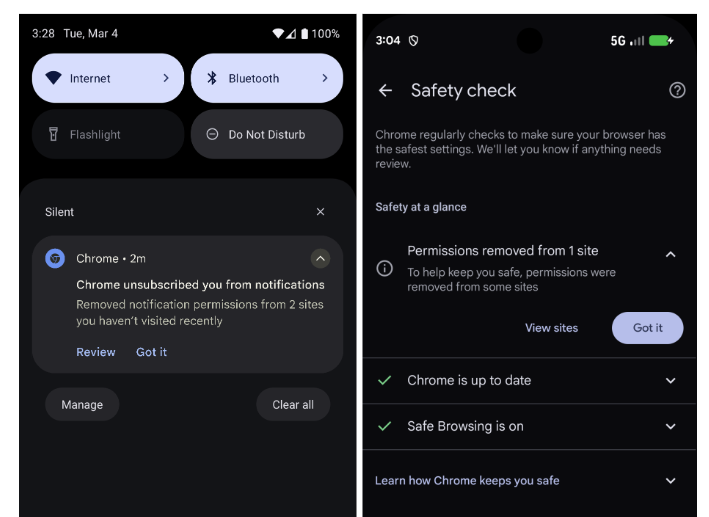
The beauty of this system isn’t just the automation,but the control it gives back to the user. When Chrome automatically removes a notification subscription,you’ll receive a notification about it – a touch of irony,perhaps,but a crucial element of clarity.
This notification provides a direct link to Chrome’s Safety Check page. Here, you can:
* Review Removed Sites: See a clear list of the websites from which notifications have been automatically unsubscribed.
* Restore Access: Easily re-enable notifications for any site you still want to hear from.
Opting Out: For the Notification Enthusiast
Not everyone wants this level of automated management.If you prefer to receive all notifications, even from infrequently visited sites, you can disable the feature entirely. This provides flexibility for users who actively value every alert.
Beyond Chrome: The Chromium Impact
This isn’t just a Chrome-specific update. As the changes are being implemented in Chromium - the open-source core of the browser – we can expect to see similar features roll out in other Chromium-based browsers. This includes popular options like microsoft Edge, Vivaldi, Brave, and Opera. This widespread adoption will substantially improve the browsing experience for a vast number of users.
Proven Results: Reduced overload, Minimal Disruption
Google reports that testing has demonstrated a significant reduction in notification overload with minimal impact on notification click-through rates. This suggests that the system effectively filters out irrelevant alerts without hindering access to vital information.
Integrated with Safety Check
The new notification management feature is seamlessly integrated into Chrome’s existing Safety Check, which already performs regular security scans. This holistic approach to browser safety and user experience is a testament to Google’s commitment to a more secure and streamlined web.
How do you manage browser notifications? Do you embrace a permissive approach, allowing notifications from sites you trust? Or do you proactively block requests? Share your strategies in the comments below – I’m always interested in learning how others navigate the digital landscape.
Worth a look