
For years, Android users have balanced the convenience of automatic cloud backups against the restrictive nature of Google One storage quotas. As our digital lives expand, so does the volume of data generated by our devices, often leading to a frustrating “storage full” notification. Recently, Google has begun rolling out significant adjustments to how Android backups are handled, specifically targeting the efficiency of data management within the Google Drive ecosystem.
These changes, which aim to optimize how system data is stored, are a welcome shift for users who have long felt penalized for maintaining comprehensive device backups. By refining the backup process, Google is effectively offering a reprieve for those nearing their 15GB free tier limit. This shift marks a broader strategic pivot by the company to streamline its cloud services and provide a more seamless experience across the Android ecosystem, as detailed in the latest official Android developer documentation.
As the Technology Editor here at World Today Journal, I have spent years analyzing how cloud infrastructure impacts the average user. Understanding these changes requires a look at both the technical architecture of Android backups and the practical reality of cloud storage management. Whether you are a casual user or a power user with multiple devices, these updates are designed to make your data management more intuitive.
Understanding the Shift in Android Backup Architecture
The core of this update centers on how Google handles app data and system preferences. Previously, the backup process was often seen as an “all-or-nothing” proposition, where system data could quickly balloon and consume precious gigabytes of your Google One quota. Google is now moving toward a more granular approach, allowing for smarter data deduplication and more efficient cloud synchronization.
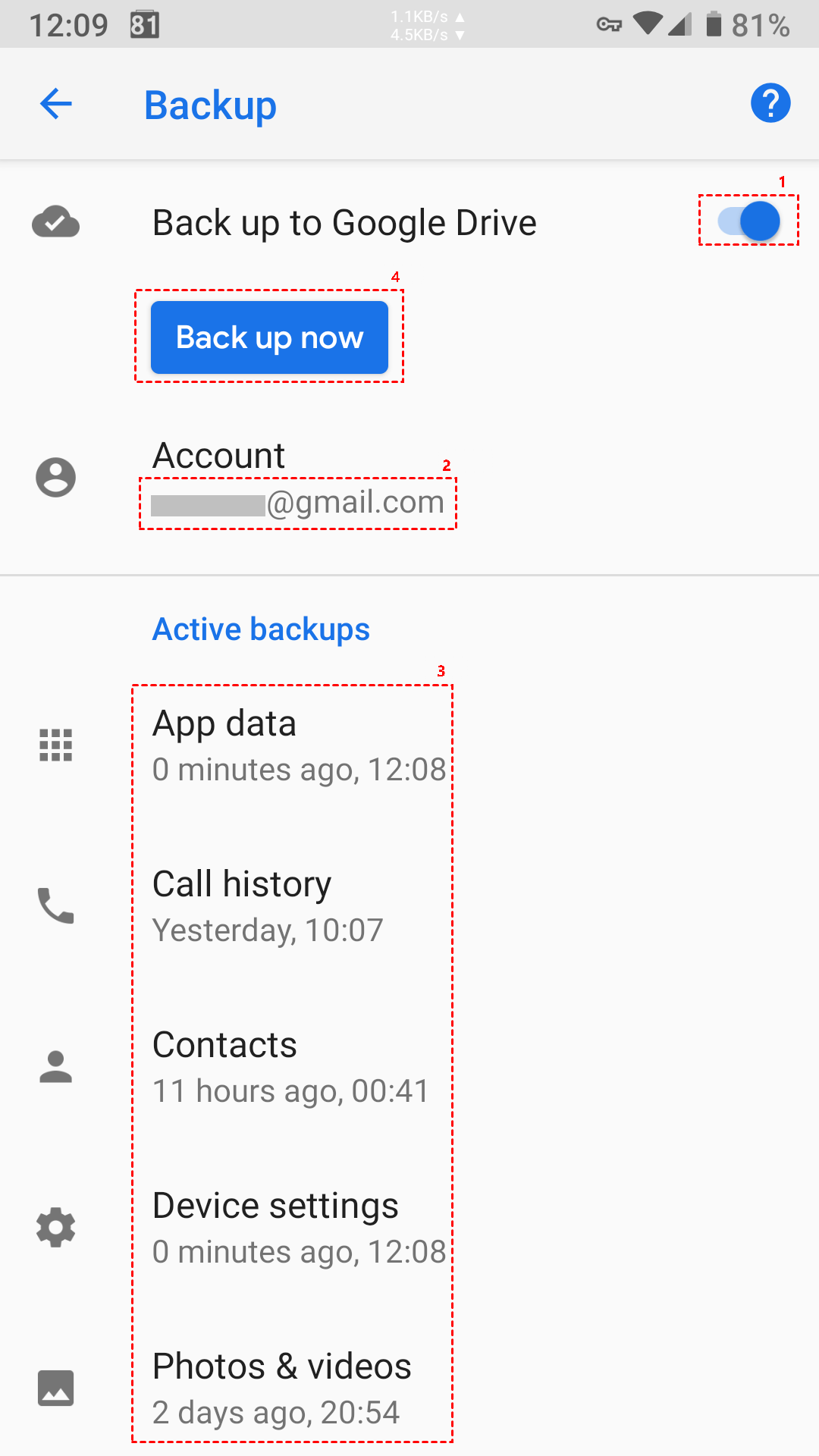
The primary goal is to ensure that essential data—such as SMS messages, call history, device settings, and app data—is preserved without the redundant storage overhead that previously cluttered user accounts. According to recent Google support guidelines, these optimizations are intended to prioritize critical restoration data while minimizing the impact on your total available space. This is part of a larger, ongoing effort to unify the experience between Google Drive and the native Android backup tool, ensuring that users do not have to choose between a secure phone and a functional cloud account.
Why Your Storage Quota Will Thank You
For most users, the 15GB of free storage provided with every Google account is shared across Gmail, Google Drive, and Google Photos. When Android backups are factored in, that space can vanish rapidly. The new adjustments are designed to alleviate this pressure by optimizing the way system-level data is compressed and stored.

By implementing more intelligent indexing and reducing the footprint of inactive app data, Google is effectively extending the life of your storage allotment. This does not mean you have unlimited space, but it does mean you are less likely to encounter the dreaded storage warning simply because your phone decided to perform a routine backup. For a detailed breakdown of how Google calculates your storage usage, you can refer to the official Google One storage management portal.
Key Takeaways for Users
- Increased Efficiency: The new backup methodology uses advanced compression to reduce the cloud footprint of your device’s system data.
- No User Action Required: These changes are being implemented server-side by Google and will automatically apply to devices running supported Android versions.
- Better Integration: The update bridges the gap between local device settings and cloud-based restoration, making transitioning to a new phone smoother.
- Storage Impact: While not a massive increase in total capacity, the optimization helps avoid “storage full” errors caused by redundant system backups.
The Bigger Picture: AI and Cloud Syncing
This update is not happening in a vacuum. As Google continues to push its Gemini AI integration and advanced cloud-based features, the company has a vested interest in ensuring that users have enough “headroom” in their storage accounts. If users are constantly hitting their storage limits, they are less likely to utilize new features like automatic photo backups or AI-powered document organization.
By optimizing the Android backup process, Google is essentially clearing the path for more data-intensive services to become part of the everyday mobile experience. It is a strategic move to keep the Android ecosystem competitive against Apple’s iCloud, which has long offered a highly integrated, albeit similarly restrictive, backup experience. For more insights on how these infrastructure changes align with Google’s long-term product roadmap, you can follow their official developers blog.
What Happens Next?
Google has indicated that these optimizations are part of a continuous deployment cycle. Users should not expect a single “update” notification; rather, the improvements to backup efficiency are being rolled out gradually across the global Android user base. You can check the status of your current backup by navigating to Settings > Google > Backup on your Android device.
As we monitor these developments, it remains clear that cloud storage will continue to be a focal point for mobile operating system evolution. The balance between offering comprehensive backup security and managing the costs of global data storage is an ongoing challenge for all major tech providers. We will continue to track these updates as they evolve and provide further analysis as more features are integrated into the Android platform.
Have you noticed more free space on your Google account recently, or are you still bumping against those storage limits? Let us know your experience in the comments below, and be sure to share this article with anyone struggling to manage their digital footprint.
Keep reading