
Microsoft has launched a comprehensive, free educational resource titled the “Get started with AI agents in Copilot Studio” learning path, designed to help developers and business users build custom artificial intelligence agents. This initiative provides a structured curriculum for those looking to leverage low-code tools to automate tasks and improve business processes using the Microsoft Copilot ecosystem. According to Microsoft’s official documentation, the program covers the fundamental concepts of agentic workflows, the role of generative AI in modern software, and the practical implementation of agents within the Copilot Studio environment.
For professionals and technology enthusiasts, learning how to create your own AI agents has become increasingly accessible as major platforms shift toward low-code and no-code development. The move by Microsoft reflects a broader industry trend toward democratizing access to complex AI tools, allowing users without traditional software engineering backgrounds to deploy functional, autonomous AI assistants. This curriculum is specifically tailored to walk users through the lifecycle of an agent, from initial design and configuration to testing and deployment within organizational workflows.
Understanding the Role of AI Agents in Copilot Studio
AI agents are software programs designed to perform specific tasks, interact with data, and execute actions on behalf of a user or an organization. Unlike standard chatbots that rely on static scripts, these agents use generative AI models to interpret intent, retrieve information from internal business systems, and make decisions based on defined parameters. Microsoft’s Copilot Studio acts as the interface where these agents are built, managed, and monitored, according to official corporate announcements regarding the evolution of its AI platform.
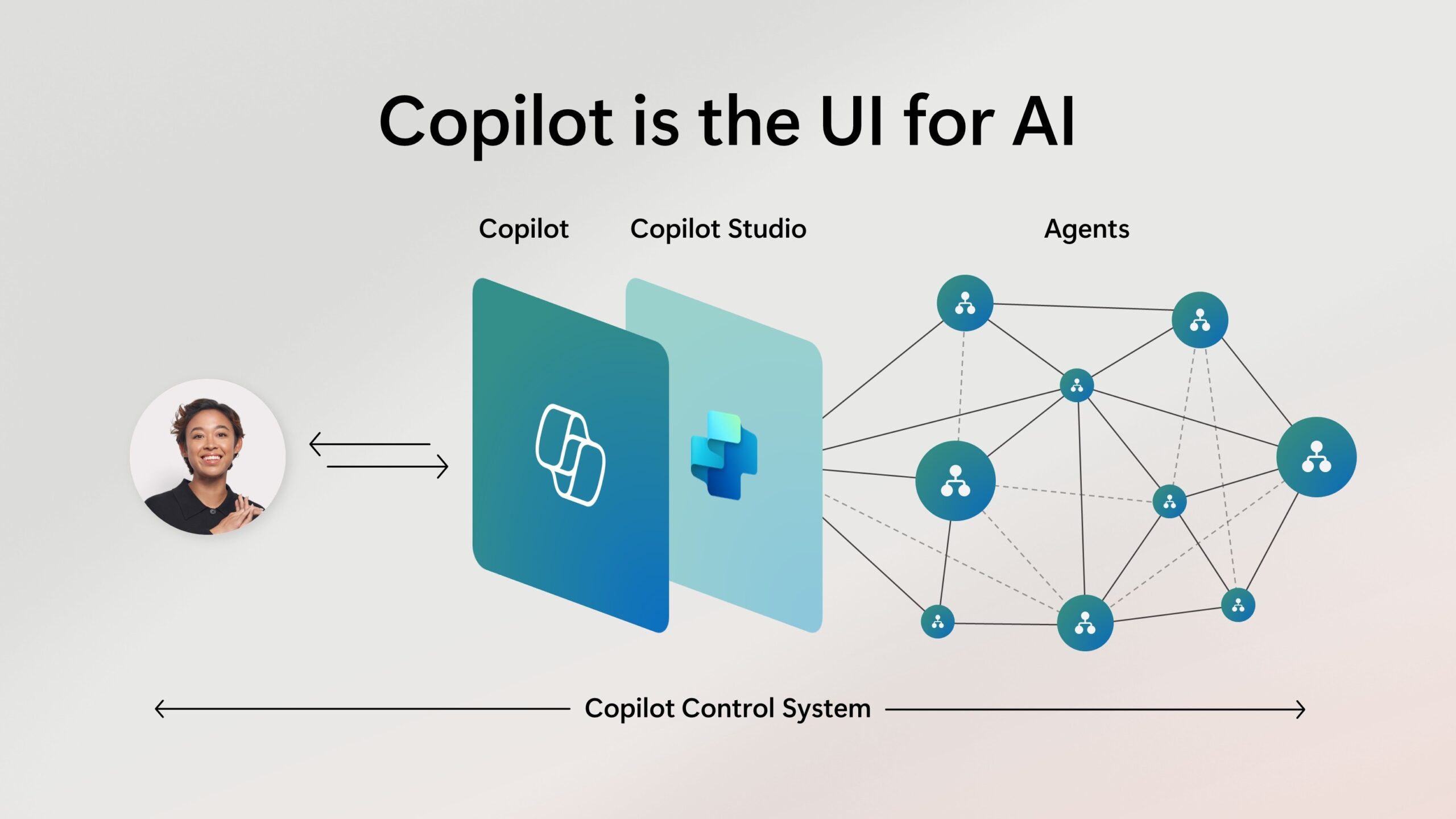
The core utility of these agents lies in their ability to bridge the gap between large language models (LLMs) and proprietary business data. By connecting an agent to sources like SharePoint, Microsoft Graph, or external APIs, developers can ensure that the AI provides relevant, context-aware responses rather than generic information. This capability is essential for enterprises aiming to automate customer service, internal HR inquiries, or complex data retrieval tasks without requiring extensive custom coding.
What the Free Training Curriculum Covers
The learning path provided by Microsoft is structured to guide users through several key technical and conceptual milestones. The curriculum is divided into modules that address the following core competencies:

- Agent Fundamentals: Defining what an AI agent is and identifying the specific business problems they are best suited to solve.
- Designing Agent Workflows: Mapping out how an agent should interact with users and which data sources it requires to function effectively.
- Configuring Topics and Actions: Using the Copilot Studio drag-and-drop interface to define conversational flows and trigger specific backend actions.
- Security and Governance: Implementing guardrails to ensure that agents adhere to organizational data policies and privacy standards.
- Testing and Deployment: Evaluating agent performance and publishing the assistant to platforms like Microsoft Teams or internal websites.
Each module includes hands-on exercises that allow learners to practice within a sandbox environment. This approach is intended to lower the barrier to entry for non-technical staff, often referred to as “citizen developers,” who are often best positioned to identify the specific inefficiencies within their own departments.
Why Organizations are Investing in Agentic AI
The shift toward agentic AI is driven by a need for increased operational efficiency. According to reports from Gartner on the impact of generative AI, the integration of autonomous agents into enterprise workflows is projected to significantly reduce the time employees spend on manual, repetitive data processing tasks. By shifting from passive AI—which simply generates text—to active agents that can perform actions, companies can create more resilient and responsive digital infrastructures.
For the individual learner, mastering these tools provides a competitive advantage in the workforce. As more businesses adopt Microsoft 365 Copilot and integrate custom agents, the ability to architect these systems becomes a high-value skill. The current training path serves as a baseline, and Microsoft frequently updates its documentation as new features, such as advanced reasoning capabilities or deeper integrations with third-party software, are added to the platform.
Practical Steps to Begin Your AI Development Journey
To start building your own AI agents, you need a Microsoft account and access to the Copilot Studio environment. Most enterprise users can access these tools through their existing Microsoft 365 subscriptions, though specific permissions may be required depending on organizational security policies. Microsoft provides a portal overview that details the licensing requirements and the different tiers of service available for developers and businesses.

Once you have access, the recommended approach is to start with a small, well-defined project. For example, building an agent that can answer frequently asked questions from a specific internal document library allows you to learn the ropes of data connectivity and response verification without the complexity of managing transactional data. As you gain familiarity with the interface, you can move toward agents that trigger workflows in other applications, such as CRM systems or project management tools.
The next major update for the Microsoft Copilot ecosystem is expected to follow their ongoing development cycle, with new feature announcements often occurring at major industry events like Microsoft Ignite. Users are encouraged to monitor the Microsoft Learn portal for the latest updates to the curriculum and new modules as they are released. If you have experience building agents or have questions about implementing these tools in your own organization, please share your thoughts or experiences in the comments section below.
Keep reading