How a New Hack Lets 30-Year-Old Windows PCs Run Modern Linux
In a breakthrough that blurs the line between vintage computing and modern software, a new hack called WSL9x is allowing 30-year-old Windows PCs to run a contemporary Linux kernel without virtualization. The project, which has captured the attention of tech enthusiasts and retro computing communities alike, demonstrates how decades-old hardware can still push beyond its original limitations—proving that even the oldest machines have untapped potential.
Developed by an independent software engineer, WSL9x brings a modern Linux 6.1 kernel to Windows 9x systems, including Windows 95, 98, and ME. Unlike traditional virtualization, which requires significant system resources, this hack integrates Linux directly into the aging Windows environment, offering a lightweight and efficient way to run up-to-date software on hardware that predates the internet boom. For hobbyists, historians, and developers, the project is more than a technical curiosity—it’s a testament to the enduring flexibility of open-source software and the creativity of the global tech community.
“This isn’t just about nostalgia,” said one retro computing enthusiast in an interview with The Register. “It’s about showing that old hardware can still be useful, even in today’s fast-paced digital world. With WSL9x, a machine from the 1990s can run modern development tools, web servers, and even AI frameworks that would have been unimaginable when these systems were new.”
What Is WSL9x and How Does It Work?
WSL9x, short for Windows Subsystem for Linux 9x, is an open-source project that enables Windows 9x systems to run a modern Linux kernel natively. The hack leverages a technique called kernel patching, which modifies the Windows 9x operating system at a low level to allow it to load and execute Linux binaries without the overhead of a full virtual machine. This approach is similar in concept to Microsoft’s Windows Subsystem for Linux (WSL), which allows modern Windows 10 and 11 systems to run Linux distributions, but WSL9x is tailored specifically for the much older Windows 9x architecture.
The project was first introduced in early 2026 by a developer known only by the GitHub handle wsldl-pg, who described it as an experiment to spot how far legacy hardware could be pushed. According to the project’s GitHub repository, WSL9x supports a Linux 6.1 kernel, which was released in late 2022 and remains one of the most stable and widely used long-term support (LTS) versions of the Linux kernel. Which means users can run modern Linux applications, including development tools like Python, Node.js, and even lightweight AI frameworks, on hardware that was originally designed to run Windows 95.
One of the most impressive aspects of WSL9x is its efficiency. Traditional virtualization software, such as VirtualBox or VMware, requires a host operating system to emulate an entire hardware environment, which can be taxing even on modern PCs. WSL9x, by contrast, avoids this overhead by integrating the Linux kernel directly into the Windows 9x environment. This allows the system to run Linux applications with minimal performance loss, making it feasible to use on machines with as little as 32MB of RAM—a specification that would have been considered cutting-edge in the mid-1990s.
Why This Matters: The Resurgence of Retro Computing
The WSL9x project arrives at a time when interest in retro computing is experiencing a renaissance. Enthusiasts, historians, and even educators are increasingly turning to vintage hardware as a way to explore the history of computing, preserve digital artifacts, and experiment with software development in constrained environments. For many, the appeal lies in the challenge of making old hardware do things it was never intended to do—a form of digital archaeology that blends nostalgia with innovation.
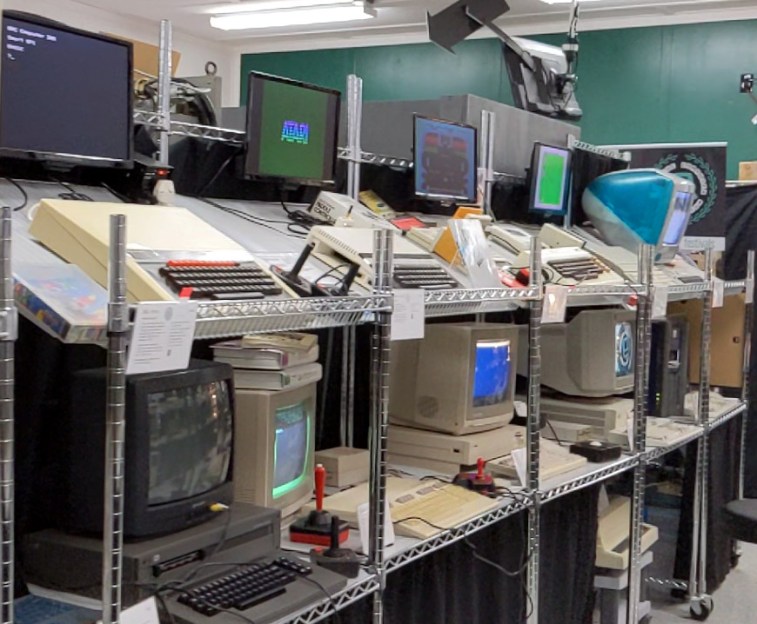
“There’s something deeply satisfying about taking a machine that was considered obsolete decades ago and giving it new life,” said a member of the Vintage Computer Federation, a nonprofit organization dedicated to preserving and restoring classic computers. “Projects like WSL9x show that the spirit of innovation isn’t limited to the latest and greatest hardware. Sometimes, the most interesting breakthroughs happen when you push the boundaries of what’s possible with the tools you have.”
Beyond the hobbyist community, WSL9x has practical implications for education and digital preservation. Schools and museums often struggle to maintain vintage computers operational due to the scarcity of replacement parts and the difficulty of running modern software on outdated systems. By enabling these machines to run contemporary Linux applications, WSL9x could help extend the lifespan of historical hardware, making it easier for future generations to interact with the technology of the past.
For developers, the project also offers a unique opportunity to test software in environments that mimic the constraints of early computing. This can be particularly valuable for those working on embedded systems, legacy software migration, or even cybersecurity research, where understanding how older systems operate can provide insights into modern vulnerabilities.
The Technical Challenges of Running Linux on Windows 9x
Bringing a modern Linux kernel to Windows 9x was no little feat. The Windows 9x family of operating systems, which includes Windows 95, 98, and ME, was built on a fundamentally different architecture than modern Windows or Linux. Unlike today’s operating systems, which use protected memory and preemptive multitasking, Windows 9x relied on a cooperative multitasking model and a monolithic kernel that was tightly coupled with the hardware. This made it demanding to introduce new software layers without causing system instability.
To overcome these challenges, the WSL9x developer had to address several key technical hurdles:
- Kernel Compatibility: The Linux 6.1 kernel was designed for modern 64-bit processors, while Windows 9x systems typically run on 32-bit or even 16-bit hardware. WSL9x includes a custom kernel patch that allows the Linux kernel to interface with the older Windows 9x environment, effectively translating system calls between the two operating systems.
- Memory Management: Windows 9x systems often have limited RAM, sometimes as little as 16MB or 32MB. WSL9x uses a lightweight memory management system that minimizes overhead, allowing Linux applications to run without exhausting the system’s resources.
- Hardware Abstraction: Many vintage PCs use hardware components that are no longer supported by modern operating systems. WSL9x includes drivers and emulation layers to ensure compatibility with older graphics cards, sound chips, and storage devices.
- User Interface Integration: Unlike modern Windows, which has a robust graphical user interface (GUI), Windows 9x relies on a simpler display system. WSL9x provides a basic terminal interface for Linux applications, allowing users to interact with the system via command-line tools.
Despite these innovations, WSL9x is not without its limitations. The project is still in its early stages, and not all Linux applications are guaranteed to work. Users may encounter compatibility issues with software that relies on specific hardware features or modern system libraries. The performance of Linux applications on Windows 9x will vary depending on the hardware configuration, with older or less powerful machines experiencing slower speeds.
How to Try WSL9x on Your Vintage PC
For those interested in experimenting with WSL9x, the project is available as an open-source download on GitHub. The installation process is relatively straightforward, though it requires some technical knowledge, particularly for users unfamiliar with Linux or vintage hardware. Here’s a basic overview of the steps involved:
- Check Hardware Compatibility: WSL9x is designed to work on Windows 95, 98, and ME systems. The minimum recommended hardware specifications are a 486DX processor (or better), 32MB of RAM, and at least 500MB of free hard drive space. However, more powerful hardware will yield better performance.
- Download WSL9x: The latest version of WSL9x can be downloaded from the project’s GitHub releases page. The download includes a compressed archive containing the necessary files and installation instructions.
- Prepare Your System: Before installing WSL9x, users should back up their Windows 9x system to avoid data loss. It’s also recommended to disable any unnecessary startup programs to free up system resources.
- Install WSL9x: The installation process involves running a setup script that patches the Windows 9x kernel and installs the Linux subsystem. Users will need to follow the on-screen instructions carefully, as the process may require manual configuration for certain hardware setups.
- Launch Linux: Once installed, WSL9x can be launched from the Windows 9x desktop. Users will be presented with a terminal interface where they can run Linux commands and install applications from the Linux package repositories.
For those who don’t have access to a vintage PC, WSL9x can also be tested in an emulator such as PCjs or QEMU, which allow users to run Windows 9x in a virtual environment on modern hardware. This can be a great way to experiment with the project without investing in retro hardware.
The Future of WSL9x and Retro Computing
As of April 2026, WSL9x remains an experimental project, but its potential has already sparked excitement within the retro computing community. The developer behind the project has indicated that future updates may include support for additional Linux distributions, improved hardware compatibility, and even graphical user interfaces for Linux applications. There is also discussion about expanding the project to support other vintage operating systems, such as Windows 3.1 or OS/2.

For now, WSL9x serves as a powerful reminder of the enduring legacy of vintage computing. It challenges the notion that old hardware is obsolete and demonstrates how open-source software can breathe new life into machines that were once considered relics of the past. Whether for education, preservation, or pure experimentation, projects like WSL9x prove that the spirit of innovation is alive and well—even on a 30-year-old PC.
As the project continues to evolve, the developer has encouraged users to contribute feedback, bug reports, and code improvements via the GitHub repository. The next major update is expected to focus on stability and performance improvements, with a target release date later this year.
For those interested in following the project’s progress, the developer maintains an active presence on retro computing forums and social media, where updates and discussions are regularly shared. Whether you’re a seasoned retro computing enthusiast or simply curious about the possibilities of vintage hardware, WSL9x offers a fascinating glimpse into the future of the past.
Key Takeaways
- WSL9x is a new hack that allows Windows 9x systems (Windows 95, 98, and ME) to run a modern Linux 6.1 kernel without virtualization, extending the lifespan of 30-year-old hardware.
- Unlike traditional virtualization, WSL9x integrates Linux directly into the Windows 9x environment, minimizing performance overhead and making it feasible to run on machines with as little as 32MB of RAM.
- The project has practical applications for education, digital preservation, and software development, particularly in constrained environments like embedded systems.
- WSL9x is still experimental, with limitations in compatibility and performance, but future updates may expand its capabilities and support for additional vintage operating systems.
- Users can try WSL9x on real vintage hardware or in emulators like PCjs and QEMU, with installation instructions available on the project’s GitHub page.
Have you experimented with WSL9x or other retro computing projects? Share your experiences in the comments below, and don’t forget to follow World Today Journal’s Tech section for more updates on the latest innovations in technology and software development.
Keep reading